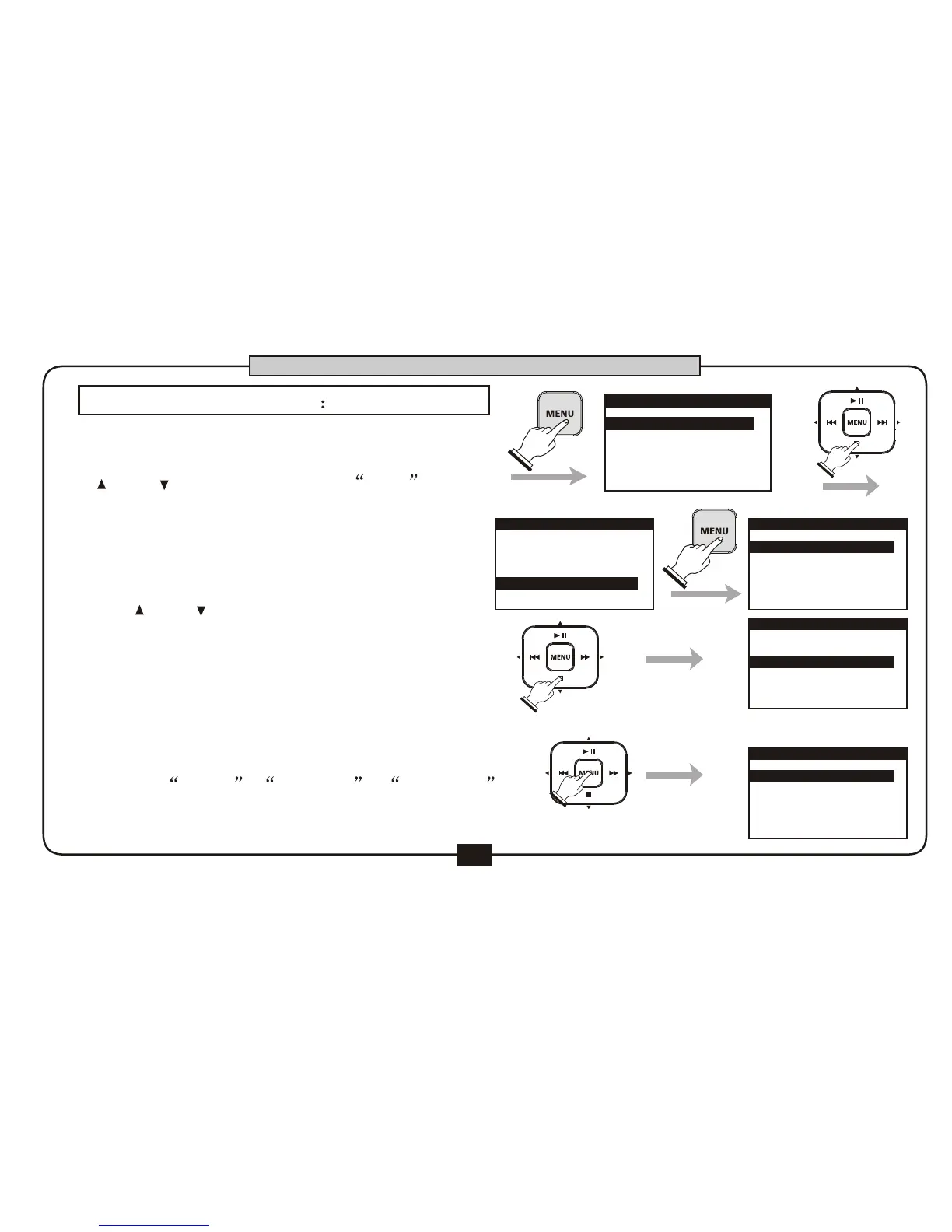
In home screen , press the [MENU]
button to ENTER the main menu. Press
[ ] or [ ] button to choose FILE
and press the [MENU] button to go into
the file manage interface , the screen
display the file list of the root directory .
Use [ ] or [ ] button to
choose file or subdirectory, press [MENU]
button to enter the subdirectory ,then the
file list of current directory will display.
Use [MENU] button after selection to enter
the file edit menu, you will see the three
option : OPEN , DELETE , RENAME .
Press the [BACK/CANCEL] button to go
back to the file manage screen.
31
FILE MANAGEMENT
1.RECORD SETUP
2.PLAY SETUP
3.EFFECT
5.UTILITY
4.FILE
MENU
1.RECORD SETUP
2.PLAY SETUP
3.EFFECT
4.FILE
5.UTILITY
MENU
Dr2-0001.MP3
Dr2- 2.
3
000 MP3
Dr2-0003.MP
FILE LIST
DR2-0001.MP3
DR2-0003.MP3
DR2-0002.MP3
FILE LIST
1.OPEN
2.DELETE
.RENAME3
FILE LIST
BASIC OPERATION
1.
2.
3.


 To Next Page