00:01:18
00:02:22
DR2-0001.mp3
R
L
-48 0-6-12-24-36
24
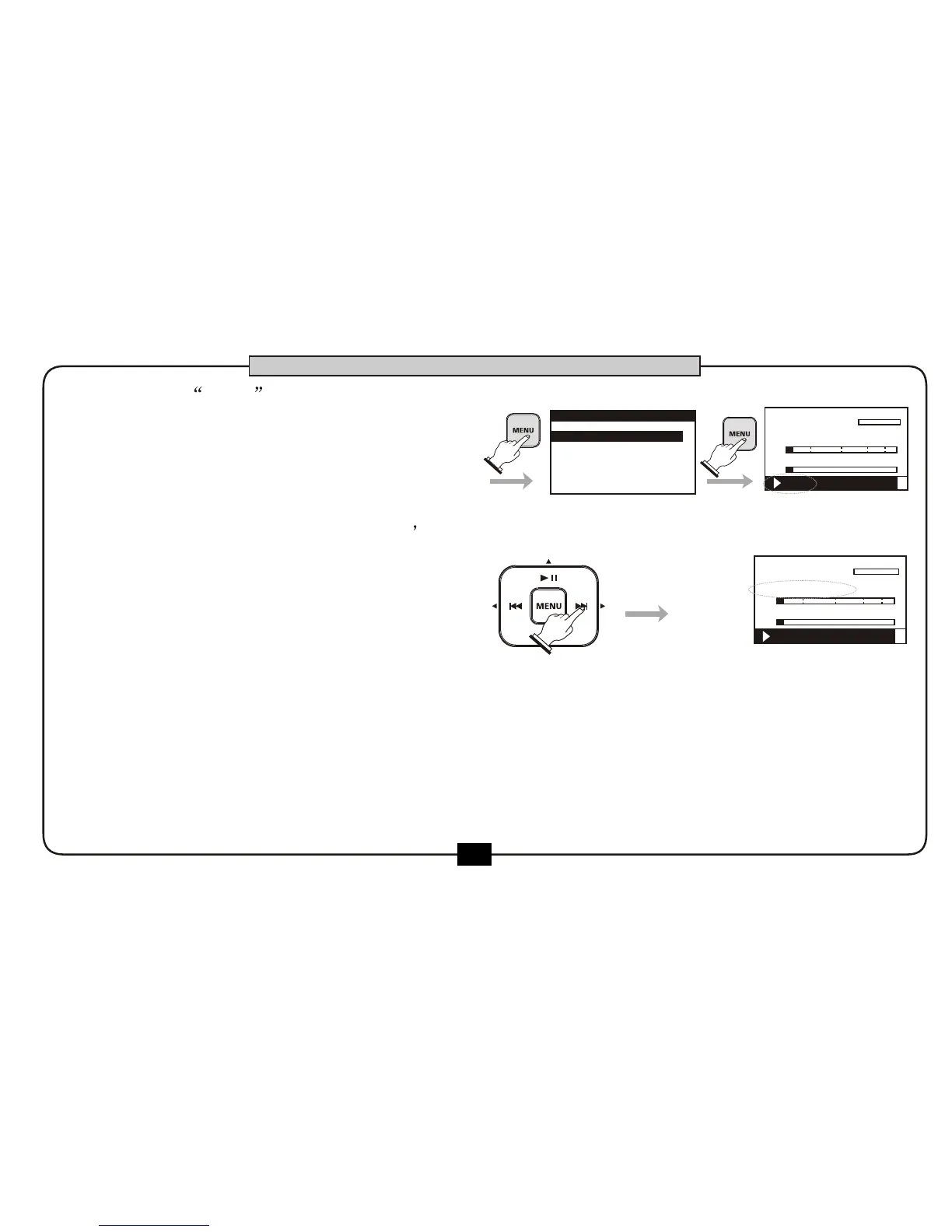
Choose the OPEN at the files edit
menu and press the [MENU] button to
start playing the selected file.
At the home screen, when file is playing,
press the [F.F] button to go to next file
Press [rewind] button to return to the
beginning of the current file,
Press [rewind] button again to go to
previous file .
While playing,Hold [REWIND] button to fast search to the beginning of the current file.
While playing,Hold [F.F] button to fast search to the end of the current file. Continue holding the
[F.F] button will enter the next file and continue to fast search . If the A-B repeat function is on,
holding the [F.F] button would not exceed the point B.
1.OPEN
2.DELETE
.RENAME3
FILE LIST
00:01:18
00:03:20
DR2-0002.mp3
R
L
-48 0-6-12-24-36
BASIC OPERATION
5.
6.
7.
8.
PLAY FX:off
PLAY FX:off


 To Next Page