36
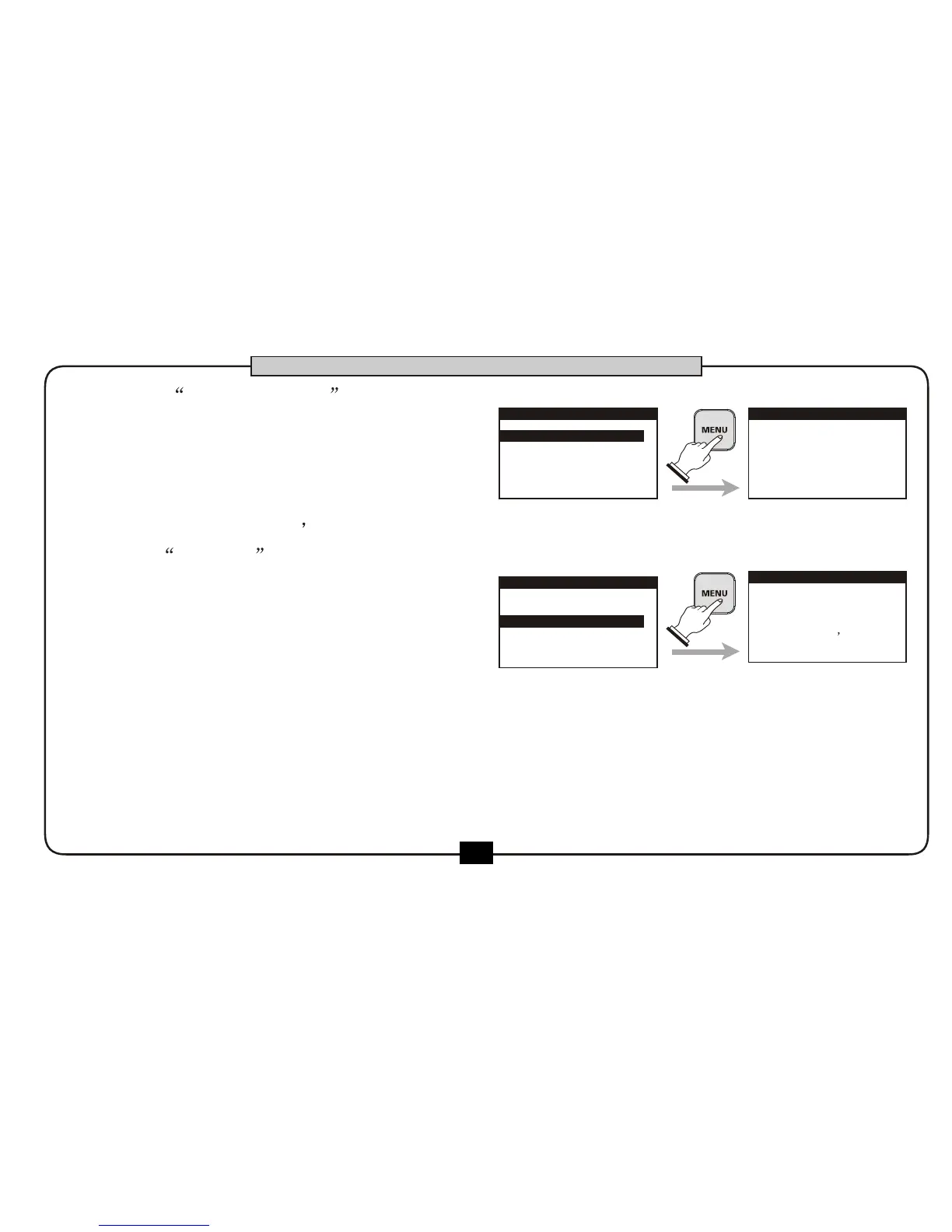
Choose FORMAT , press [MENU] button .
this initialization process will erase all
information stored on the SD card, and the
information cannot be retrieved. Perform
this operation with care.
The screen will display the warning
message.
Press [MENU] to confirm.
Press [BACK/CANCEL]button to cancel this initialization process.
Press [MENU] button again ,Confirmation message for formation (ARE YOU SURE?)appears.
1.INFORMATION
2.FORMAT
SD CARD
Choose INFORMATION , then press
the [MENU] button ,the screen displays
the information of SD card such as
capacity ,used capacity and the free
capacity. press [BACK/CANCEL] button
back to SD card menu
1.INFORMATION
2.FORMAT
SD CARD
SD INFORMATION
CAPACITY
952 MB
USED
342 MB
FREE
610 MB
DATA IN SD
WILL LOST
PRESS [BACK]
TO CANCEL
PRESS [MENU]
TO PROCESS
BASIC OPERATION
SD FORMAT


 To Next Page