Operation SI PCF User Manual
Ref: DOC03148 Issue 1 Friday, 06 January 2017 Page 45 of 81
Starting a Standard Instrument Cycle
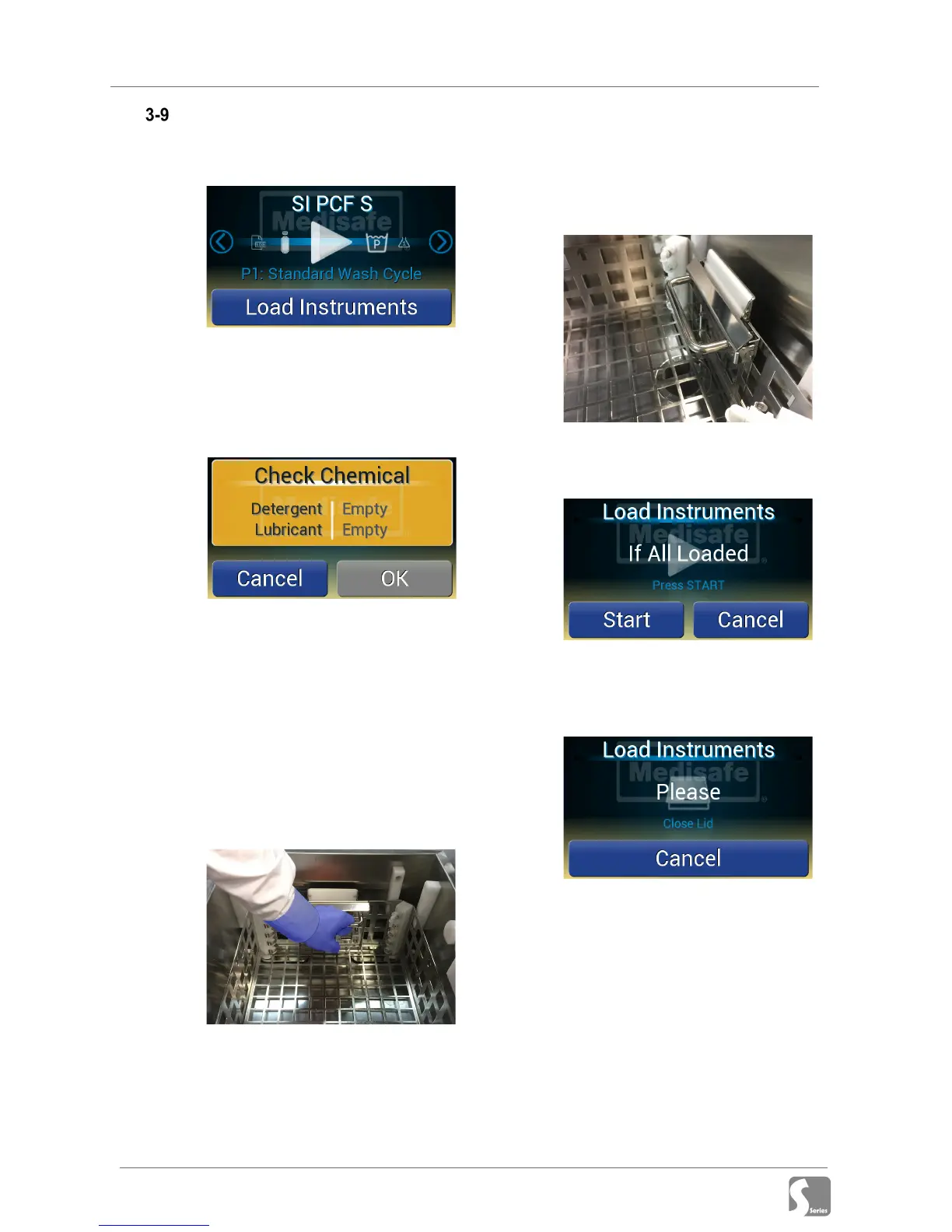
1. Confirm program selection (to
change see section 3-5)
2. Press Load Instruments
3. If there is insufficient chemical to
complete the cycle a warning will be
shown:
Replace chemical(s) (see section 3-
6-1) and press OK to continue, or
press Cancel to abort the cycle start
4. Open the lid
5. Remove the basket from the machine
6. Load instruments into the basket
7. Insert the basket into the machine
8. Lower the basket into the machine,
pushing down on the handles.
9. Ensure the basket is locked into
position by pushing it down until the
side latches engage on both sides of
the tank
10. Press Start to confirm instrument
loading complete
11. Close the lid and firmly push down
on the handle to engage the lock,
and the cycle will begin
Note: The lid has a tight seal and an
interlock, which requires the lid to be
fully down and latched before the
cycle can start (the red interlock
switch should be in the locked
position).


 To Next Page