Questions? Refer to Page 10-13 For Customer Care Information.
8-37
What You See
on the Display
What You Do Comments
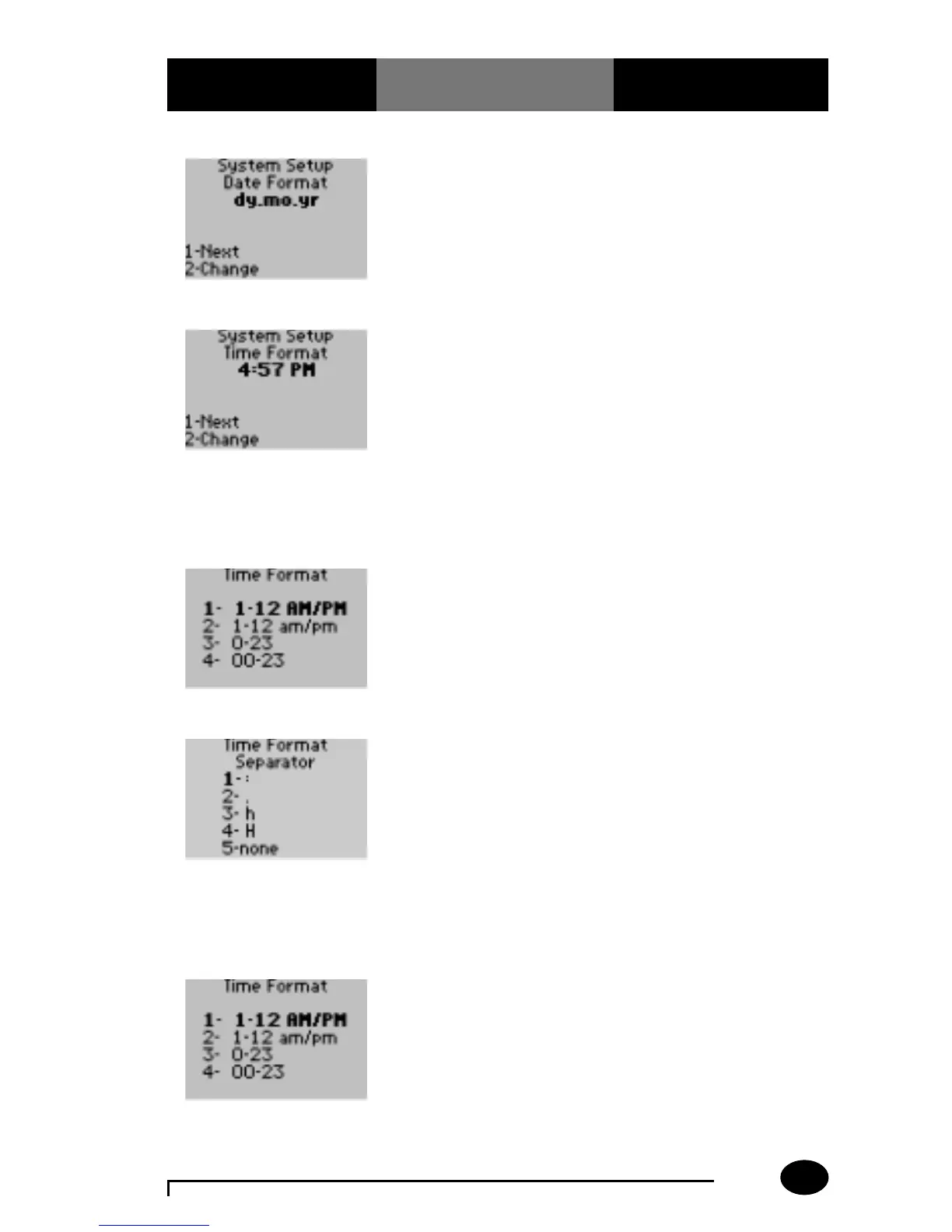
11. Press 1 to continue to
System Setup Time
Format menu.
The display shows the
System Setup Time
Format menu.
12. The administrator will
select one of the
following options:
Press 1 – Next, to
continue to System Setup
Password; skip forward
to step 19.
Press 2 – Change, to
change the Time Format.
The display shows the
Time Format options. The
four options to use are: 12
hour clock using capital
AM/PM; 12 hour clock
using lowercase am/pm; a
0-24 hour clock; and a
01-24 hour clock.
13. The administrator will
select one of the
following options:
Press 1 – 1-12 AM/PM.
Press 2 – 1-12 am/pm.
The display shows the
Time Format Separator
screen for hours. The 5
options are separators for
hours.
14. The administrator will
select one of the
following options:
Press 1 – colon (:).
Press 2 – period (.).
Press 3 – h.
Press 4 – H.
Press 5 – none.
The display returns to the
System Setup Time
Format screen.
15. If the administrator
selects one of the
following options:
Press 3 – 0-23.
Press 4 – 00-23.
The display shows the
Time Format Separator
screen for hours. The 5
options are separators for
hours.



 To Next Page