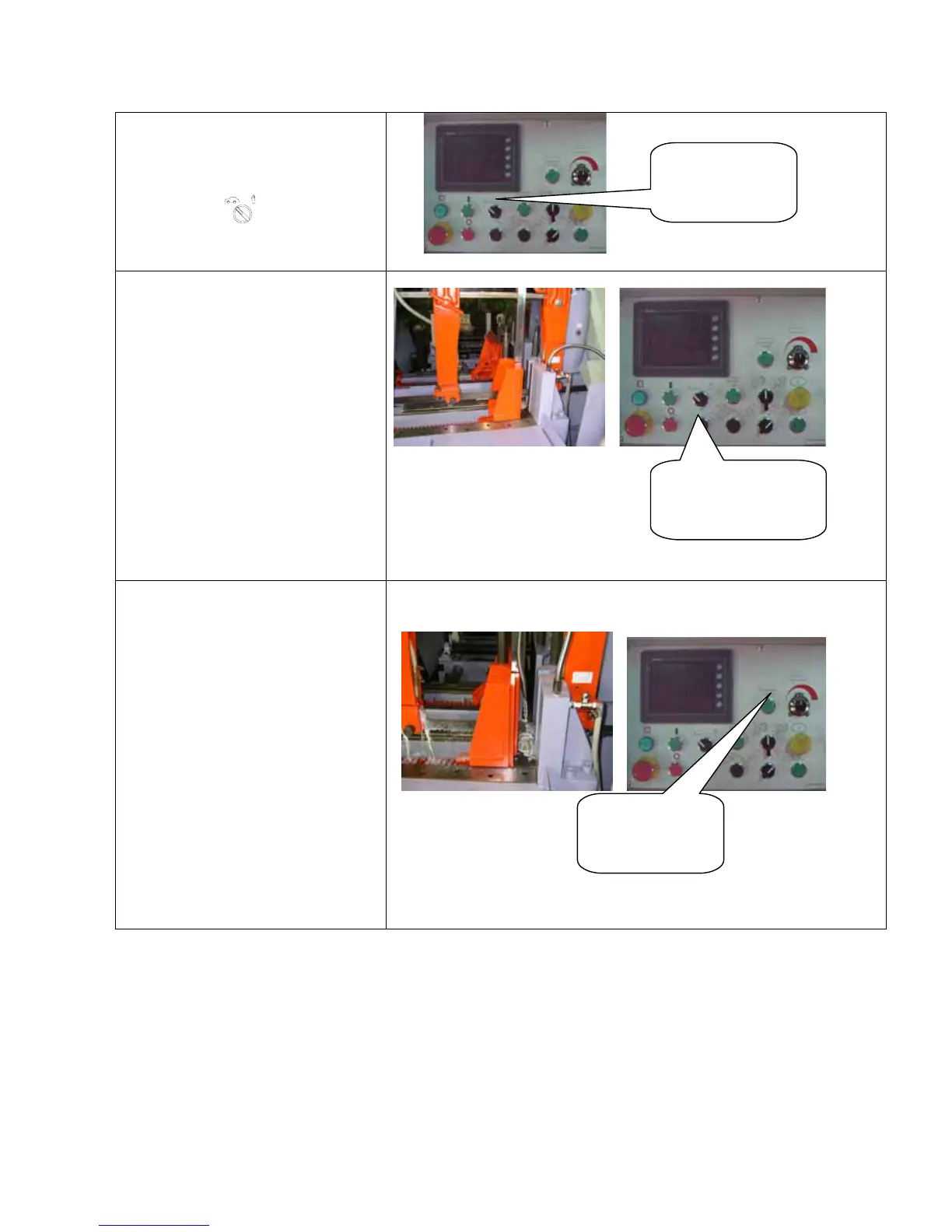
and clamp it.
(A) Turn the “AUTO-MANUAL
SELECTOR” to “auto”.
(B)Press the “QUICK APPROACH
BUTTON
” to make the saw
frame descend quickly to touch
the lower limit position,it will
then rise automatically to the
height preset.
(C)Make any necessary adjustments
to HEIGHT SELECTOR to ensure
that the saw blade clearly higher
than material by 1/2 to 3/4 inch
then repeat (B) to check setting.
(D)Press “MANUAL FEED FORWARD
“ button until the workpiece
reach to the position of the
cutting edge.
(E) Preset the number of cuts
required.
(F) Press the “BLADE DRIVE
BUTTON”
to start both the saw
blade motor and the cutting
fluid pump.
The saw frame begins to
descend to cut workpiece.
(G) After the required number of
cut has been completed, the saw
frame will lift to the raised
position and all machine
operation will stop.
(H) The machine will automaticlly
stop, when the workpiece is so
short that it can no longer be
automatically feed.
AUTO-MANUAL
SELECTOR
MANUAL FEED
FORWARD BUTTON
BLADE DRIVE
BUTTON



 To Next Page