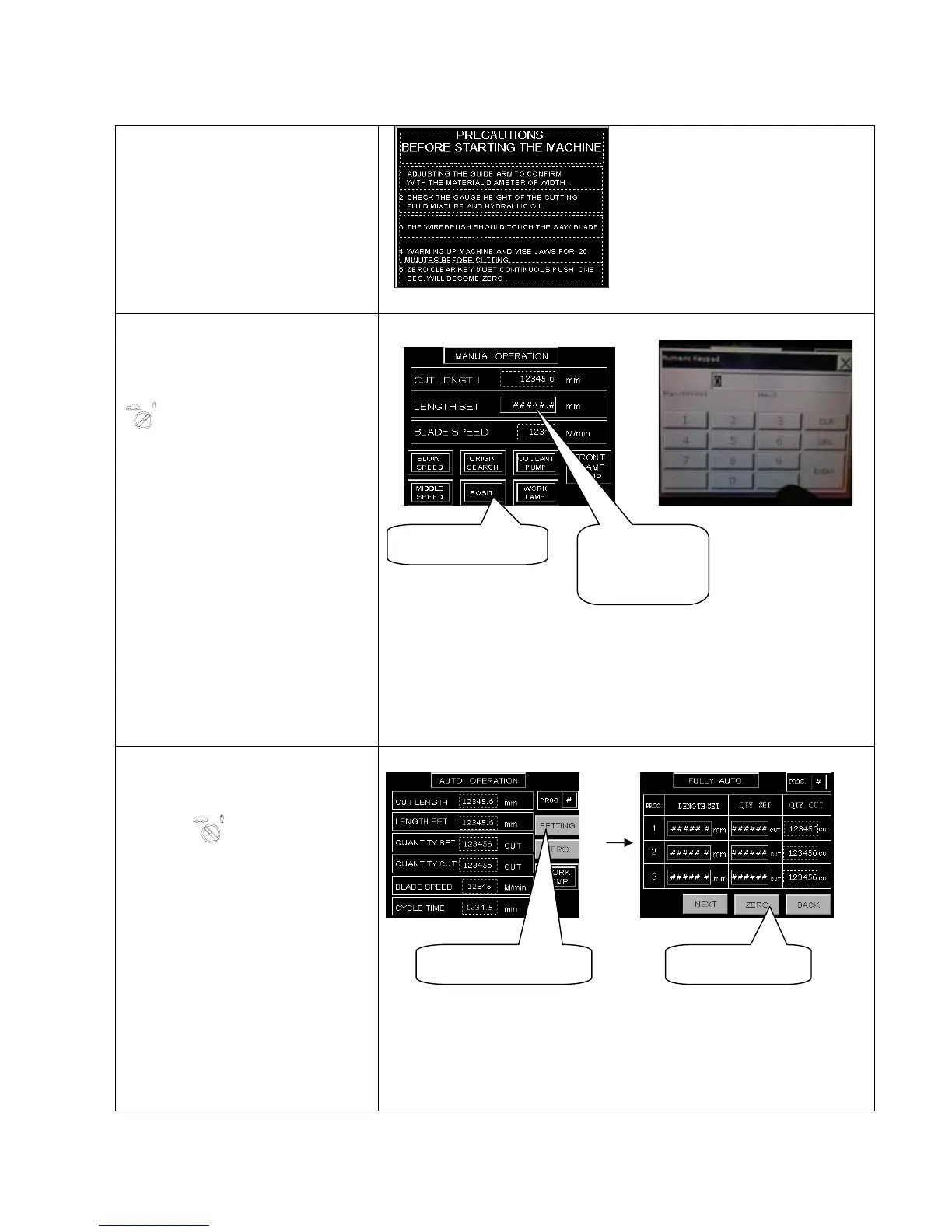
4.2 LCD Panel illustration
4.2.1 LCD Panel operation sequence
After powered on, the LCD panel
will display as fig. right. By
touching screen, the LCD panel
will escape to the next figure.
Manual mode:
To individually operate each
function, turn the “
AUTO - MANUAL
SELECTOR
” to right “manual”.
Operator not only can control
coolant pump and work lamp
on/off but also the feed rate.
1. LENGTH SET:
When press the LENGTH SET
button,it will display the figure
“Numeric Keypad”.Operator can
setting the length on this pad.
2. POSIT:
When press the POSIT button,it
will display the value of the
length set column.
Auto mode:
For continuous cutting , turn
“
AUTO - MANUAL SELECTOR” to left
"AUTO".
1. QUANTITY SETTING:
When press the SETTING
button,it will display the figure
“
FULLY AUTO”.Operator can
setting the length and quantity
here.
2. ZERO SETTING:
When press the ZERO
button,it will change the value of
quantity to zero.
9
LENGTH SET
BUTTON
POSIT BUTTON
(AUTO OPERATION)(FULLY AUTO)
QUANTITY SETTING ZERO SETTING
(Numeric Keypad)(MANUAL OPERATION)



 To Next Page