Process of installation:
Step 1. Use the RS485 cable to connect inverter and lithium battery .Please choose the RS485
inverter
Step 2. Replace the battery BMS protocol to “VoltronicPower” by BMS tool and host
computer.(Please refer to page 4,point 4.2)
Step 3. Press the button to start lithium battery , power output ready .
Step 4. Turn on the inverter (Warning: Turn on the battery first and then the inverter).
Step 5. To connect battery BMS, need to set the battery type:LIb-protocol. After selected,Maximum
charging
current, Bulk charging voltage (C.V voltage), Floating charging voltage and Low DC cut off voltage
setting
will be automatically set up, no need for further setting.
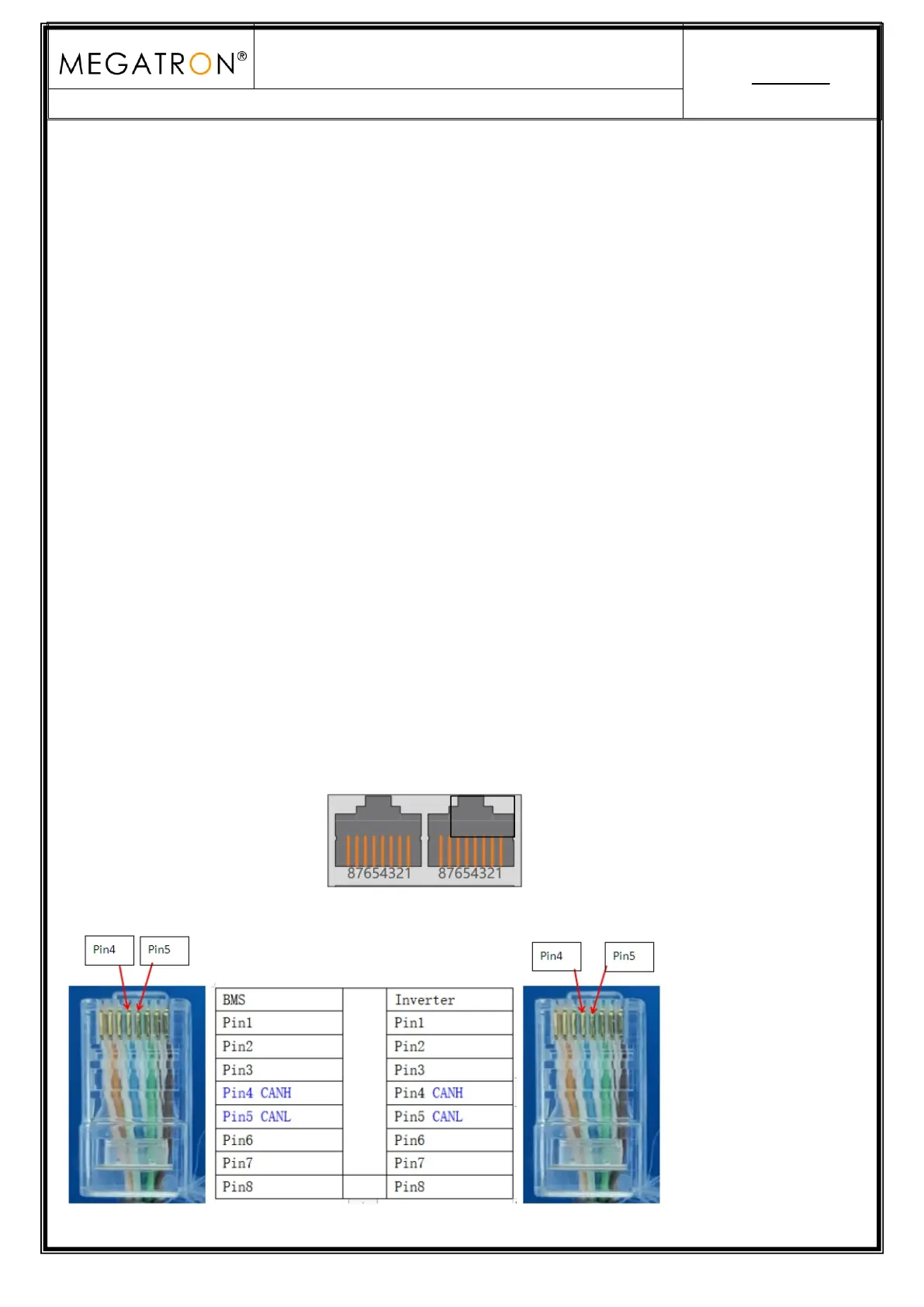
8. DEYE Inverter CAN Communication Setting (Compatible Sunsynk,Default protocol)
Dual RJ45 Port(RS485 & CAN):


 To Next Page