5-12
5.3.3 Capacitive Balance Measurement
Test Procedure
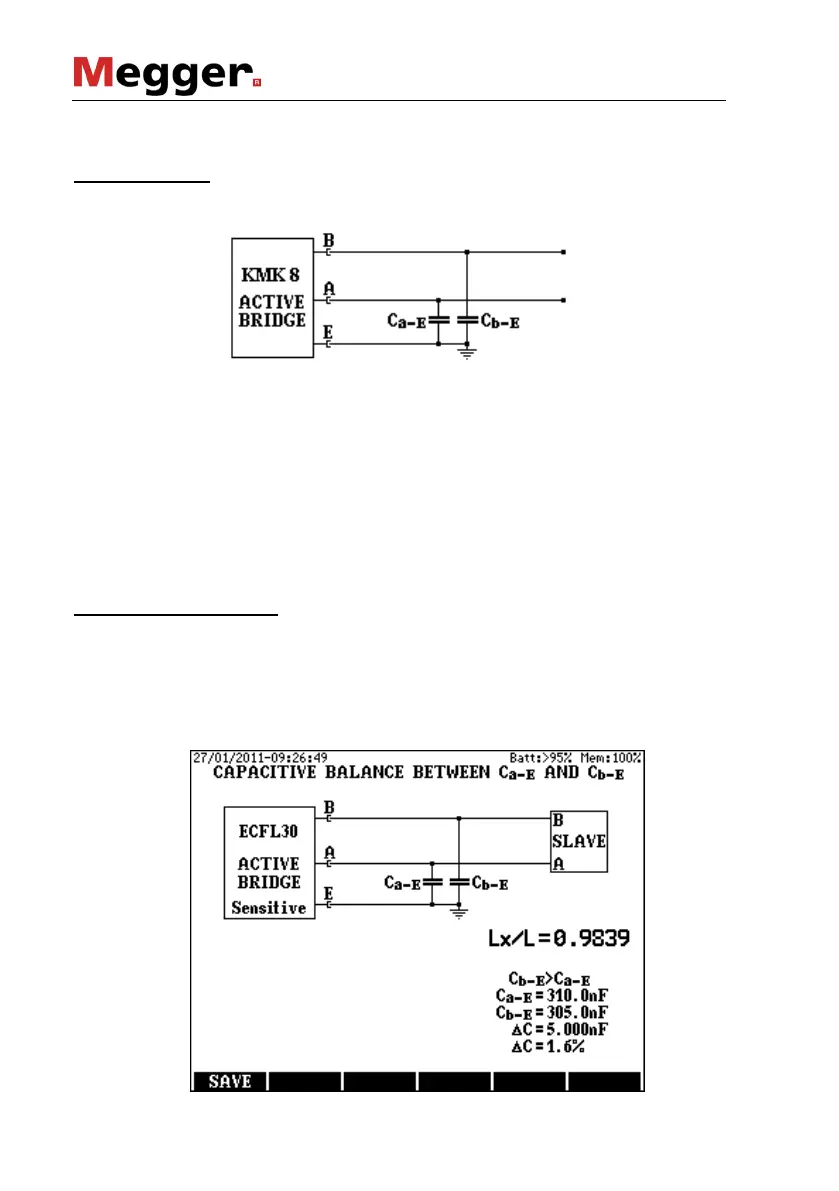
Select the CAPACITIVE BALANCE mode and press ENTER and then
the measuring arrangement appears:
The far endings of the tested pair should be open.
Two measuring modes are provided: Sensitive or Protected mode.
It is recommended to start the measurement with sensitive mode. When
the disturbing voltages overload the indicator a warning appears
informing the user that the result can be inaccurate. In that case the
measurement should be repeated in protected mode.
• Select the proper mode with the MODE (F3) key
• Start the measurement with the START/STOP key
Having the measurement completed the following results appear:
Displayed Test Results
• Lx/L relative capacitance rate
• Ca-E wire capacitance
• Cb-E wire capacitance
• ΔC = Ca-E – Cb-E capacitance difference
• ΔC% = 2 ΔC / (Ca-E + Cb-E) difference in percents



 To Next Page