6-12
Bridge Balancing
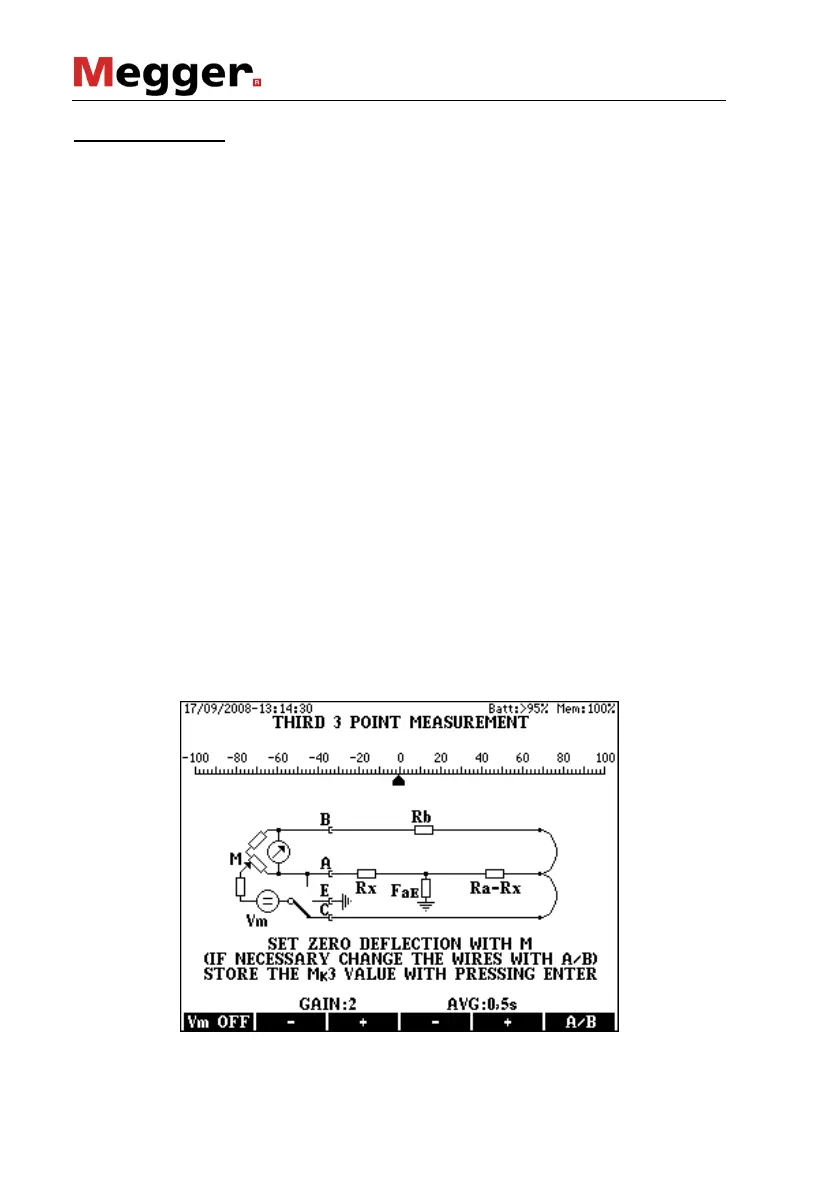
• Select the minimum gain with key F2
• Switch the measuring voltage off with the Vm OFF(F1) key and
keep it pressed until the pointer reaches a stable position. While
the key is pressed KMK 8 measures the disturbing DC voltage.
After releasing the key, KMK 8 performs a null-correction com-
pensating the effect of disturbing voltage. The null point remains
in the middle.
• Set the pointer to the 0 point with the M balancing potentiometer
• Increase the gain gradually with key F3 and repeat the first two
points until reaching the perfect balance. The balance is perfect
when the gain is 4 or 5 and the pointer stands on the 0 point with
pressed and released F1 key as well.
The indicator performs numerous measurements per second. The pointer
shows the result of the last measurement. When the line is too noisy the
pointer is waving around a middle point and the reading is difficult.
The waving of pointer can be reduced by average calculation.
Five averaging times are provided: 0, 0.5, 1, 2 or 4 sec. (Zero means: no
averaging).
• The averaging time can be changed with keys F4 and F5
• When the balancing is completed press ENTER to store the result
(MK2) and to call the picture of the third measurement.
Doing so the following display appears and the bridge is ready for the
third balancing:



 To Next Page