TIPS
The controller will automatically record the new setting and repeat for next times.
Only Temperature-Mode has temperature holding function.
5.5.4 Developer Mode
The developer mode offers a flexible options for the chef to produce
different products;
The freezing will finish if the Setting Temperature is achieved;
The agitating will continuous until the operator manually press Take out or
STOP;
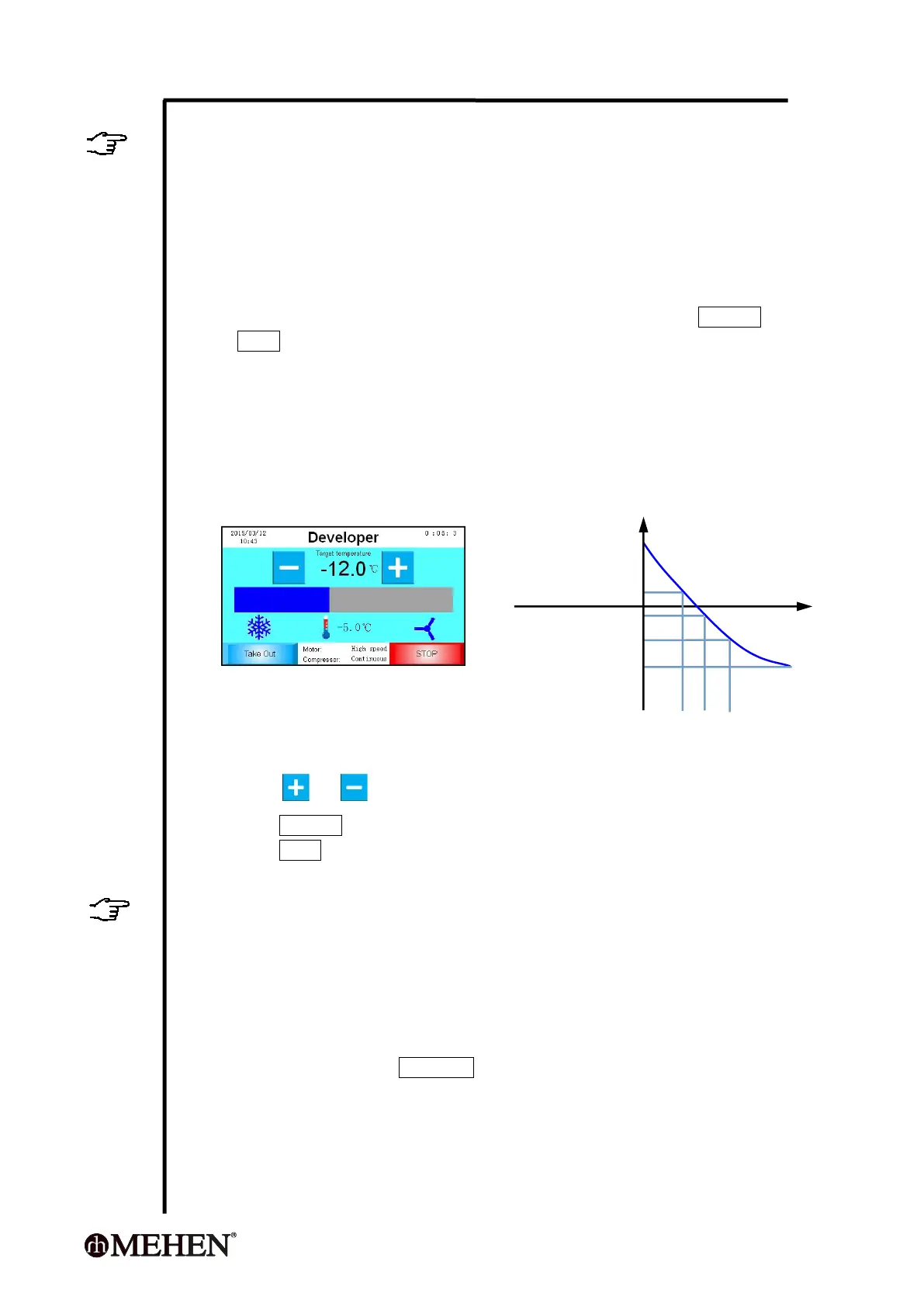
The entire temperature range is divided into 4 segments ( Fig 1.);
In each temperature range:
The operator can program the compressor: Continuous or Intermittent
working;
The operator can program the agitating motor: Low Speed,
Intermittent Low Speed, High Speed or Intermittent High Speed.
S1 S2 S3 S4
Fig 1
During processing, the operator can:
Press or to decrease or increase the temperature setting;
Press Take out to finish the processing and turn to take out the product;
Press STOP to stop the processing and turn to Standby mode.
TIPS
The controller will automatically record the new Target Temperature Setting and
repeat from next time.
We suggest you use this program only if you are experienced.
5.6 Program Setting
5.6.1 How to Set Program?
On Home-page, press Parameter will enter program setting mode;
Press the volume frame to regulate.
The new setting will be saved automatically.
Temperature 1
Temperature 2
Temperature 3
Target temperature



 To Next Page