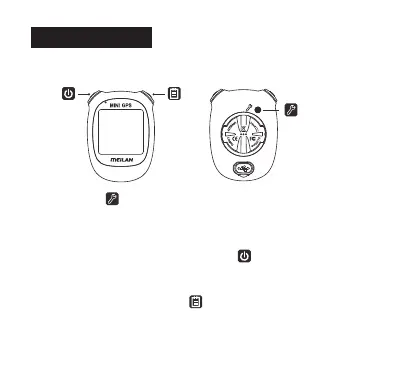
Setting Button :
Operation of buttons
Setting up the M3
Located above the back of the device, this button accesses the settings menu
if pressed when the device is on, then please press again to save if you have
completed the setting.
Smart and Power Button (left top button) :
On the left top side button of the device is the Smart and Power Button which is
to change the data, or power it on or off when held for 2 seconds.
Smart Button (right top button) :
On the right top side button of the device is the Smart Button which is to confirm
and scroll backwards through the functions. And after completing the last step of
setting, press to save the setting.
6



 To Next Page