027
MA3 Integrated D/A Converter Manual
meitner © 2020 Meitner Audio, All Rights Reserved. Meitner Audio reserves the right to amend specifications & design without notice.
mConnect Control App
Setup and Information
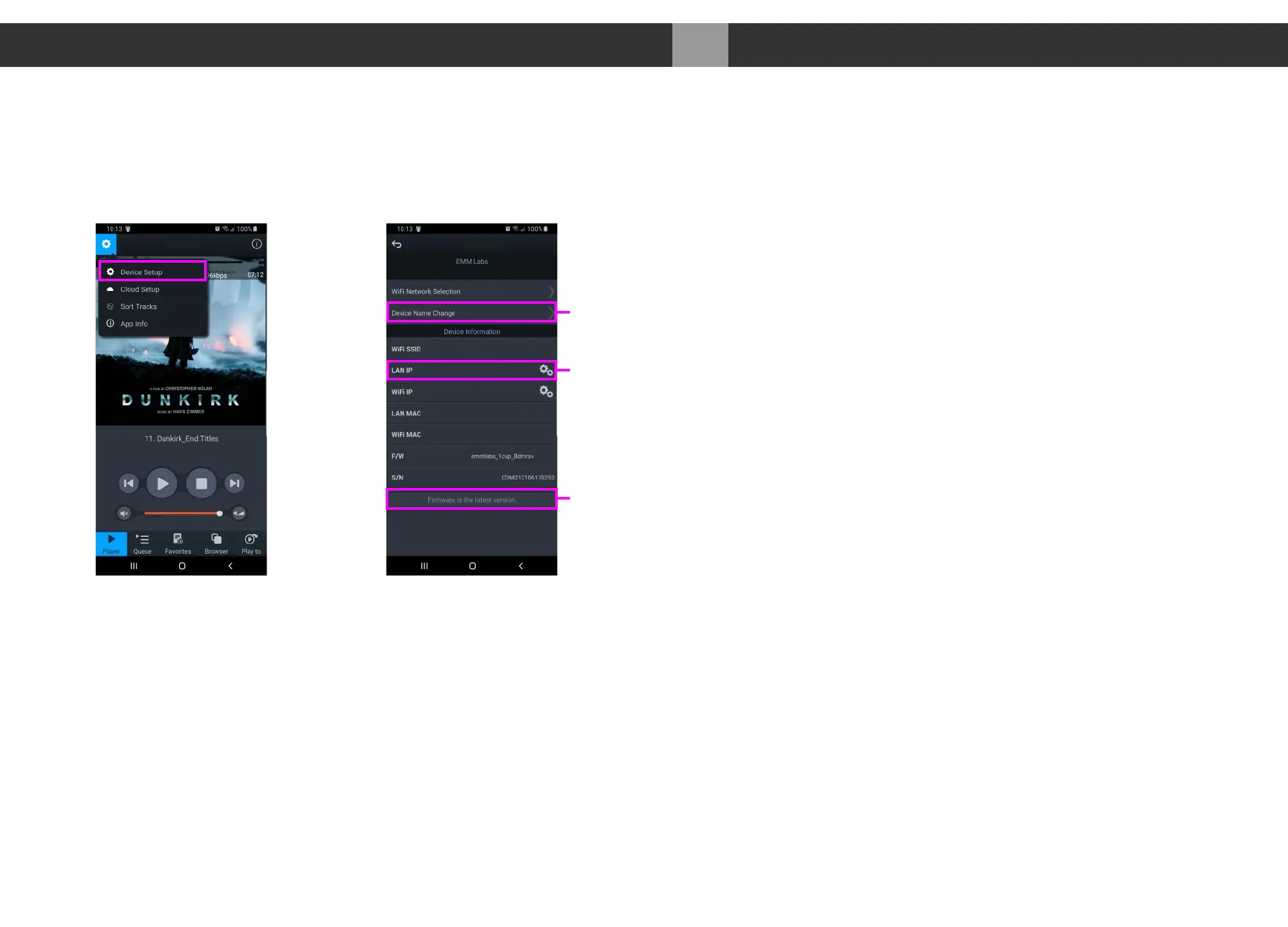
1. Access the MA3’s device setup for detailed network information, change the
MA3’s network name, set a static IP or to update the MA3’s firmware.
2. MA3 has a pre-assigned default factory set network name, in this case it is
“Meitner_MA3”. You can change this by selecting the “Device Name
Change” option.
3. Set a static IP for the MA3 by pressing the cog on right of the “LAN IP”
setting.
4. If a firmware update is available you will be notified at the bottom of the page,
and you can just press this option to update.
Device Setup
CDM2121XXXXXXXX
Change MA3
Network Name
Static IP
Assignment
Firmware
Update
xx:xx:xx:xx:xx:xx
123.456.78.900
Meitner_MA3 Meitner_MA3
MA3
v3.7.67


 To Next Page