Front Panel & Functions
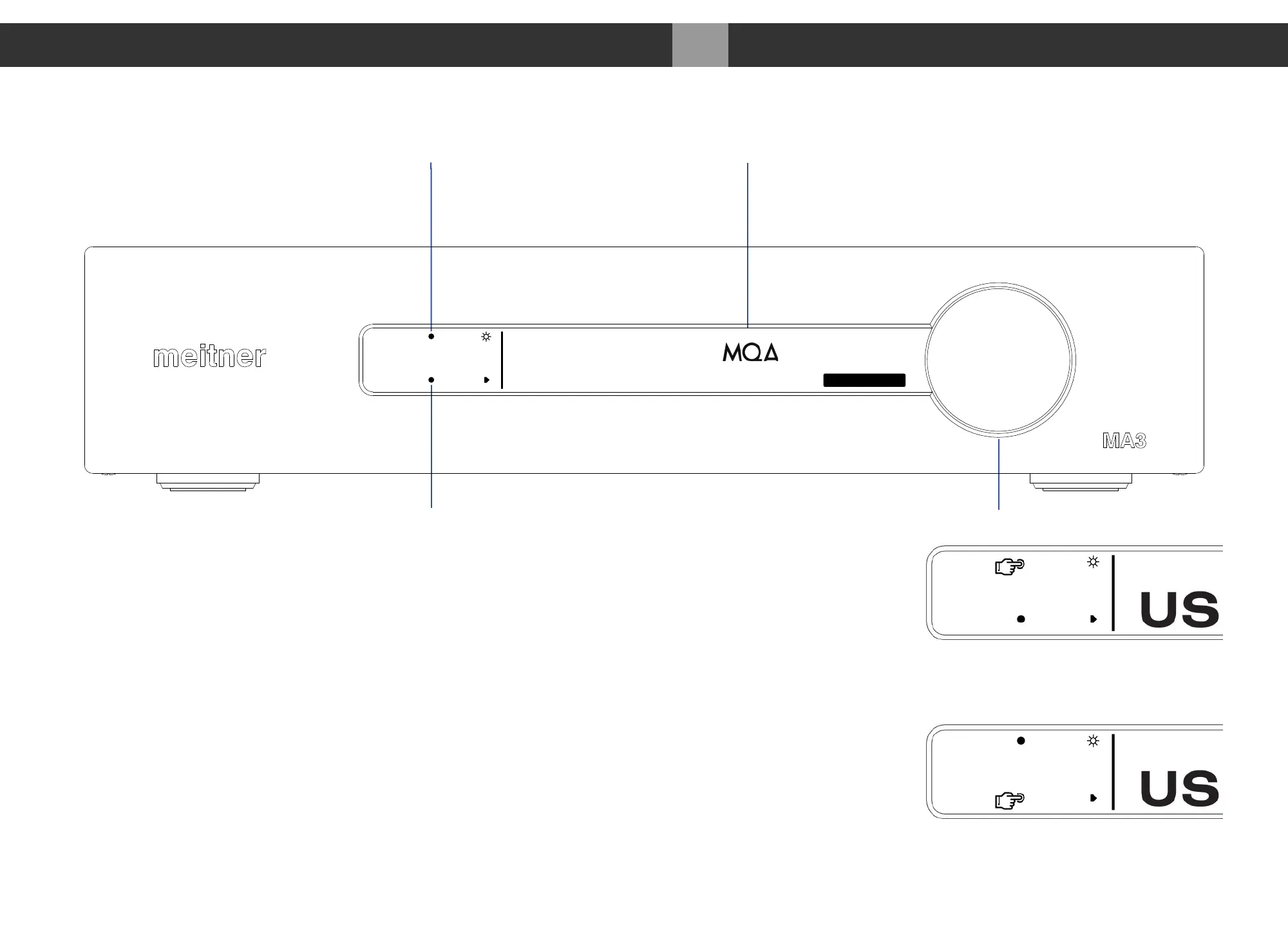
1. Display brightness touch button, toggles the display brightness settings between
“Normal”, “Dim” and “Off”.”Off” turns display off. Only the brightness touch guide led
will stay on.
2. Display shows digital input, file/stream and samplerate information and volume setting.
Volume is shown in dB on all inputs, except for the “NET” input (numerical equivalent).
3. Volume control knob.
4. Input touch button, cycles between all available digital inputs:
• AES : Selects AES/EBU (XLR) format digital audio input
• COAX : Selects SPDIF (RCA) digital audio from COAX connector
• TOS : Selects SPDIF (TOSLINK) digital audio from TOS connector
009
Front Panel & Functions MA3 Integrated D/A Converter Manual
meitner © 2020 Meitner Audio, All Rights Reserved. Meitner Audio reserves the right to amend specifications & design without notice.
USB audio
384 kHz
STUDIO
-36.0
dB
Brightness touch button
Input touch button


 To Next Page