10-14 Melitta Cana XT4 Touch Display Service Manual V1.0 -270320
Filling levels settings
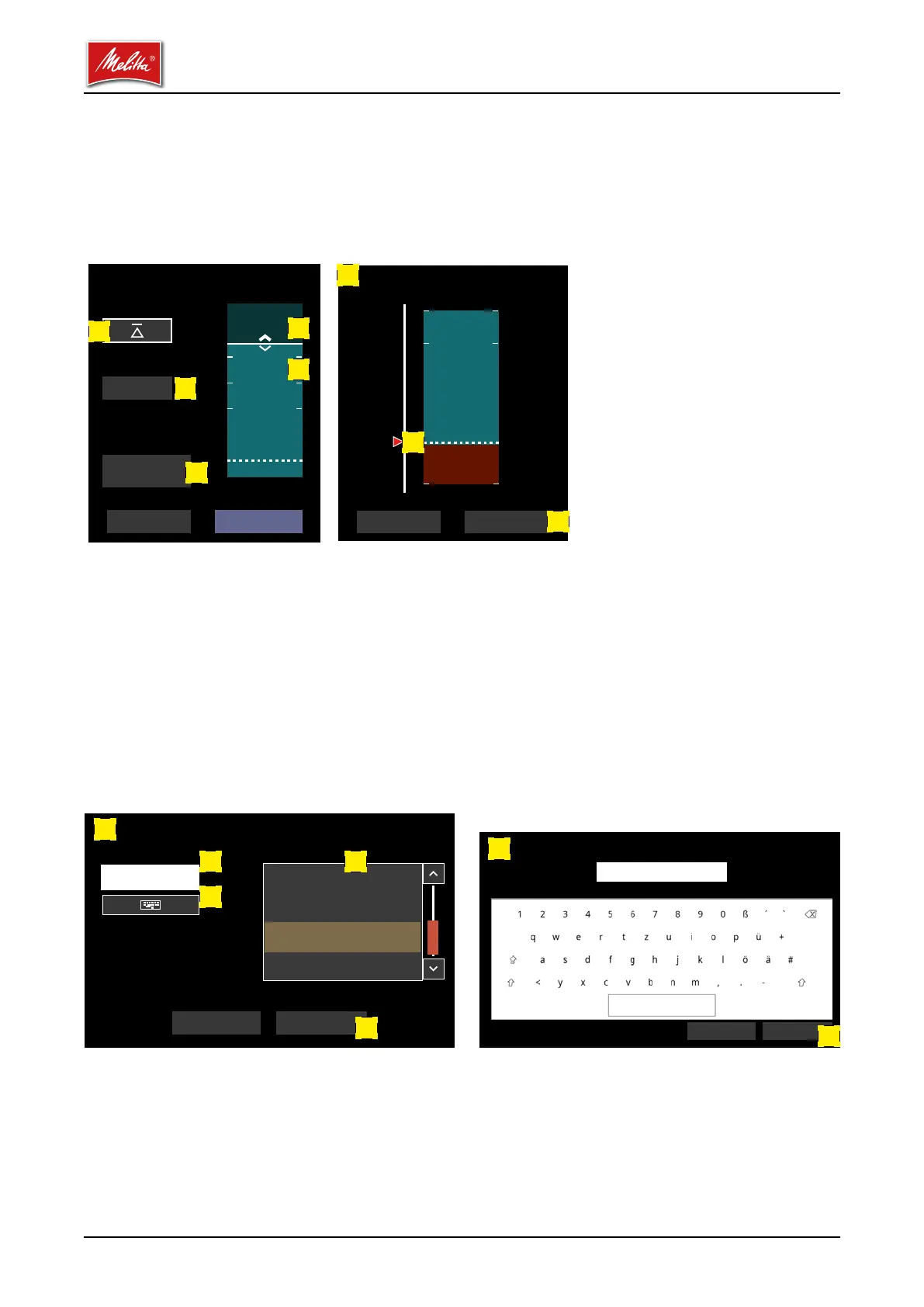
Click on a container symbol in the main window to open the settings menu for that container.
Press the arrow button [1] to set the lling level for this container to 100 %, just as on the main
screen. Each tap on the container symbol [2] above the solid white line increases the lling level
by 100 g. Each tap on the container symbol [3] below the white line reduces the lling level by
100 g.
Click on the Shortage threshold eld [4] to open another window [5] where you can adjust the
shortage threshold. Move the red arrow [6] to adjust the shortage threshold to the required value.
To save the value you have set, press the Apply button [7]. The window will then close and the
Filling levels window is displayed again.
Click on the Designation eld [8] to open another window [9] where you can change the desig-
nation for the contents of the container, e.g., "Beans 1" or "Cocoa". In this window you can select
the required designation from a suggestion list [10] or enter it directly using a keyboard. Click
on an entry in the suggestion list to transfer the selected term into the Designation eld [11]. The
keyboard [12] opens if you click on the Designation eld or on the keyboard symbol [13]. To
apply the settings, click on the OK button [14] in the keyboard eld and on the container names
screen.
Filling level Instant 1
Shortage threshold
Set to 100 %
Designation
3400
SaveCancel
Cocoa
10 %
-10 %
+10 %
25 %
100 %
50 %
0 %
Cancel Apply
25
Shortage threshold Instant 1
5
6
7
Please select / enter container name
Designation Suggestions
Reset OK
Instant 1
Beans 1
Beans 2
Instant 2
Instant 2
9
1011
13
14
Reset OK
Instant 1
12
14
Please select / enter container name
1
2
3
4
8



 To Next Page
 Loading...











