EasyManua.ls Logo

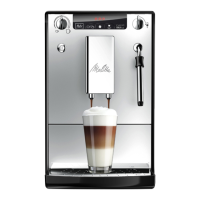
Melitta CaffeO Solo&milk - User Manual

Melitta CaffeO Solo&milk
282 pages
Go to English
Print Icon
To Next Page IconTo Next Page
Loading...
Version 1.0
01/2011
Melitta Haushaltsprodukte
GmbH & Co. KG
D-32372 Minden
NEDERLANDS FRANÇAIS ENGLISH DEUTSCHESPAÑOL
Bedienungsanleitung
Operating Instructions
Guide d’utilisation
Gebruiksaanwijzing
Manual de Instrucciones
Návod k obsluze
Návod na použitie
SLOVENSKY ČESKY

Table of Contents

Questions and Answers

  • T
    Thomas FreemanSep 18, 2025
    Why is the bean symbol flashing on my Melitta Coffee Maker when the container is full?
    • A
      alisha01Sep 19, 2025
      If the bean symbols are flashing even though the bean container is full, it indicates an insufficient quantity of ground beans in the brewing chamber. Press the button or button.
  • T
    Timothy SanchezAug 25, 2025
    How to fix a Melitta CaffeO Solo&milk Coffee Maker that only runs coffee drop-by-drop?
    • J
      Jacqueline JacobsAug 25, 2025
      If your Melitta Coffee Maker only dispenses coffee drop-by-drop, it could be due to a grind setting that's too fine. Adjust the grind to a coarser setting. Also, clean the brewing unit and descale the appliance if necessary. Running a cleaning program may also help.
  • C
    Crystal BrooksAug 25, 2025
    What to do if coffee does not flow from my Melitta CaffeO Solo&milk Coffee Maker?
    • R
      Robert WattsAug 26, 2025
      If coffee isn't flowing, it could be due to a few reasons. First, check if the water tank is filled and correctly inserted. If that's not the issue, the brewing unit might be obstructed, so try cleaning it.
  • P
    Patrick SandersAug 26, 2025
    What to do if coffee does not flow in my Melitta Coffee Maker?
    • F
      francis93Aug 27, 2025
      If the coffee does not flow in your Melitta Coffee Maker, make sure the water reservoir is filled and correctly seated. If necessary, open the valve until water runs out of the appliance, then re-close the valve. Another cause may be a brewing unit obstruction, so clean the brewing unit.
  • S
    Sean ClarkSep 23, 2025
    Why is my Melitta Coffee Maker grinder so loud?
    • M
      Melanie TaylorSep 23, 2025
      If the grinder noise is loud, this may be caused by foreign objects in the grinder. In that case call the hotline.
  • U
    umorseSep 23, 2025
    Why is not enough milk froth formed during the frothing process in my Melitta CaffeO Solo&milk Coffee Maker?
    • F
      flowersmatthewSep 23, 2025
      If not enough milk froth is formed, it could be due to the steam pipe nozzle being in the wrong position. Adjust it to the proper position. Also, the steam pipe nozzle might be dirty, so try cleaning it.
  • K
    Kevin SmithSep 10, 2025
    Why are the bean symbols flashing on my Melitta Coffee Maker when the container is full?
    • D
      Deanna HansenSep 10, 2025
      If the bean symbols are flashing on your Melitta Coffee Maker even though the bean container is full, it means there is an insufficient quantity of ground beans in the brewing chamber. Press the button for coffee dispensing or brewing strength to resolve this.
  • K
    Keith PalmerSep 12, 2025
    How to reinsert the brewing unit in my Melitta CaffeO Solo&milk?
    • C
      Casey ThompsonSep 12, 2025
      If your Melitta Coffee Maker's brewing unit cannot be re-inserted after removal: 1. Check if the handle for the locking mechanism is correctly engaged. 2. If that's not the case, switch the appliance OFF and ON again, then simultaneously press the button for coffee dispensing and brewing strength for longer than 2 seconds. This will move the drive into the correct position. Then, re-insert the brewing unit and ensure it's correctly locked in place.
  • D
    David CareySep 3, 2025
    What to do if the symbols for cleaning and stand-by flash alternately on my Melitta Coffee Maker?
    • E
      Eric DouglasSep 3, 2025
      If the symbols for cleaning and stand-by are flashing alternately, ensure the brewing unit is properly inserted. If it is, the brewing chamber may be overfilled. Switch the appliance off and on again using the On/Off button. Repeat if necessary until standby mode is displayed.
  • P
    Pamela ClementsSep 1, 2025
    What to do if my Melitta Coffee Maker does not brew coffee?
    • E
      emitchellSep 1, 2025
      If your coffee maker isn't brewing coffee, it could be due to a couple of reasons. First, check if the water reservoir is filled and correctly inserted. If necessary, open the valve until water runs out, then re-close it. Another possibility is that the brewing unit is obstructed, so try cleaning it.

Summary

Information about operating instructions

Symbols in text

Explains symbols used for warnings, cautions, and notes.

Intended use

Defines the proper use of the appliance and its limitations.

Non-intended use

Describes improper usage and associated risks.

General safety instructions

Appliance description

Legend for Fig. A

Lists and explains numbered parts of the appliance shown in Figure A.

Display

Explains the meaning and display of various symbols on the appliance.

Start-up

Setting up

Instructions for placing and preparing the appliance for initial use.

Connecting

Steps for connecting the appliance to the power supply.

Filling the bean container

Instructions on how to fill the bean container with coffee beans.

Filling the water reservoir

Guide to filling the water reservoir with fresh water.

Switching on and venting

Steps for turning on the appliance and performing initial venting.

Adjusting coffee amount

How to set the desired coffee volume.

Adjusting brewing strength

How to select the desired coffee strength.

Inserting water filter

Preparing coffee;espresso

Preparing milk froth

Rinsing the steam pipe

Instructions for cleaning the steam pipe after use.

Heating milk

Rinsing the steam pipe

Instructions for cleaning the steam pipe after heating milk.

Dispensing hot water

Switching off and operating modes

Switching off

Steps to turn off the appliance and its idle state.

Operating modes

Explanation of different operating modes like standby and auto-off.

Function settings

Adjusting water hardness

How to set the water hardness level for optimal performance.

Setting energy-saving timer

Guide to configuring the timer for energy-saving mode.

Setting auto-off timer

Instructions to set the automatic shut-off timer.

Adjusting brewing temperature

How to adjust the coffee brewing temperature.

Resetting to factory settings

Procedure to restore the appliance to its default settings.

Overview of factory settings

Summary of default settings for various functions.

Adjusting grinding fineness

How to adjust the coffee grounds fineness for flavour.

Care and maintenance

General cleaning

Instructions for regular cleaning of the appliance exterior and components.

Cleaning the steam pipe

Detailed steps for cleaning the steam pipe assembly.

Cleaning the brewing unit

Procedure for removing and cleaning the brewing unit.

Integrated Cleaning programme

Steps for running the automatic cleaning cycle.

Integrated Descaling programme

Instructions for running the automatic descaling cycle.

Transport and Disposal

Preparation for transport and storage

Guidance on preparing the appliance for transport and storage.

Drying out the appliance

Steps to remove residual water for frost protection.

Troubleshooting

Melitta CaffeO Solo&milk Specifications

General IconGeneral
TypeAutomatic Coffee Machine
Milk FrotherYes
Pump Pressure15 bar
Dimensions20 x 32.5 x 45.5 cm
BrandMelitta
ModelCaffeO Solo&milk
ColorBlack/Silver
Voltage220-240 volts
ProgrammabilityYes
Water Tank Capacity1.2 liters
Bean Container Capacity125 g
Power Consumption1400 W
MaterialPlastic
Included ComponentsCoffee machine, Milk container

Related product manuals