EasyManua.ls Logo

Memmert IF260 - Menu Functions

Memmert IF260
48 pages
Print Icon
To Next Page IconTo Next Page
To Previous Page IconTo Previous Page
Loading...
3
4 D33363
|
Date 06/2016
M
e
n
u
fu
n
ct
i
o
n
s
7
.
M
enu mo
de
I
n menu mo
d
e, you can ma
k
e
b
asic settin
g
s as we
ll
as a
d
just app
l
iance parameters
.
Cautio
n
:
B
efore chan
g
in
g
menu settin
g
s, read the description of the respective functions on the fol-
l
owin
g
pa
g
es to avoi
d
possi
bl
e
d
ama
g
e to t
h
e app
l
iance an
d
/or c
h
am
b
er
l
oa
d
.
To
enter menu mode, press the MENU key.
To
e
xit t
h
e menu mo
d
e at any time, press t
h
e MENU
k
ey
a
g
ain. T
h
e app
l
iance t
h
en returns to manua
l
mo
d
e. On
ly
c
han
g
es accepted by pressin
g
the confirmation key are
s
av
ed
.
7.1
O
v
e
rvi
ew
P
ress t
h
e MENU
k
ey to c
h
an
g
e
b
etween t
h
e
d
isp
l
ays in menu mo
d
e:
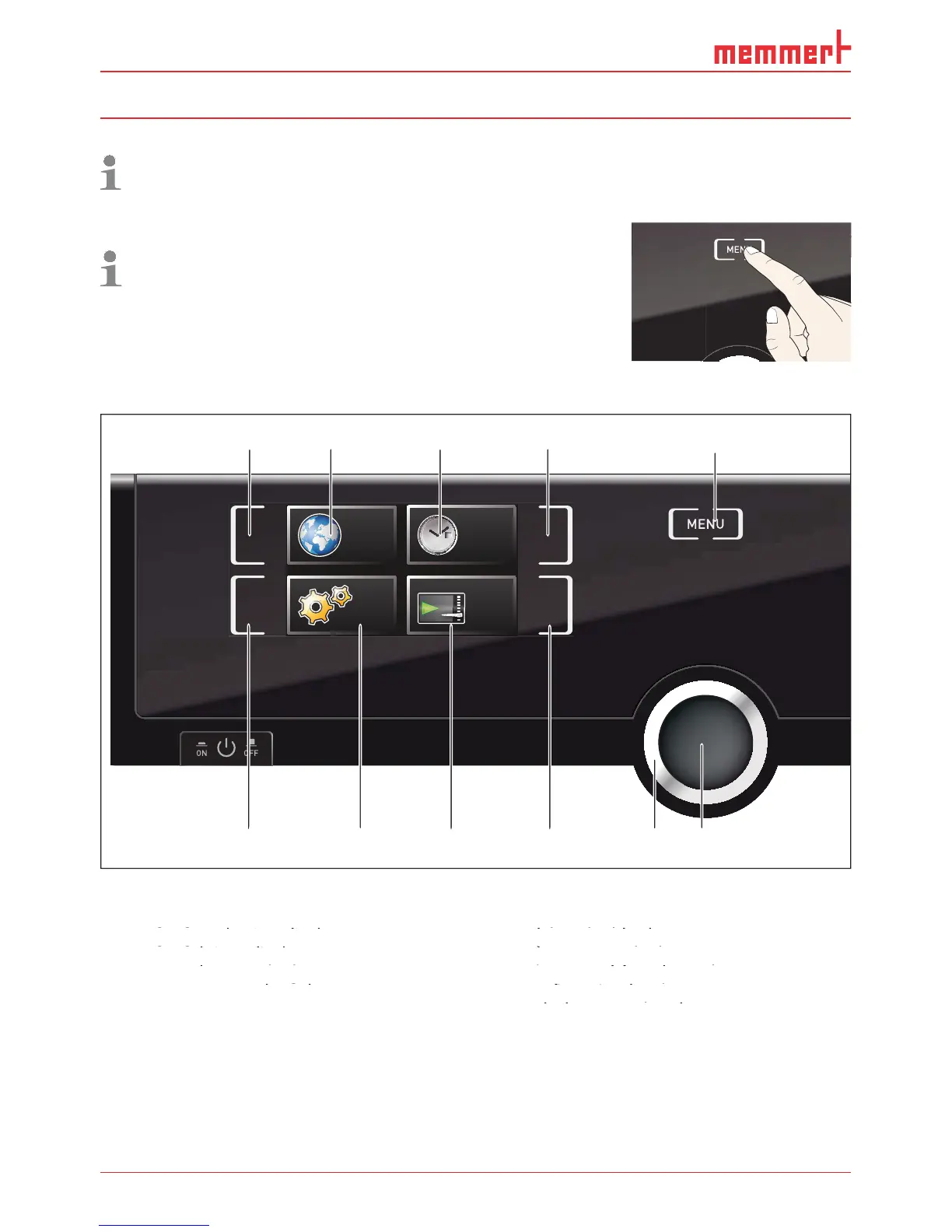
SETUP
SIGNALTÖNE
CALIB
LANGUAGE
TIME
12 34 5
6789 1011
F
ig
. 21
C
ontro
lCOC
KPIT in m
e
nu mo
de
1
Language selection activation key
2
Language selection display
gg
3
Date and time display
gg
4
Date and time setting activation key
py
5
R
e
turn to manua
l
mo
de
g
g
6
Setup activation key (basic appliance set-
t
i
n
g
s
)
7
Setup display (basic appliance settings)
8
Adjustment display
ppy
ppy
9
Adjustment activation key
jpy
j
10
Turn control for adjustment
jy
11
Confirmation key (accepts setting made
j
with the turn control)
y
y

Table of Contents