EasyManua.ls Logo

Memmert IF260 - Basic Operation in Menu Mode Using the Example of Language Selection

Memmert IF260
48 pages
Print Icon
To Next Page IconTo Next Page
To Previous Page IconTo Previous Page
Loading...
D
33363
|
Date 06/2016 35
M
e
n
u
f
u
n
ct
i
o
n
s
7.2
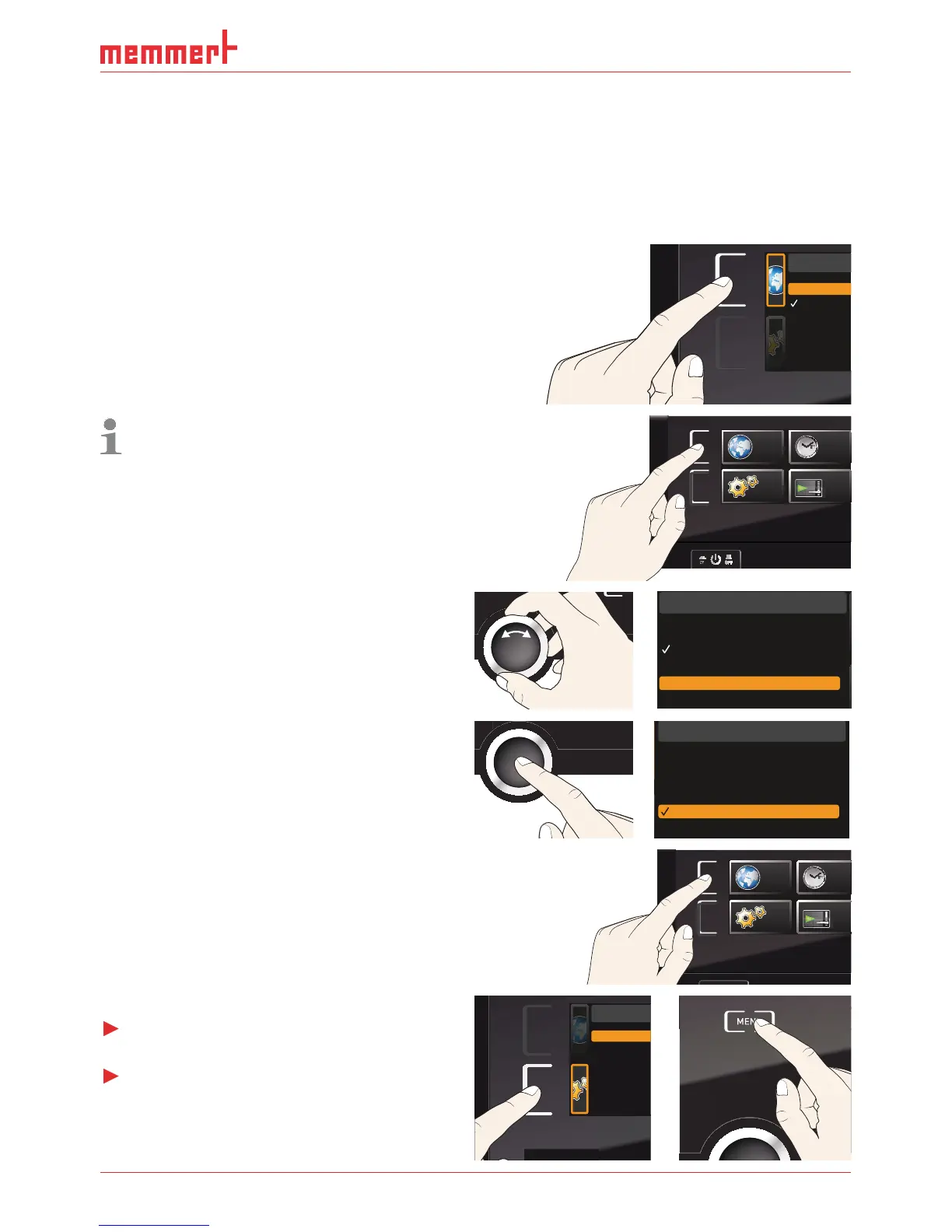
Basic operation in menu mode usin
g
the example o
f
l
an
g
ua
g
e
s
electio
n
I
n
g
enera
l
, a
ll
settin
g
s in menu mo
d
e are
d
one just
l
i
k
e in manua
l
mo
d
e: Activate t
h
e re-
s
pective display, use the turn control for settin
g
and press the confirmation key to accept
the chan
g
e. A more detailed description is provided in the followin
g
, usin
g
the example of
l
an
g
ua
g
e se
l
ection
.
1.
A
ctivate the desired parameter (in this
e
xample the lan
g
ua
g
e). To do so, press
th
e correspon
d
in
g
activation
k
ey on t
h
e
left or ri
g
ht of the respective display. The
activate
d
d
isp
l
ay is en
l
ar
g
e
d
.
ENGLISH
DEUTSCH
ESPANOL
FRANCAIS
I
f you want to exit or cancel your settin
g
s,
a
g
ain press t
h
e activation
k
ey w
h
ic
h
you
h
ave used to activate the display. The
a
ppl
iance returns to t
h
e menu overview.
O
n
l
y t
h
e settin
g
s t
h
at you
h
ave con-
f
irmed by pressin
g
the confirmation key
before cancellin
g
the settin
g
procedure
are accepte
d
.
SETUP
SIGNALTÖNE
CALIB
LANGUAGE
TIME
ON
O
O
ON
N
N
N
O
O
N
O
2
. Wit
h
t
h
e turn contro
l,
se
l
ect t
h
e
d
esire
d
n
ew settin
g
, e.
g
. Español (Spanish).
3
.
S
ave the settin
g
by pressin
g
the confir-
m
ation
k
ey.
SPRACHE
ENGLISH
DEUTSCH
ESPANOL
FRANCAIS
4
.
T
o return to t
h
e menu overview, press t
h
e
activation key a
g
ain
.
SETUP
SIGNALTÖ
N
CALI
B
LANGUAGE
TIM
Yo
u can n
ow
Ź
activate another menu function by press-
in
g
t
h
e correspon
d
in
g
activation
k
ey o
r
Ź
r
eturn to manua
l
mo
d
e
b
y pressin
g
t
h
e
M
ENU
k
ey.
Balance
Einheit
IP Adresse
Alarm Tem
p
Timer Mod
e
Unit
IP address
Subnet mas
k
Alarm temp
Timer mode
Slide-in unit
SPRACHE
ENGLISH
DEUTSCH
ESPANOL
FRANCAIS

Table of Contents

Related product manuals