Date 06/2016
Menu function
with different protocols.
ateway is set the same way as the IP address (see
pa
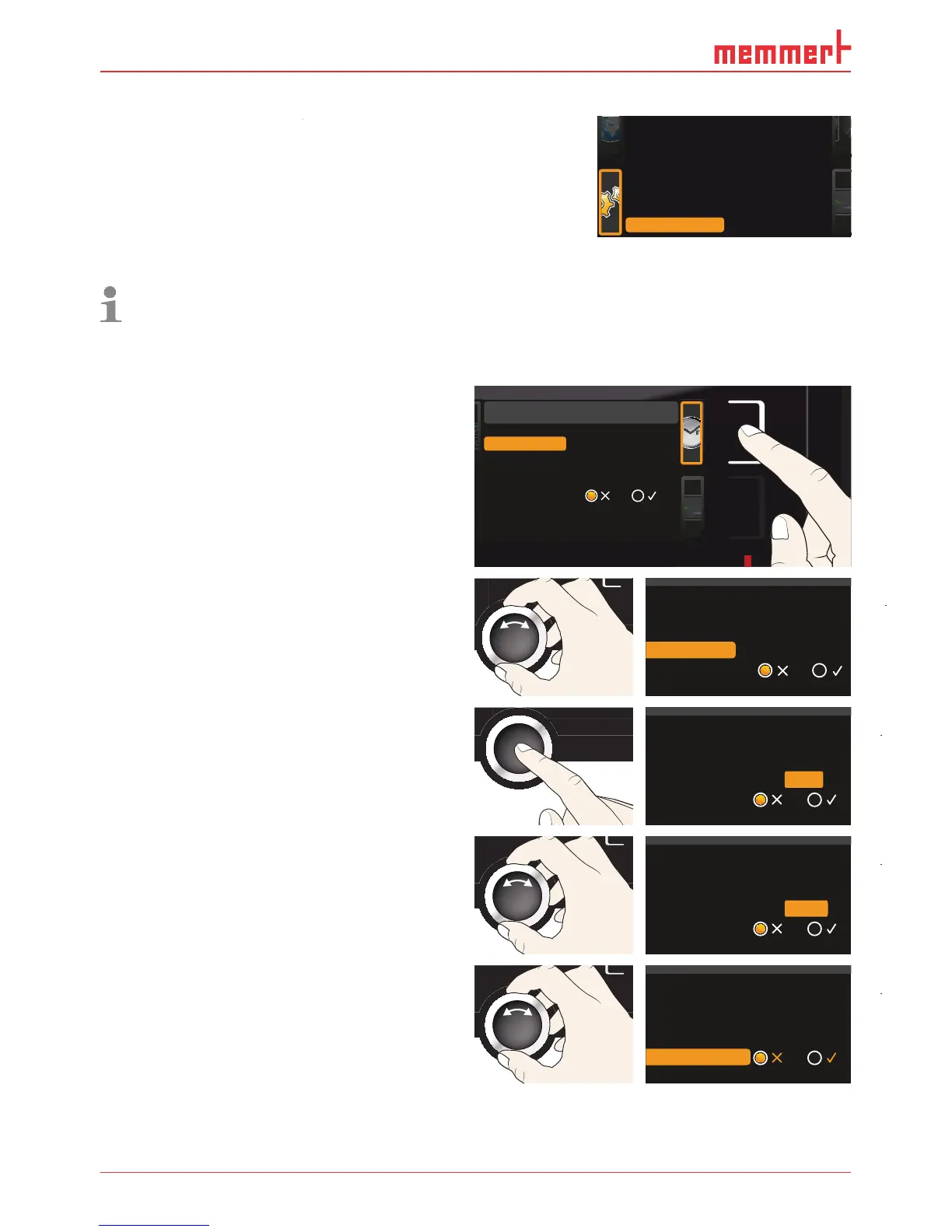
lways set the time zone (and summer time yes/no) before you set the date and time.
the set time after that since this can lead to
measured values. If you still need to chan
e the time, you should not run a
ramme immediately before or after doin
he activation key on the ri
me display. The display is enlar
ed
and the first adjustment option (
D
.
Date and time
Time
Time zone
Daylight savings
12.05.2012
12:00
GMT 01:00
Date
.
Time
Daylight savings
12.05.2012
12:00
GMT 01:00
Date
Time zone
ccept the selection by pressin
onfirmation key.
Time
Daylight savings
12.05.2012
12:00
GMT
Date
Time zone
01:00
with the turn control, e.
rance, Spain or Great Britain, 01:00 for
Germany. Accept t
Time
Daylight savings
12.05.2012
12:00
GMT
Date
Time zone
00:00
5. Wit
ry
Time
12.05.2012
12:00
GMT 00:00
Date
Time zone
Daylight savings
Balance
Remote Control Off
Gateway 192.168.5 .1
+30 %
2/2



 To Next Page