EN
34
DESCRIPTION
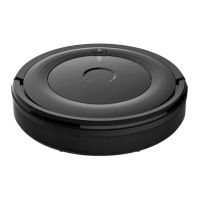
1. Vacuum cleaner
2. Charging station
3. Remote control
4. Cleaning brush
5. Side brushes, 4
6. Operating instructions
7. HEPA lter
8. Transformer
FIG. 1
9. Infrared receiver
10. Bumper
11. Touch button
12. Top cover
13. Power switch
FIG. 2
14. Catch for battery compartment
15. Bottom cover
16. Left wheel
17. Charger connection
18. Right wheel
19. Right side brush
20. Suction inlet
21. Battery cover
22. Rotating wheel
23. Charging connector
24. Left side brush
FIG. 3
25. Top cover
26. Dust container
FIG. 4
Dust container
27. Main lter
28. HEPA lter holder
29. HEPA lter
30. Dust container
FIG. 5
Charging station
31. Signal receiver
32. Top cover
33. Transformer connection
34. Status light
35. Infrared transmitter
36. Charging connectors
FIG. 6
Remote control
1. Display
2. HOME – When HOME is pressed the
vacuum cleaner goes automatically to the
charging station and the HOME symbol is
shown on the display. Press ON/OFF to stop
the vacuum cleaner, and press ON/OFF
again to start it.
3. PLAN –
Press PLAN for three seconds to
access programming mode. Press ON/OFF
to conrm the programming.
4. ON/OFF – Start/stop
–
Press to switch from sleep mode to
standby mode.
–
Press to stop the vacuum cleaner
when vacuuming is in progress.
–
Press to conrm settings when
programming.
–
In standby mode, press to start
vacuuming.
5. Changing input values/direction.


 To Next Page