2
2 Overview – 2.3 Display and user interface
2.3 Display and user interface
NOTE
The entire display is touch-sensitive. Make selections using a
fingertip or special touch pen. Do not touch the display with
sharp objects (e.g. the tip of a ballpoint pen).
• Do not place objects on the display, as doing so may scratch it
• Touch buttons, words or symbols to select them
• Scrollbars are provided to assist quick movement through
long lists
• Touch the arrow in the scrollbar to scroll upwards or down-
wards through the list
• Following selection, the item is activated immediately
• Touching a main button outlines it in blue
• Selecting an item inverts it (with dark text being shown on a
lightbackground),e.g.method-specicsettingsforconcentra-
tion mode “Show Absorbance"
• “0” is OFF, “I” is ON – the active selection is displayed light grey
withdarkgure,inthiscasetheShowAbsorbanceisON
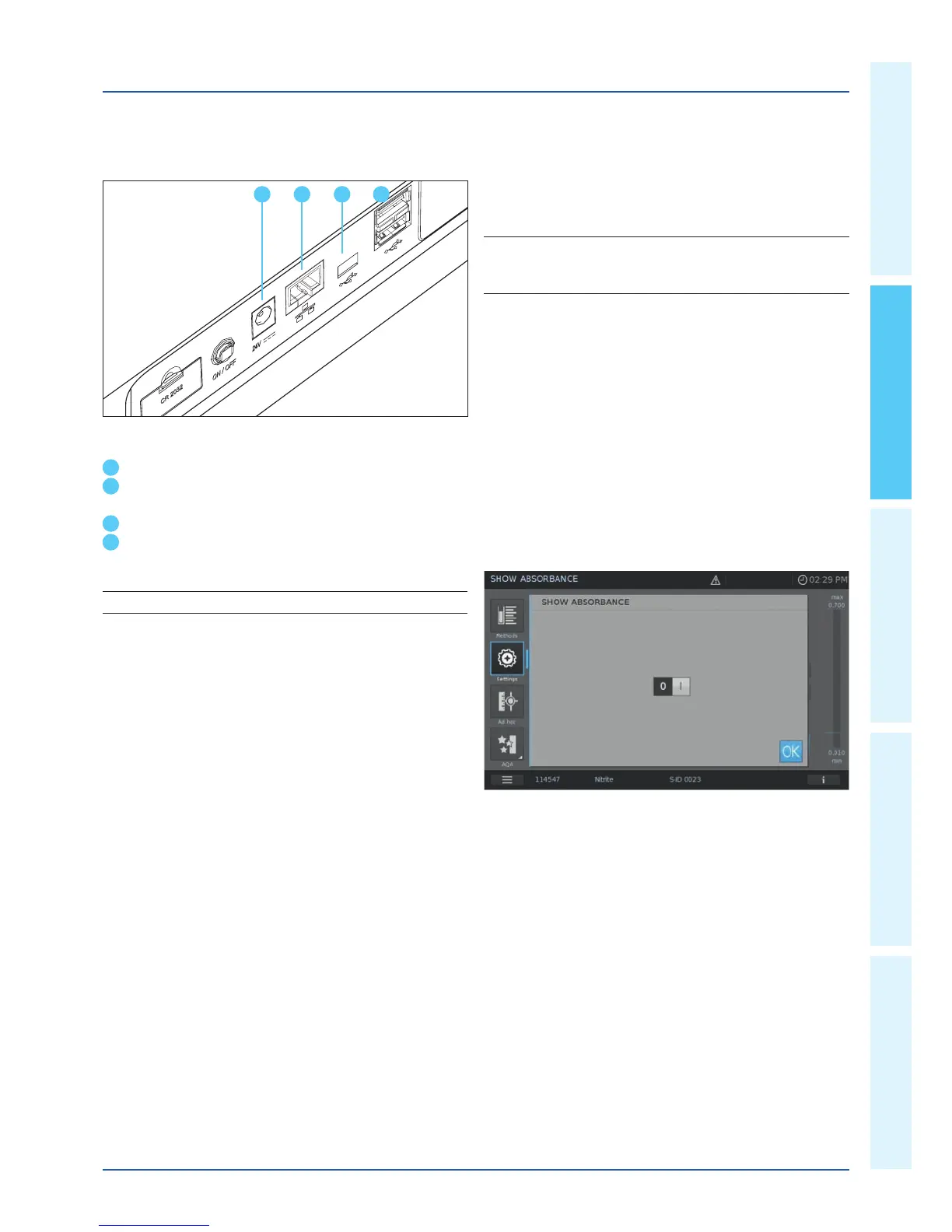
Ports at the rear of the instrument
5
Socket for plug-in power supply unit
6
LAN port (currently not active for data export, function is
in preparation)
7
USB-B port
8
USB-A ports
NOTE
All connections comply with SELV.
5 6
7 8


 To Next Page