Section 1 - General Information
90-8M0074777 eng MAY 2013 Page 5
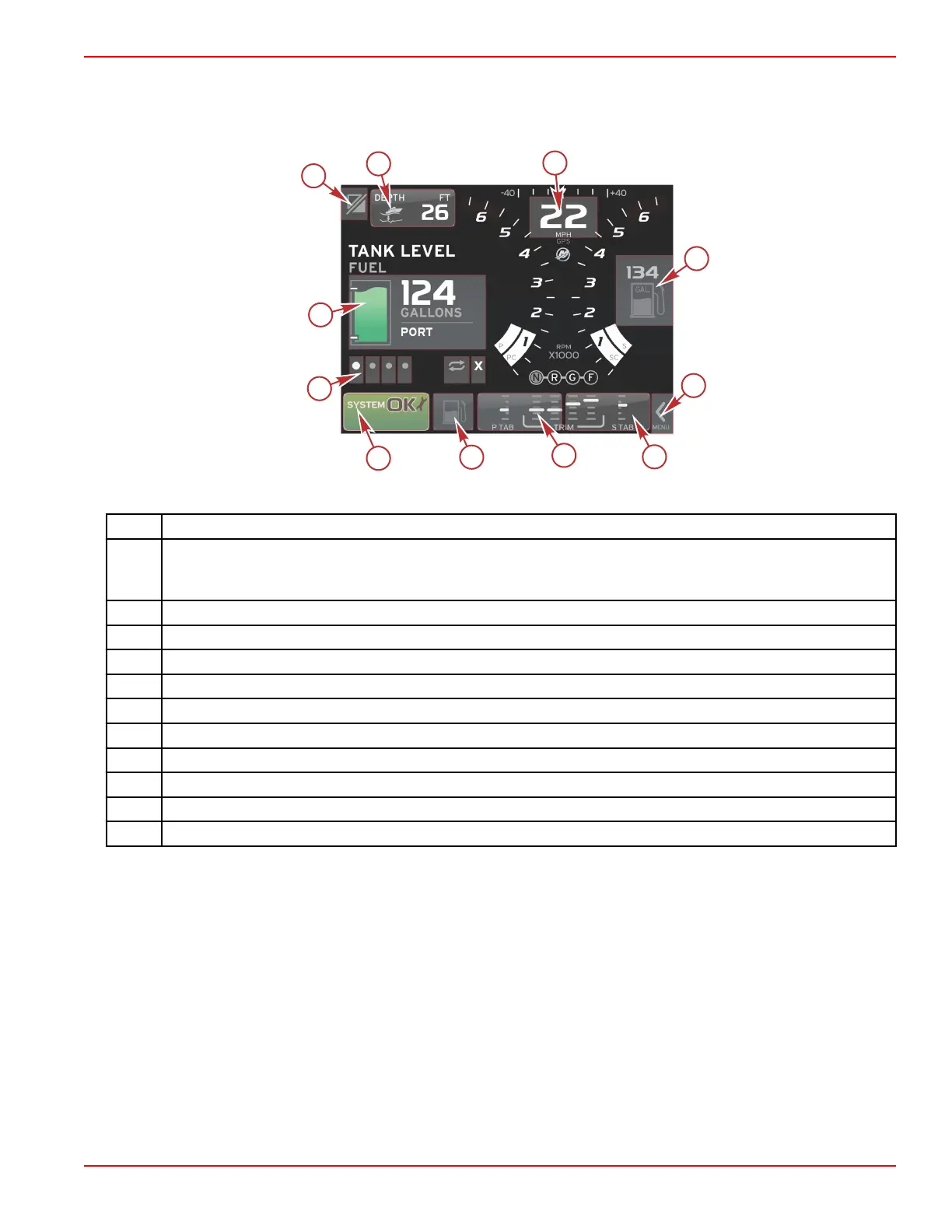
Tap/Press Districts
Tap/press districts are used in both the persistent and contextual data elements. These districts offer maximum usability and
enhance screen graphics.
Quad engine example
District Description
1
Area that toggles the application
IMPORTANT: Other applications associated with VesselView may not be accessible. The vessel must have a
specific Navico
®
device connected to the NMEA 2K backbone to be able to toggle between applications.
2 Area that displays data box information
3 Area that displays speed information
4 Area that displays fuel information
5 Area that opens and closes the scroller bar
6 Area that displays data box information
7 Area that displays data box information
8 Area that toggles display of active menu
9 Area that displays variable system tray information
10 Area that performs various tasks for contextual data area
11 Area that performs various tasks for contextual data area






 To Next Page