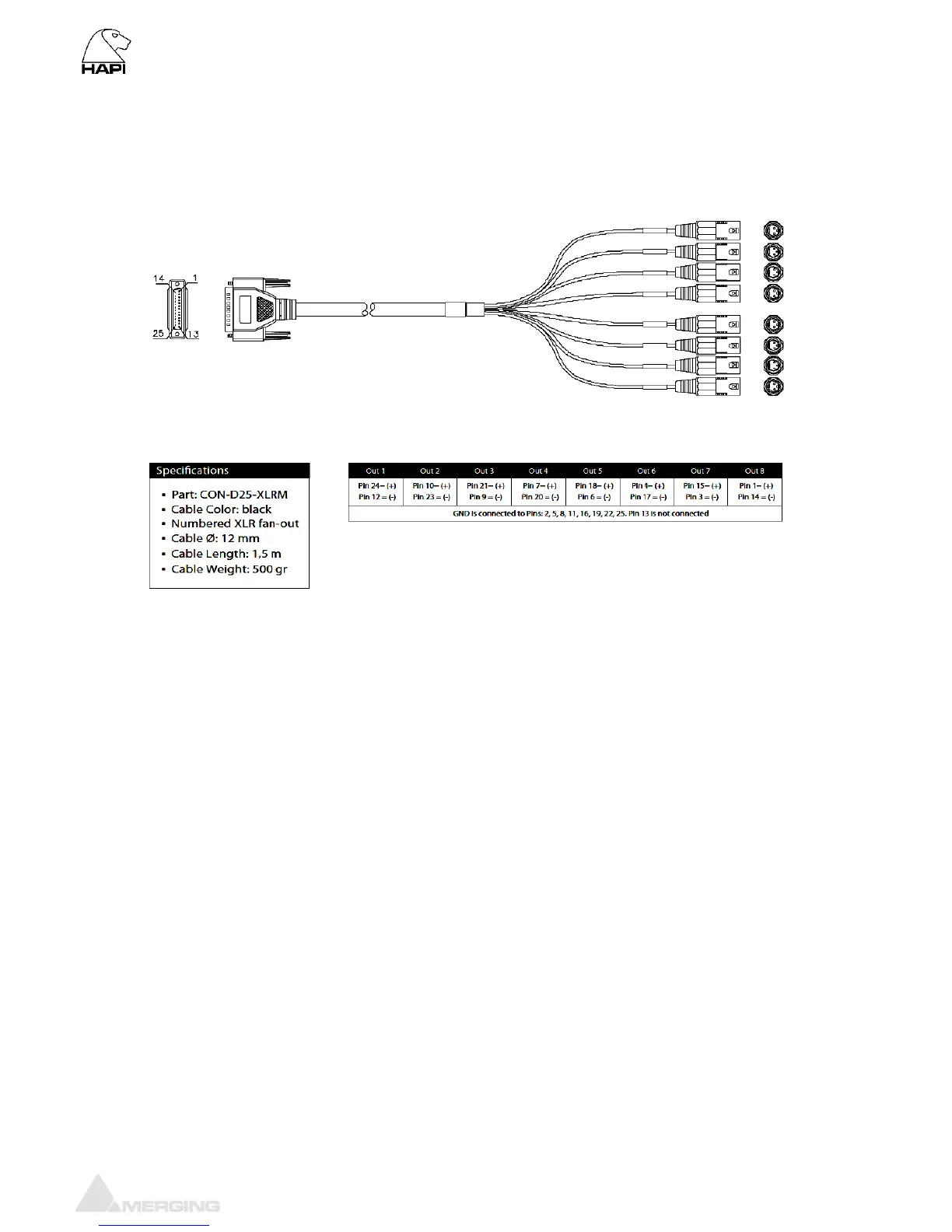
Connecting the analogue outputs cables to the DA8/DA8P modules
The IOC-DA8(P) modules connect the line outputs using DB25 D-SUB connections.
Please ensure that the cables you have chosen to use, or have had made, conform to this specification
before you attempt to connect them.
To connect the DSUB connection to the IOC-DA8(P), align the Male cable connector with the female
DSUB port on the module. Then, with slight pressure, guide the connector into place. If your DSUB
connector has mounting screws on either side, then fasten them finger-tight once the connector has
been pushed into place.
Note: The pinout of the DB-25 is as per AES59 (Tascam Analog).
* THESE CONNECTIONS ARE NOT MEANT TO SUPPORT ANY SIGNIFICANT WEIGHT.*
Ensure that there is no strain from the connected cable as any significant pressure on the module’s DSUB
connector could damage the Hapi unit.



 To Next Page