23
14
15
- TEXT VIEW (ALTERNATIVE VIEW OF EDIT PAGE)
- FACTORY RESET
The default appearance of the EDIT PAGE is GRAPHIC VIEW, which contain orbiting bubbles that allow for a focused approach to
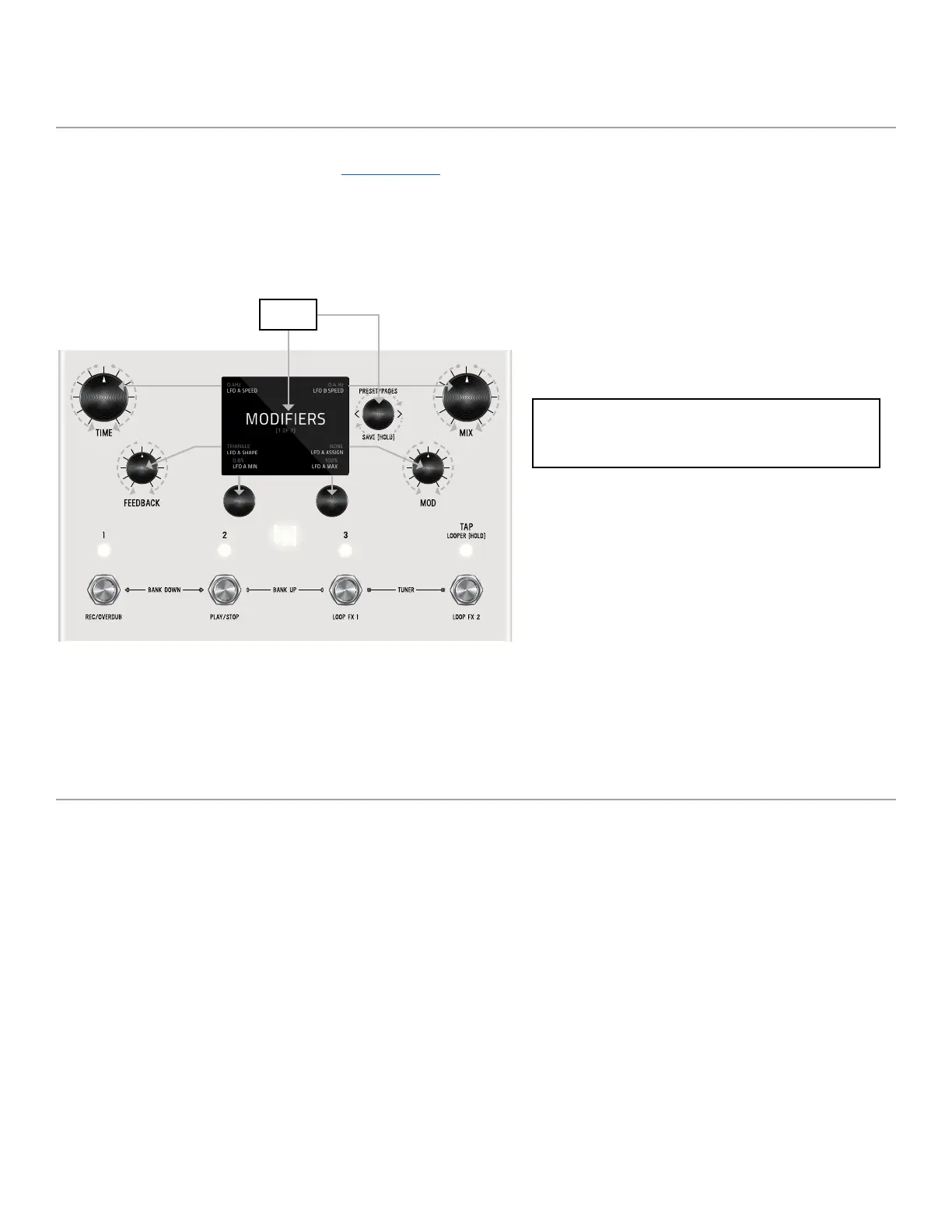
editing. An alternative view of the EDIT PAGE is TEXT VIEW which displays 6 parameters per page. Turn C3 to cycle through
categories. 6 knobs control settings simultaenously. You can change from GRAPHIC VIEW to TEXT VIEW in GLOBALS.
In GLOBALS, turn C1 to carousel to EDIT PAGE. Turn C2 and change from GRAPHIC VIEW to TEXT VIEW.
To put your LVX back to factory fresh condition, press and hold C2 when powering up the LVX.
6 SIMULTANEOUS KNOB CONTROL
TEXT VIEW edit page (when set) utilizes 6 knobs to simultaneously
control settings. See knobs indicated with grey arrows.
Category


 To Next Page