Merrychef conneX
®
Installation and User Manual
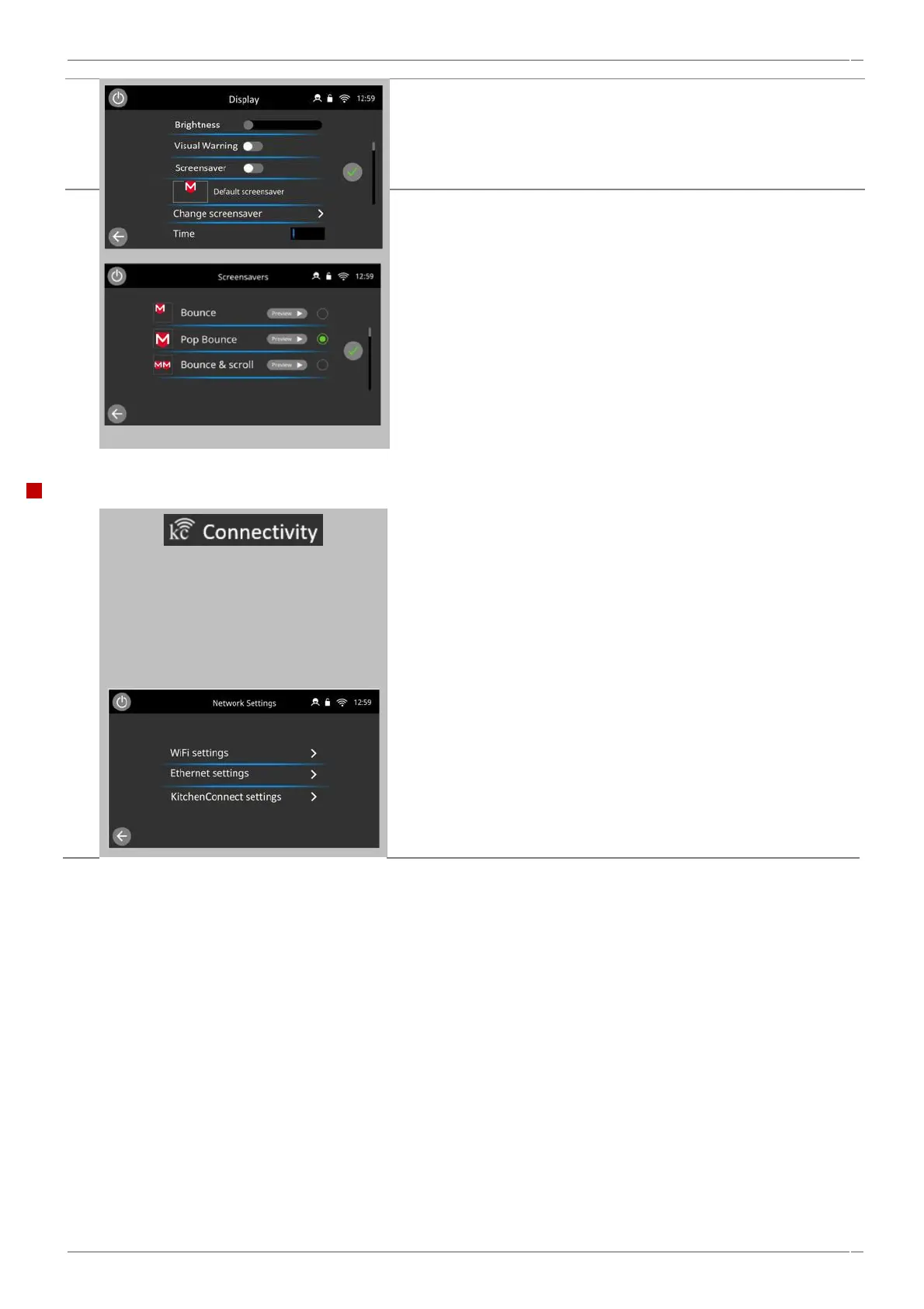
ENABLE screensaver by activating the toggle button, this will reveal
additional selections.
To change the screensaver select the ‘change screensaver’ selection
When making a change to the screensaver type once selected and
confirming with the green tick, an option to customise the image
becomes available.
An active screen saver will mask the screen showing a moving image.
To use the touchscreen, tap the screen to deactivate the screen saver.
The communication settings for Kitchen Connect Communications
Module can be accessed by selecting the ‘Connectivity’ symbol.
This allows you to make a connection via Wi-Fi or the ethernet port.
(The ethernet port is located on the rear of the oven, there is a black
cap that should be unscrewed for access).
The network settings page allows access to settings for Wi-Fi,
ethernet connections, and allows link access via QR code to
KitchenConnect settings online.
Further information on connectivity can be found at Merrychef.com



 To Next Page