Merrychef conneX
®
Installation and User Manual
8.2.4 Changing a cooking profile
Changing the cavity temperature
Recipes not created for the ovens current preheat temperature will be
inactive and greyed out, to determine these recipes preheat
temperature select, press and hold the icon until the edit/delete
option appears over the button, then select edit to investigate the
recipes parameters. Then return to the ‘Home’ screen.
Note: this can only be done when the operating mode is unlocked in
'Modes'.
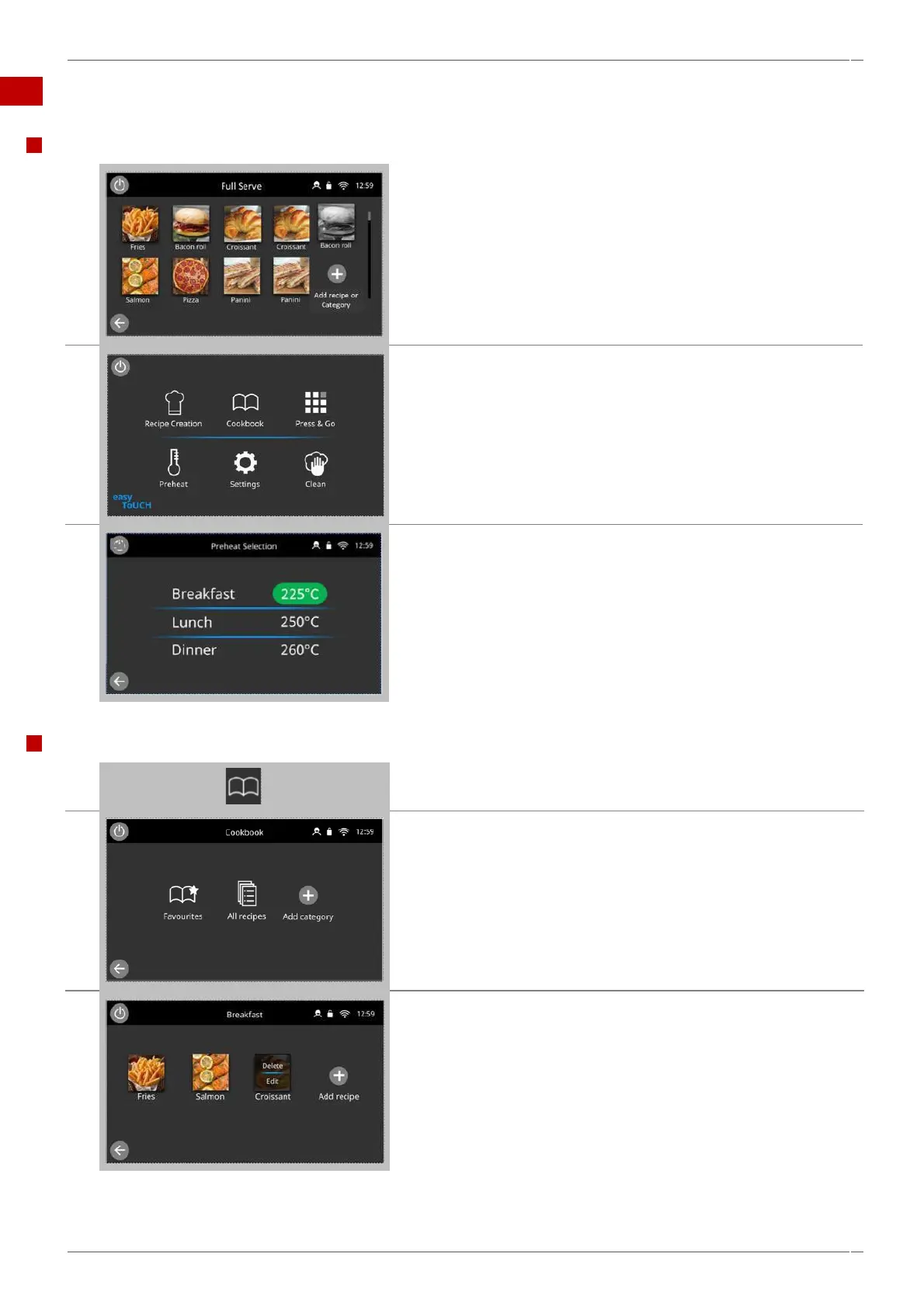
Select the 'Preheat' icon on the ‘Home’ screen, or the preheat button
in the bottom left hand corner of the screen if the oven is in
Quick Serve or Press & Go modes.
Note: the preheat icon does not appear in the latter two modes if only
one preheat has been set on the appliance.
A green highlight of the temperature value indicates the present
cavity temperature.
Select the required cavity temperature for the cooking profile, for
example 250°C / 482°F.
Once the cavity reaches the required temperature continue from
selecting the ‘cookbook’ in step 1.
Viewing and editing cooking profiles
Select the 'cookbook' icon from the ‘Home’ screen.
Select the 'All recipes' icon.
Select and hold on an image to access the edit and delete functions.
Note: This is only available when the operating mode is unlocked in
‘Modes’.



 To Next Page