EasyManua.ls Logo

Merrychef conneX 12 - Basic Settings of Your Microwave Combination Oven

Merrychef conneX 12
83 pages
Print Icon
To Next Page IconTo Next Page
To Previous Page IconTo Previous Page
Loading...
8 Cooking procedures
Back to contents >
Merrychef conneX
®
Installation and User Manual
55
8.2.6 Basic settings of your microwave combination oven
Control settings and icons
1.
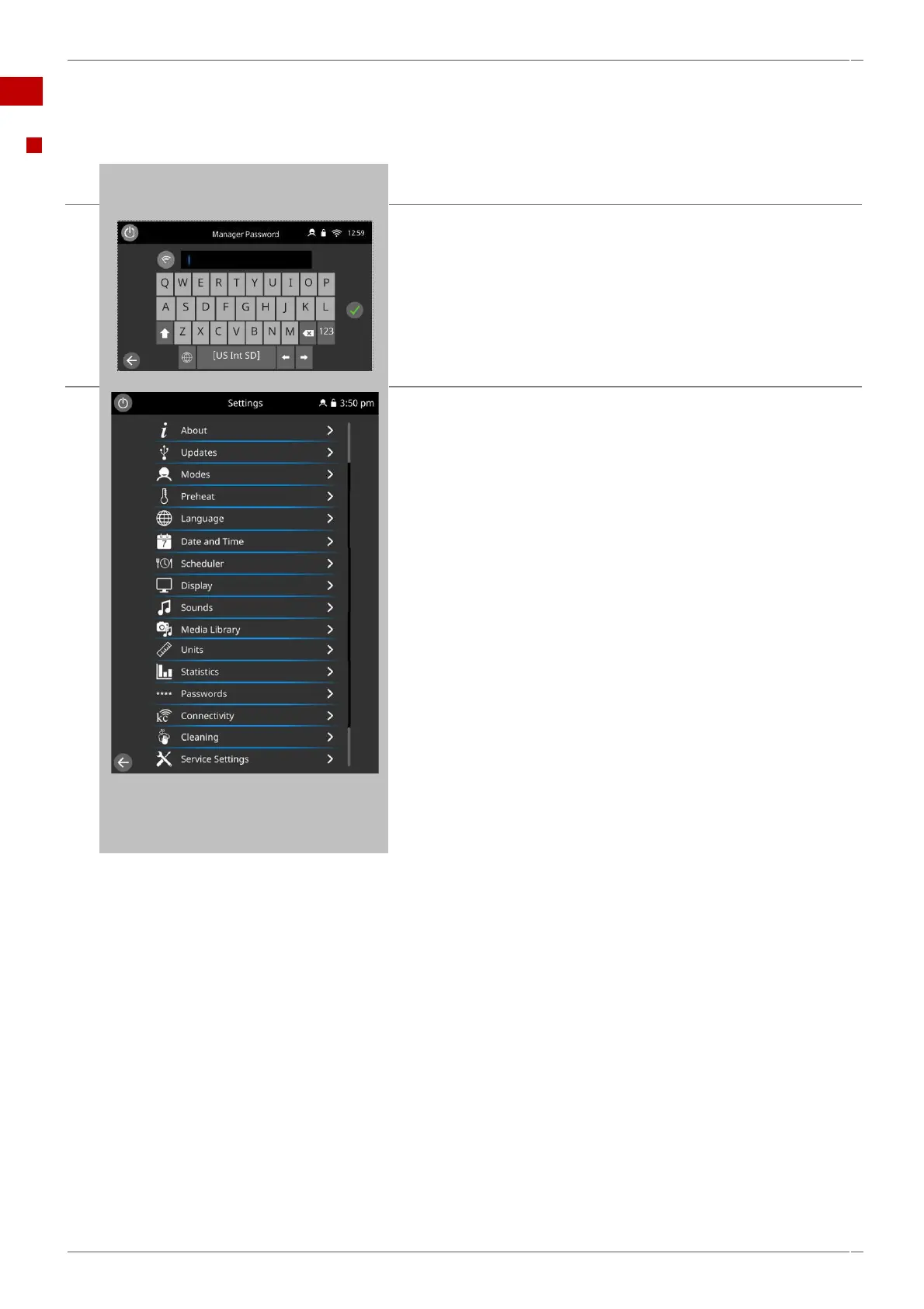
Select the ‘settings’ icon from the main menu screen.
2.
Enter the password ‘MANAGER’.
Select the green tick to display the 'settings' menu.
3.
The 'settings' menu comprises the following functions:
A. About
B. Updates
C. Mode selections
D. Preheat creations
E. Language selections
F. Date and time settings
G. Scheduler settings
H. Display setting and Options
I. Sound options
J. Media Library for Images and Sounds
K. Units selection
L. Statistic screens
M. Password settings
N. Connectivity options and settings
O. Cleaning options
P. Service Setting Menu (Password Protected screen).
Swipe to scroll up/down the menu.
Press the backspace button to exit the 'settings' menu.


Table of Contents