EasyManua.ls Logo

Metrologic MS7120 Series - User Manual

Metrologic MS7120 Series
48 pages
Print Icon
To Next Page IconTo Next Page
Loading...
METROLOGIC INSTRUMENTS, INC.
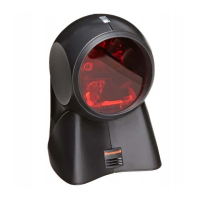
MS7120 Series Fixed Projection
Laser Scanner
Installation and User’s Guide
MLPN 2408
Printed in USA
December 1998

Questions and Answers

  • K
    Kevin WhiteJul 26, 2025
    What to do if my Metrologic MS7120 Barcode Reader has no LEDs, beep, or motor spin?
    • S
      schmidtkevinJul 26, 2025
      If your Metrologic Barcode Reader exhibits no LEDs, beep, or motor spin, it indicates that no power is being supplied to the scanner. Check the transformer, outlet, and power strip to ensure they are functioning correctly. Also, verify that the cable is securely plugged into the scanner.
  • P
    pattonjamesJul 30, 2025
    Why does my Metrologic Barcode Reader scan, communicate, and beep twice?
    • B
      Brenda MillerJul 30, 2025
      If your Metrologic Barcode Reader scans, communicates, and beeps twice, it means the same symbol timeout is set too short. Adjust the same symbol timeout for a longer duration.
  • S
    Sandra EdwardsAug 3, 2025
    What to do if my Metrologic MS7120 Barcode Reader has no LEDs and beep?
    • J
      Jennifer FloresAug 3, 2025
      If your Metrologic Barcode Reader shows no LEDs and no beep, the scanner may not be getting enough power from the host system. Try using the power supply included with the scanner, as some host systems cannot supply enough current to power the Orbit.
  • G
    Gloria EricksonAug 7, 2025
    What to do if my Metrologic Barcode Reader is giving 3 beeps on power up?
    • F
      frazierrobertAug 8, 2025
      If your Metrologic Barcode Reader emits 3 beeps upon power up, it indicates a Non-volatile RAM failure. If the unit will not hold the programmed configuration, contact a Metrologic Representative.
  • T
    Thomas HughesAug 12, 2025
    What to do if my Metrologic MS7120 makes a continuous razz tone on power up?
    • C
      Christopher ThompsonAug 12, 2025
      If your Metrologic Barcode Reader produces a continuous razz tone when powered on, it suggests a RAM or ROM failure. If the unit will not function, contact a Metrologic Representative.
  • K
    Kelly YoungAug 16, 2025
    What to do if my Metrologic Barcode Reader makes a razz tone and the green LED flashes at power up?
    • M
      Mary DunlapAug 16, 2025
      If your Metrologic Barcode Reader emits a razz tone and the green LED flashes when powered on, it indicates a VLD failure. Contact a Metrologic Representative.
  • J
    jessica35Aug 20, 2025
    What to do if my Metrologic MS7120 makes a razz tone and both LEDs flash at power up?
    • P
      Peter RussellAug 20, 2025
      If your Metrologic Barcode Reader emits a razz tone and both LEDs flash upon power up, it indicates a scanner motor failure. Contact a Metrologic Representative.

Summary

Quick Start Guide

Operational Test

Scanner Installation: External Power Supply

Scanner Installation: Host Device Power

Power-Up Indicator Behavior

Describes LED and beep behavior upon receiving power.

PC Communication Note

Notes that PC connection alone doesn't guarantee scanned data transmission.

Scanner Installation: Built-in PC Keyboard Wedge

Manufacturers Recommendation

Recommends external power supply for Keyboard Wedge applications due to potential PC port issues.

Scanner Parts Identification

LED Indicators

Explains the function of the green and red LEDs on the scanner.

Orbit Face and Output Window

Describes the tilting mechanism of the Orbit face and the output window.

Cable Connection

Details the 10-pin modular jack and PowerLink cable connection.

Audible Indicators and Feedback

Single Beep Indicator

Describes the single beep upon power-up and successful scan.

Razzberry Tone Indicator

Identifies the Razzberry tone as a failure indicator.

Three Beeps During Operation

Explains three beeps during programming mode or communication timeout.

Three Beeps on Power Up

Indicates three beeps on power up signify a failure.

Scanner Failure Modes

Laser Subsystem Failure Indicator

Indicates a laser subsystem failure. Return unit for repair.

Motor Failure Indicator

Indicates a motor failure. Return unit for repair.

Electronic Failure Indicator

Indicates an electronic failure. Return unit for repair.

Memory Failure Indicator

Indicates non-volatile memory failure. Return unit for repair.

Visual Indicators and Status

Troubleshooting Guide (All Interfaces)

Troubleshooting Guide (Keyboard Wedge)

Troubleshooting Guide (RS-232)

Metrologic MS7120 Series Specifications

General IconGeneral
BrandMetrologic
ModelMS7120 Series
CategoryBarcode Reader
LanguageEnglish

Related product manuals