49
CHAPTER 8: LYON RMS MODULE
The LYON RMS module is used only in the LYON loud-
speaker, in which it comes standard.
When equipped with an RMS module, Meyer Sound loud-
speakers can be connected to an RMS network and moni-
tored with Compass control software. Some Meyer Sound
loudspeakers, including LYON, come standard with the RMS
module already installed. For other Meyer Sound loudspeak-
ers, the RMS module is available as an option that can either
be factory installed or installed at a later date by a qualified
service technician.
The following sections document how to install and use the
LYON RMS module:
■ “Installing the LYON RMS Module” on page 49
■ “Neuron ID for Lyon RMS Modules” on page 51
■ “Resetting the Lyon RMS Module” on page 51
INSTALLING THE LYON RMS MODULE
This section documents installing the LYON RMS mod-
ule.This installation procedure requires a standard #2 Phil-
lips screwdriver.
To install the LYON RMS module:
1. Remove the loudspeaker’s AC power cable and audio
cable and place the loudspeaker on a clean, low-static
flat surface. Orient the loudspeaker with the top facing
up. Wait at least five minutes before removing the MX
RMS module.
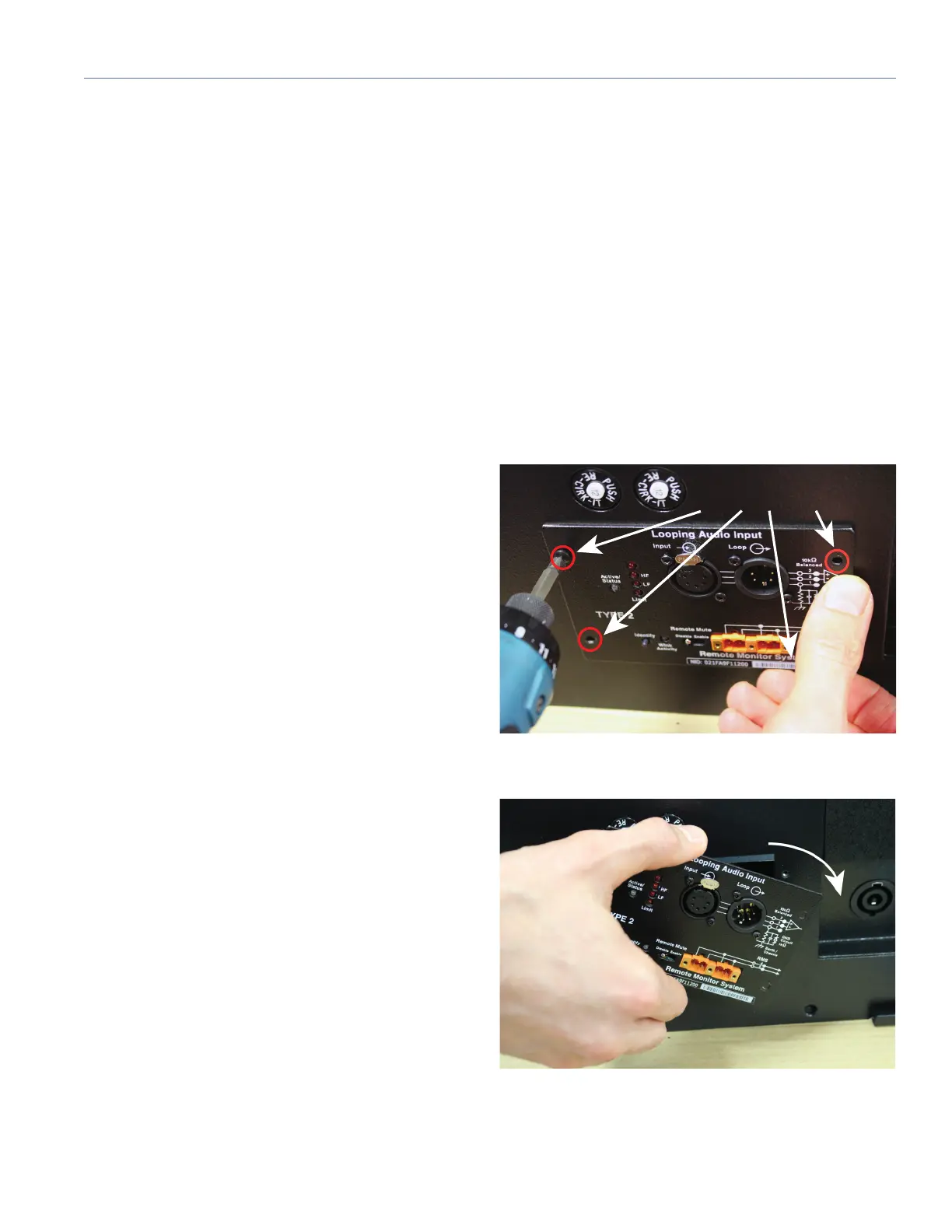
2. Remove the 4 screws that hold the module to the ampli-
fier rear panel.
3. Turn the module slightly to the right to allow the RMS
interconnect wire to clear the amplifier rear panel.


 To Next Page