MFJ-784B Instruction Manual
Introduction Error! Main Document Only.-5
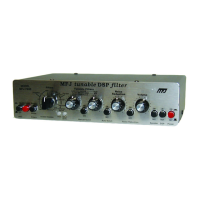
Front Panel Layout
AGC button: Enables the automatic gain control.
Program button: Press to program memory filters, to talk, or to
activate CW spotting tone.
Memory button: Selects either normal or memory filters.
Filters switch: Selects one of ten normal or memory filters.
PWR LED: Indicates normal (red) or memory (green) filters.
Input Level LED: Indicates input signal level (red too high, off too
low, green is OK).
Tunable Filters left knob: Adjusts tunable filters and manual notch.
Manual Notch button: Enables the manual notch.
Tunable Filters right knob: Adjusts tunable filters and manual notch.
Auto Notch button: Enables the automatic notch.
Noise Reduction knob: Controls the level of noise attenuation.
Noise Reduction button: Enables the noise reduction.
Volume control: Controls the output volume level to speaker
and headphones jacks.
Speaker button: Enables the speaker jack.
DSP button: Enables digital processing of input signal.
Power button: Applies power and places the DSP "in-line".
For an in-depth description of the front panel controls, refer to Chapter 3,
Operation.


 To Next Page