MFJ-784B Instruction Manual
Advanced Features Error! Main Document Only.-10
Setting the CW Sidetone Filter
If you do not have a T/R connection and wish to pass CW sidetone through
the DSP, you must enable this filter. This is not the preferred method to pass
sidetone, see page 2-5. The CW sidetone filter is a jumper programmable
internal constant frequency filter. It only works in the Tunable CW mode. Any
signal within 30 Hz of the sidetone frequency will pass through this filter.
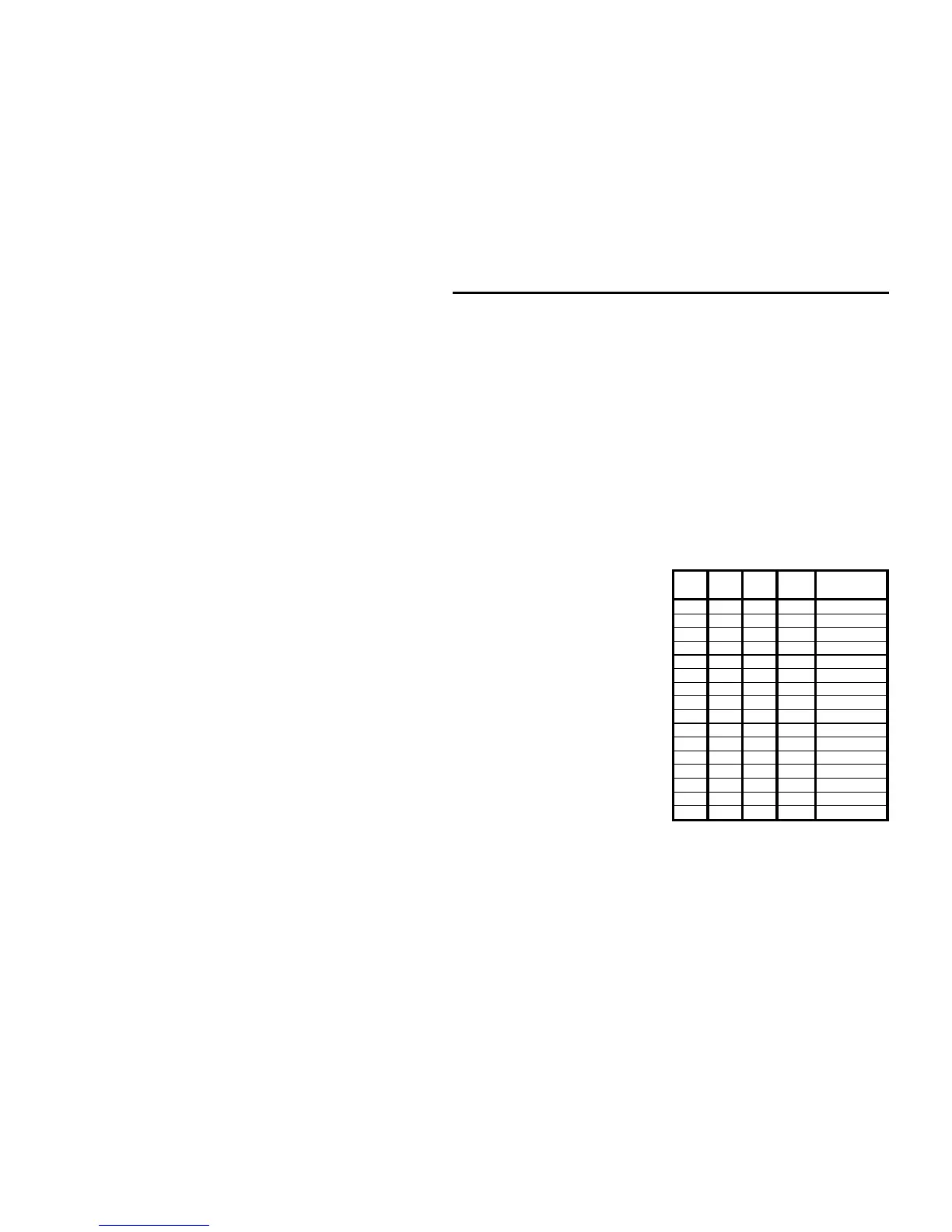
To enable the CW sidetone filter, program it to the sidetone frequency of your
radio. The center frequency of the sidetone filter ranges from 300 Hz to
1000 Hz in 50 Hz increments. The bandwidth of the sidetone filter is fixed at
50 Hz. See the chart below for jumper settings.
The DSP unit is shipped with the CW sidetone filter set to "off." If you wish to
disable the filter, program it with all four jumpers in the "H" position.
To set the CW sidetone filter:
1. Disengage the Power button
and
remove the power plug
.
2. Remove the unit's cover.
3. Set the jumpers for the selected
sidetone filter.
4. Turn the Filters switch to CW.
5. Reconnect the power cable.
6. Press and hold the Program
button.
7. Press and lock the Power
button to "on."
8. The unit will beep at the new
sidetone pitch until the
Program button is released.
9. Disengage the Power button
and
remove the power plug
.
10. Set the jumpers back to the Talk
tone frequency and Morse code
speed.
11. Replace the unit's cover.
12. Reconnect the power cable and resume normal operation.
JMP
1
JMP
2
JMP
3
JMP
4
Sidetone
Frequency
L L L L 300 Hz
L L L H 350 Hz
L L H L 400 Hz
L L H H 450 Hz
L H L L 500 Hz
L H L H 550 Hz
L H H L 600 Hz
L H H H 650 Hz
H L L L 700 Hz
H L L H 750 Hz
H L H L 800 Hz
H L H H 850 Hz
H H L L 900 Hz
H H L H 950 Hz
H H H L 1000 Hz
H H H H * OFF
* Factory default.


 To Next Page