MFJ-941EK Tuner Kit Instruction Manual
- 11 -
CONSTRUCTION
PC Board Installation:
Find the MFJ-941E chassis. Also, find the following hardware items:
(3) 4-40 x 1/2" Machine Screw
(3) 4-40 x 1/4" Threaded Aluminum Spacer
(3) 4-40 Hex Nut, KEP (nuts with lock washers)
Locate the three circuit board mounting holes on the bottom of the chassis.
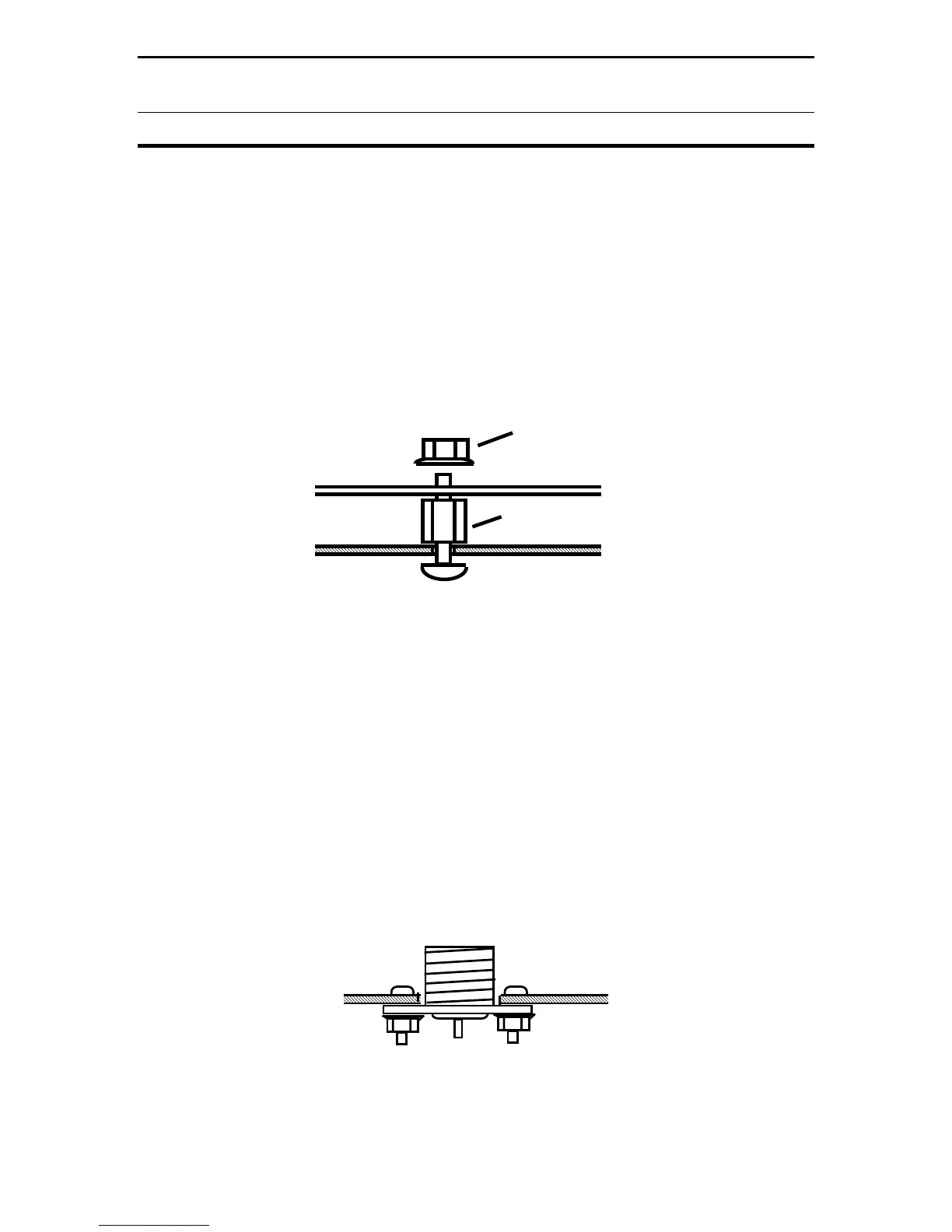
These form a triangle -- two at the rear and one in front. Spacers are mounted as
shown below in Diagram 4:
KEP Nut
PC Board
Spacer
Screw
Chassis
Diagram 4: PC Board Mounting
[ ] Install spacers with 1/2" screws and spacer. Don't fully tighten.
[ ] Align and install the circuit board on top of the spacers.
[ ] Tighten the threaded spacers in place.
[ ] Secure the circuit board on top of spacers using KEP nuts.
Rear Panel Components:
Coax connectors are mounted from the inside of the chassis as shown below in
Diagram 5:
Diagram 5: Coax Mounting


 To Next Page