MFJ-941EK Tuner Kit Instruction Manual
- 13 -
CONSTRUCTION
[ ] Install the split lock washer.
[ ] Install the wing nut (loosely).
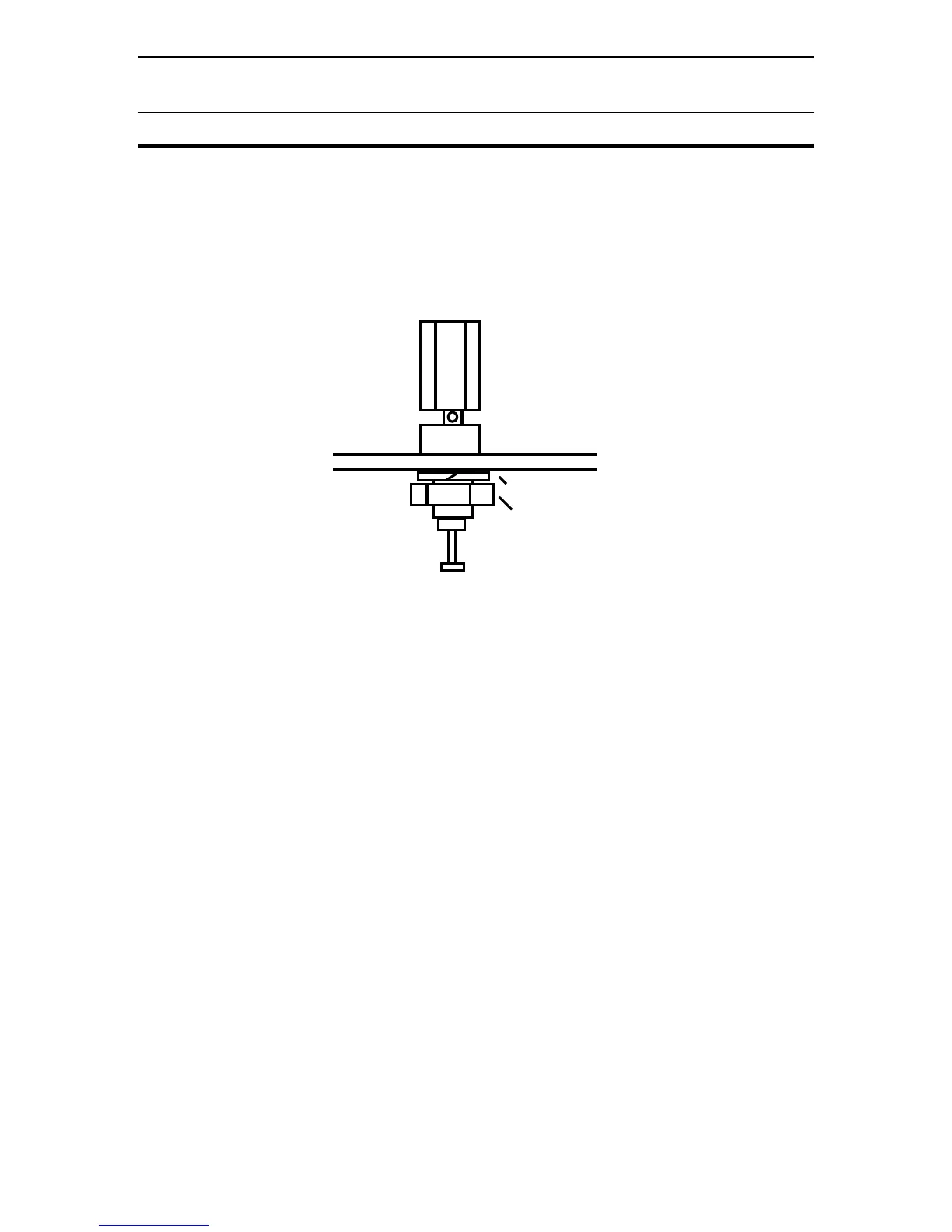
From the larger parts bag, locate the three red plastic insulated terminal posts.
Confirm that each one has a mating lock washer and nut. Install according to
Diagram 7.
Lockwasher
Nut
Diagram 7: Groundpost Mounting
[ ] Install a terminal post at WIRE on the back panel (next to GND) and secure.
[ ] Install two terminal posts at BALANCED LINE and secure.
[ ] On the pc board, locate the buss lead labeled WIRE.
[ ] Trim and install it on the WIRE terminal post. Solder.
Find the following components to install the 300-W 4:1 Balun:
(1) 300-W, 4:1 Balun on 1" Toroid Form
(1) 6-32 x 1" Machine Screw, SS, PH
(1) 6-32 Hex Nut, KEP
(1) 6-32 Flat Washer
(2) 6-32 x 1-1/4" OD Fiberglass Washer
(1) 6-32 x 1/4" Nylon Spacer


 To Next Page