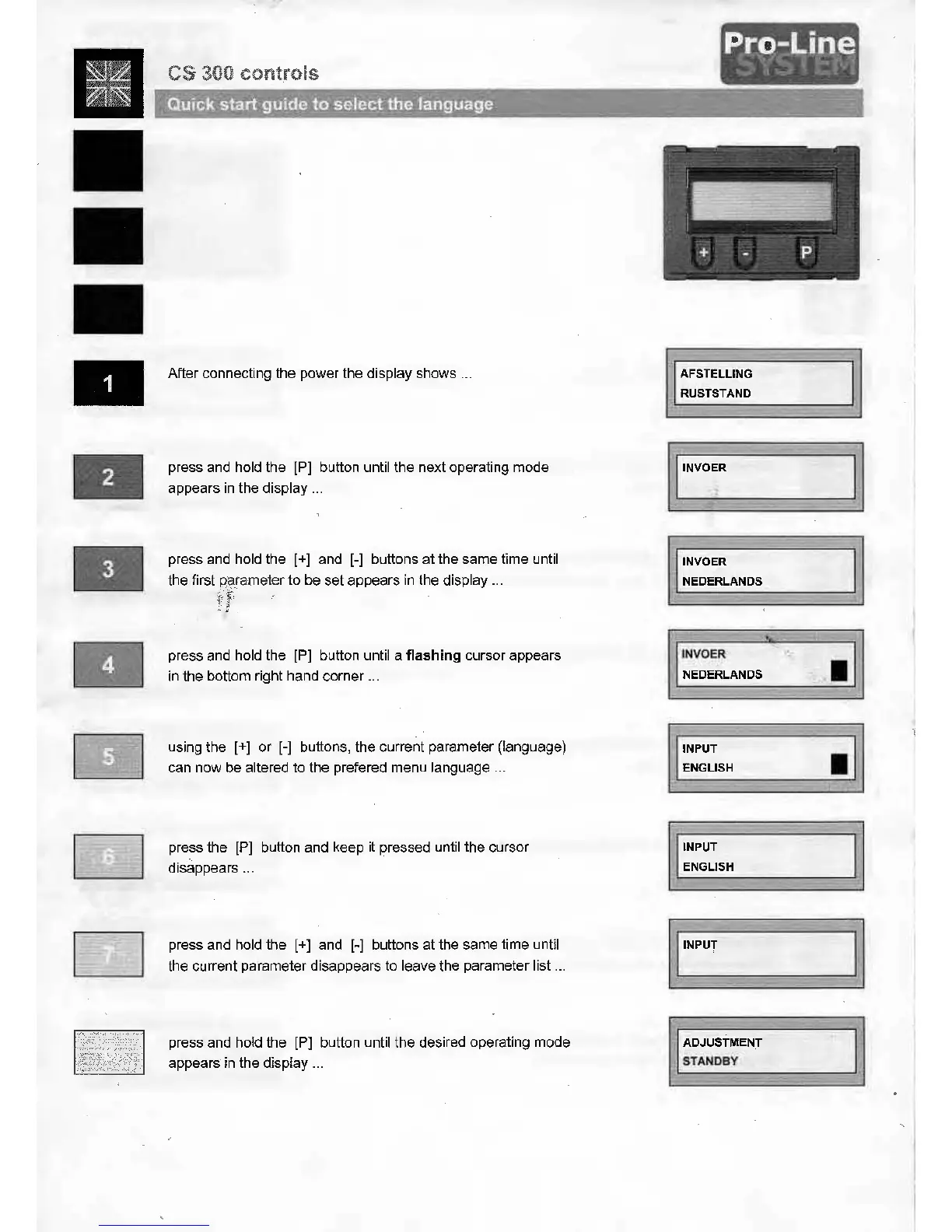
After connecting the power the display shows
..
.
press and hold the [P] button until the next operating mode
appears
in
the display
...
press and hold the [+] and [-] buttons at the same tirne until
the first parameter to be set appears
in
the display
...
press and hold the [P] button until a flashing cursor appears
in
the bottom right hand corner
...
using the [+] or [-] buttons, the current parameter (language)
can now be alte red to the prefered menu language
...
press the [P] button and keep it pressed until the cursor
, .
disappears
...
press and hold the [+] and [-] buttons at the same tirne until
the current parameter disappears to leave the parameter list
...
press and hold the [P] button until the desired operating mode
appears
in
the display
...
AFSTELLING
RUSTSTAND
INVOER
NEDERLANDS
INVOER
NEDERLANDS
INPUT
ENGLISH
INPUT
ENGLISH
INPUT
ADJUSTMENT
STANDBY
·
;<·
[
セセIN[⦅@
•


 To Next Page