51033211EN/AC - Page 29
10
8
24
21
21
3
3
31
20
4. Maintenance
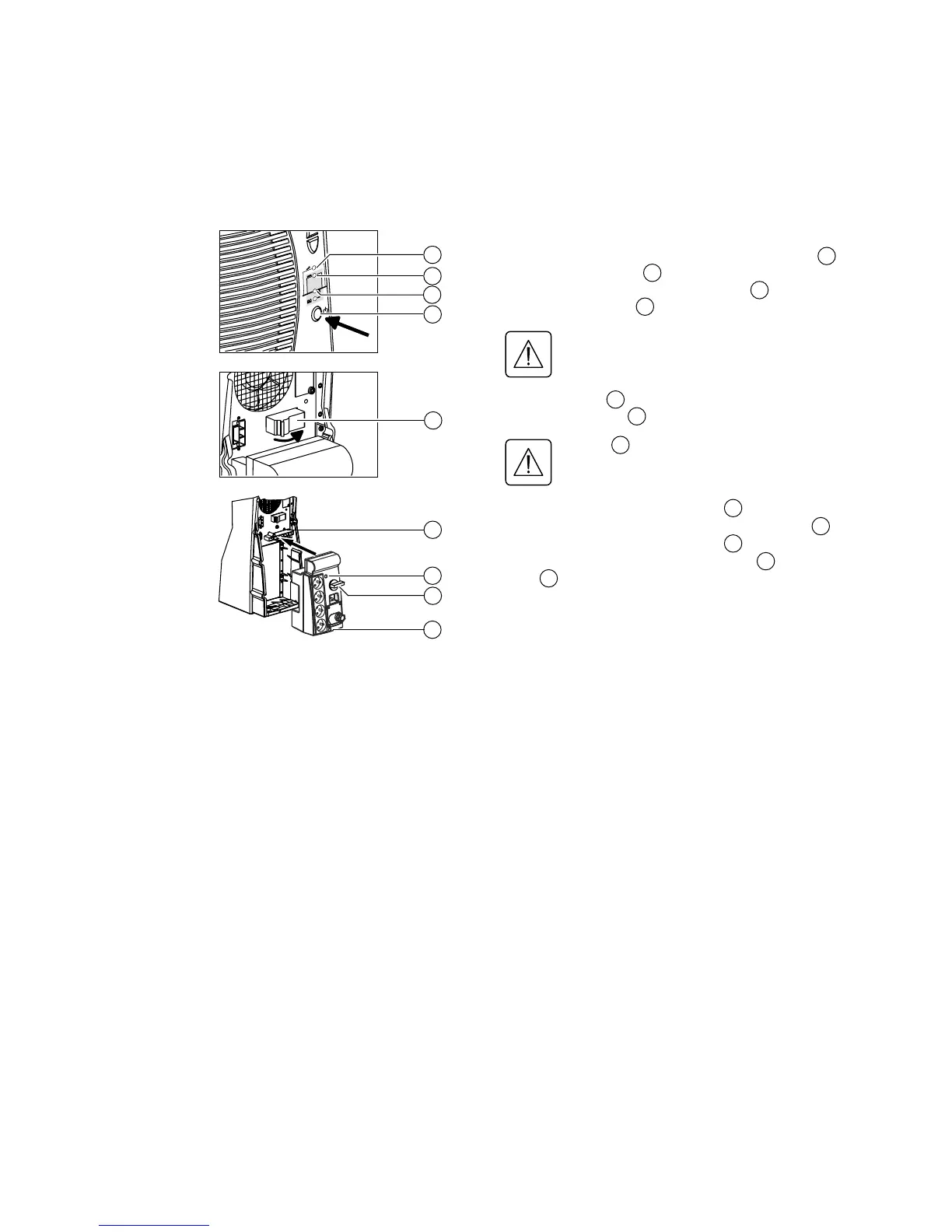
Reconnection:
1. Insert the connection module in the connector and secure
using the two screws .
2. Switch the battery circuit breaker(s) to the ON position
and check that LED is ON.
Check that UPS personalization settings still
correspond to the equipment to be supplied
(see section 3.5).
3. Press button and wait 20 seconds.
4. Check that LED is ON.
If LED is not ON, do not switch to the
intermediate position and call the after-sales
support department.
5. Turn the manual bypass switch from the BYPASS position
to the intermediate position and check that LED is ON.
6. Turn the manual bypass switch from the intermediate
position to the NORMAL position. LED goes OFF and
LED goes ON.
The connected equipment is again protected by the UPS.
24
10
31
8
31
3
21
20
22
20
21
22






 To Next Page