Instructions GD1-GD10 37
• Keep an eye on the moving door and keep at a safe distance
until the door has completely opened or closed; do not cross the
opening until the door has completely opened and stopped.
• Do not allow children to play near the door or with its controls.
• Keep the transmitter out of the reach of children.
• Stop using the automation system immediately if you notice any-
thing abnormal (strange noise or jerky movements); failure to
observe this warning may result in serious danger and accidents.
• Do not touch any components while they are moving.
• Have periodic checks made according to the instructions pro-
vided in the maintenance schedule.
• Maintenance operations and repairs can only be performed by
qualified technicians.
This guide should be stored in an accessible location and made available
to all users of the automation.
7.3 Annexe 3. OPERATING GUIDE
7.3.1 Safety regulations
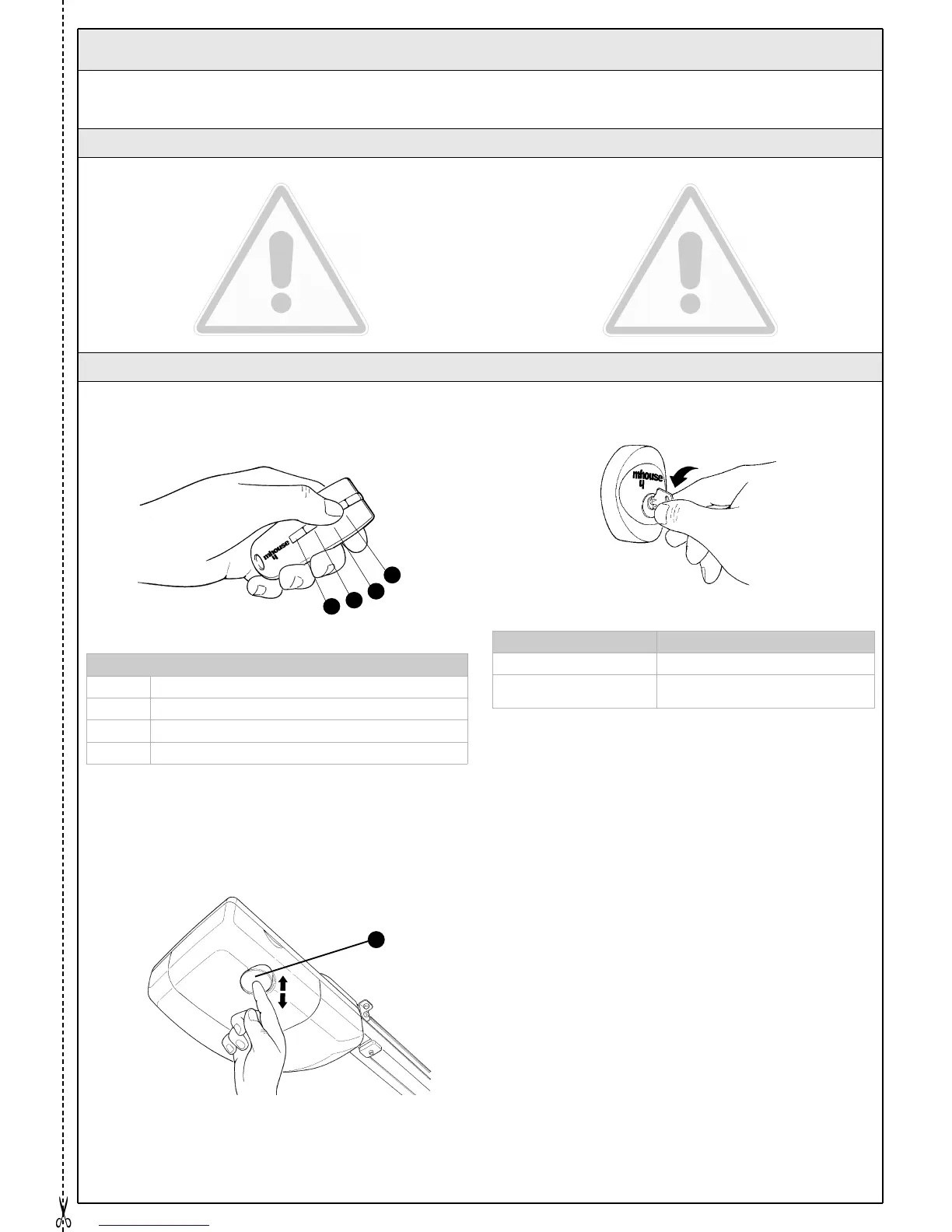
With radio transmitter
The radio transmitter is ready for use and the four buttons have the fol-
lowing functions:
With pushbutton (incorporated)
The movement of the door can be controlled by operating the orange
button directly [A].
With selector switch (optional accessory)
With selector switch (optional accessory)
Control with safety devices out of order
If the safety devices are out of order or malfunctioning, it is still possible
to control the door.
1 Operate the gate control device (remote control or key-operated
selector switch). If the safety devices enable the operation, the door will
open normally, otherwise: actuate the control again within 3 seconds
and keep it actuated.
2 After approximately 2s the gate will start moving in the “man present”
mode, i.e. so long as the control is maintained the gate will keep mov-
ing; as soon as the control is released the door will stop.
If the safety devices are out of order the automation must be repaired as
soon as possible.
Function(*)
T1 button
T2 button
T3 button
T4 button
Action Function
Rotated to the right: “OPEN” (*)
Rotated to the left: “STOP”
It stops the movement of the sectional
or up-and-over door
(*) This item must be drafted by the person who has programmed the system:
7.3.2 Door Control
(*) This table must be prepared by the person who has programmed the system:
T1
T2
T3
T4
A
Figure 90
Figure 91
Figure 92



 To Next Page