10
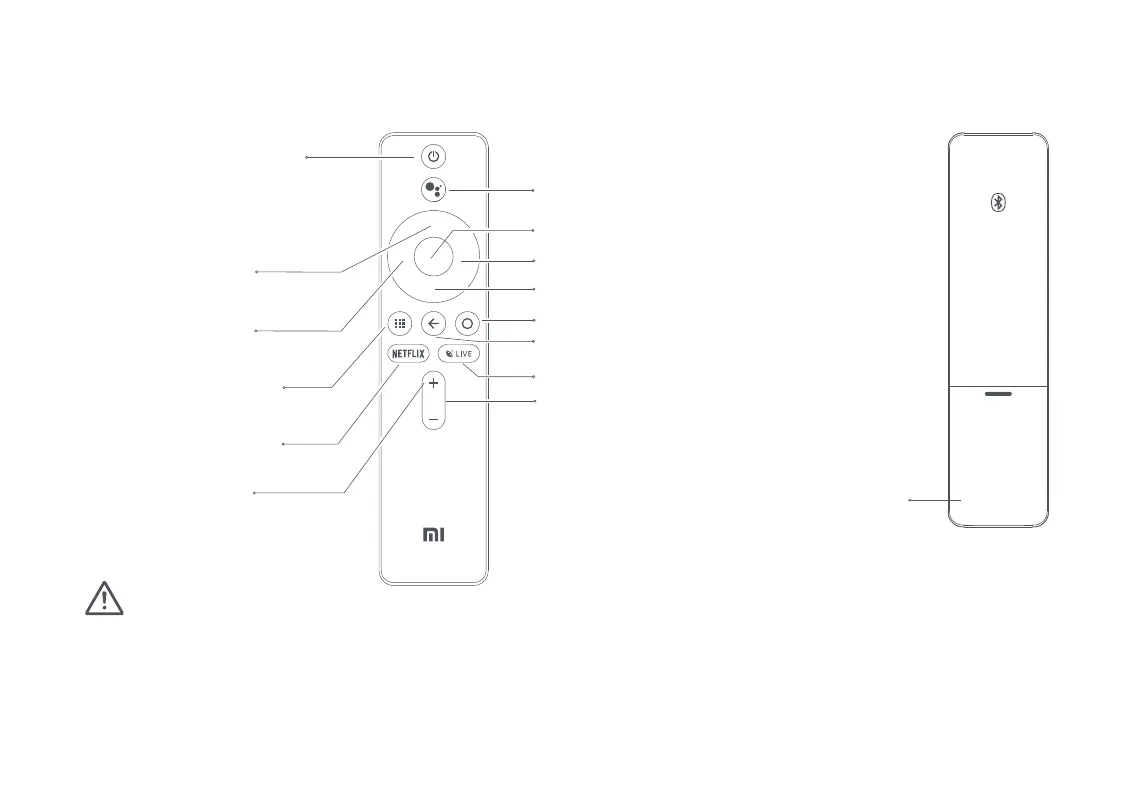
Power Button:
When the projector is turned
off, press to turn on. When the
projector is on, press to select
Power off, Restart, Bluetooth
speaker mode or Screenshot.
Directional Pad (Up):
Move Up.
Directional Pad (Left):
Move Left.
OK: Confirm the selected option or setting.
Directional Pad (Right): Move Right.
Directional Pad (Down): Move Down.
Google Assistant:
Press the Assistant button on your remote
to talk to Google Assistant.
Battery Cover:
Slide down the battery cover, and install or replace
the batteries with two new AAA batteries.
- Pay attention to the positive and negative poles when installing batteries in the remote control.
- When battery leaks, immediately wipe away any fluid with a dry cloth and replace the batteries with new ones.
- Dispose of used batteries according to local waste disposal rules and regulations of the country or area you live in.
Home: Return to the home screen.
Return: Return to the previous menu.
LIVE: Access the Live Channels.
Volume - : Decrease the volume.
Volume + :
Increase the volume.
App:
Access the app interface.
NETFLIX:
Access the Netflix App.
Note:
Remote Control


 To Next Page