Copyright © 2009-2010 Micca, LLC. All rights reserved.
IV. Hard Disk Drive Installation
The Micca Slim has an integrated Serial ATA hard disk drive interface that is
compatible with all SATA 1.5/3/I/II 2.5-inch internal hard disk drives. Proper hard
disk drive installation is critical the player’s proper and reliable function.
Without a hard disk drive installed, the Micca Slim can still be
used to play media files from the card reader or USB devices.
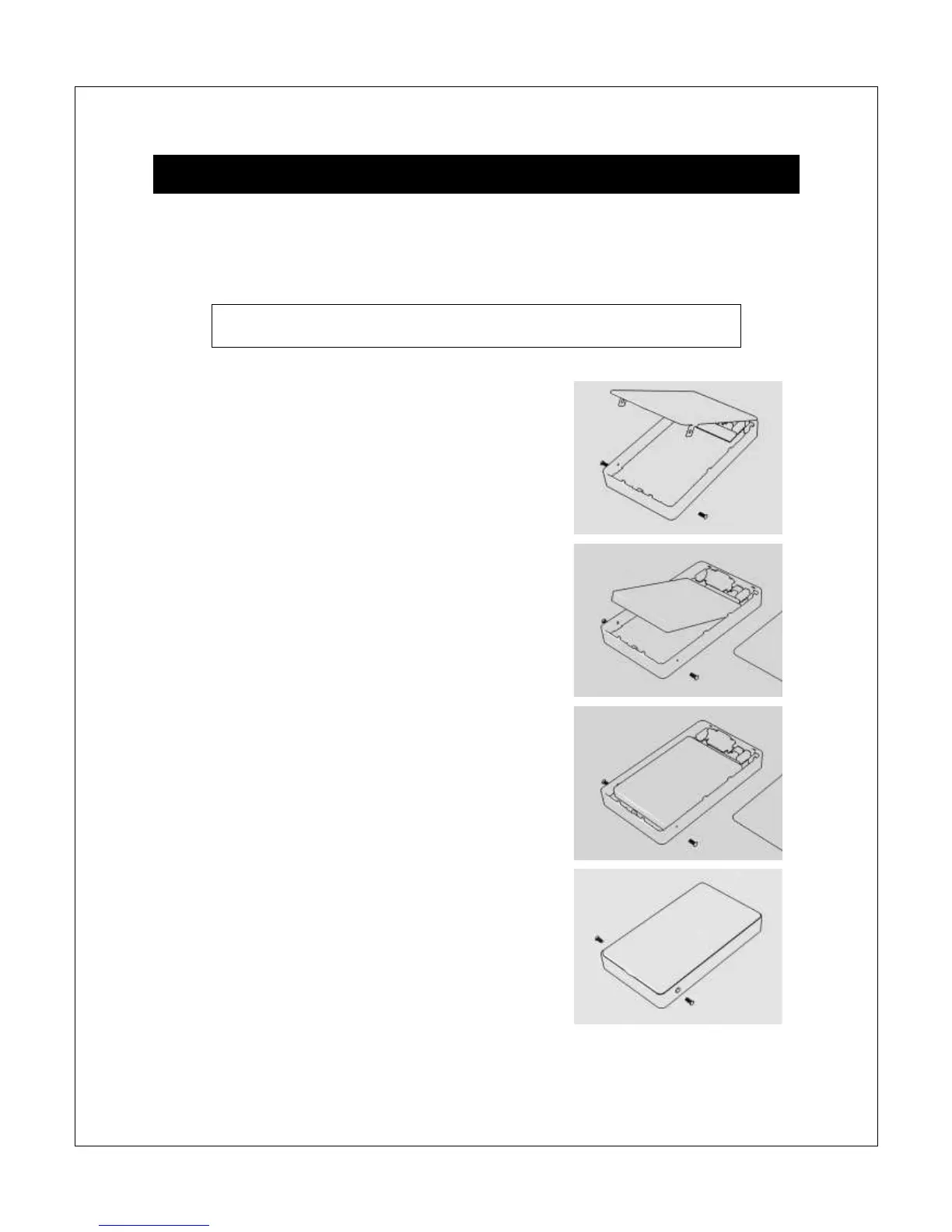
Step 1: Remove the two side screws if present and
carefully pry open the bottom cover.
Step 2: Insert a 2.5-inch SATA hard disk drive into
the drive bay. Lay the drive down flat but do not yet
engage the SATA connector.
Step 3: With the hard disk drive laying flat in the
drive bay, slide the hard drive towards the SATA
connector to make the connection.
Step 4: Replace the bottom cover and make sure
that it is completely seated. Install the two side
screws as the final step of assembly.



 To Next Page