Copyright © 2009-2022 Micca. All rights reserved. Page | 4
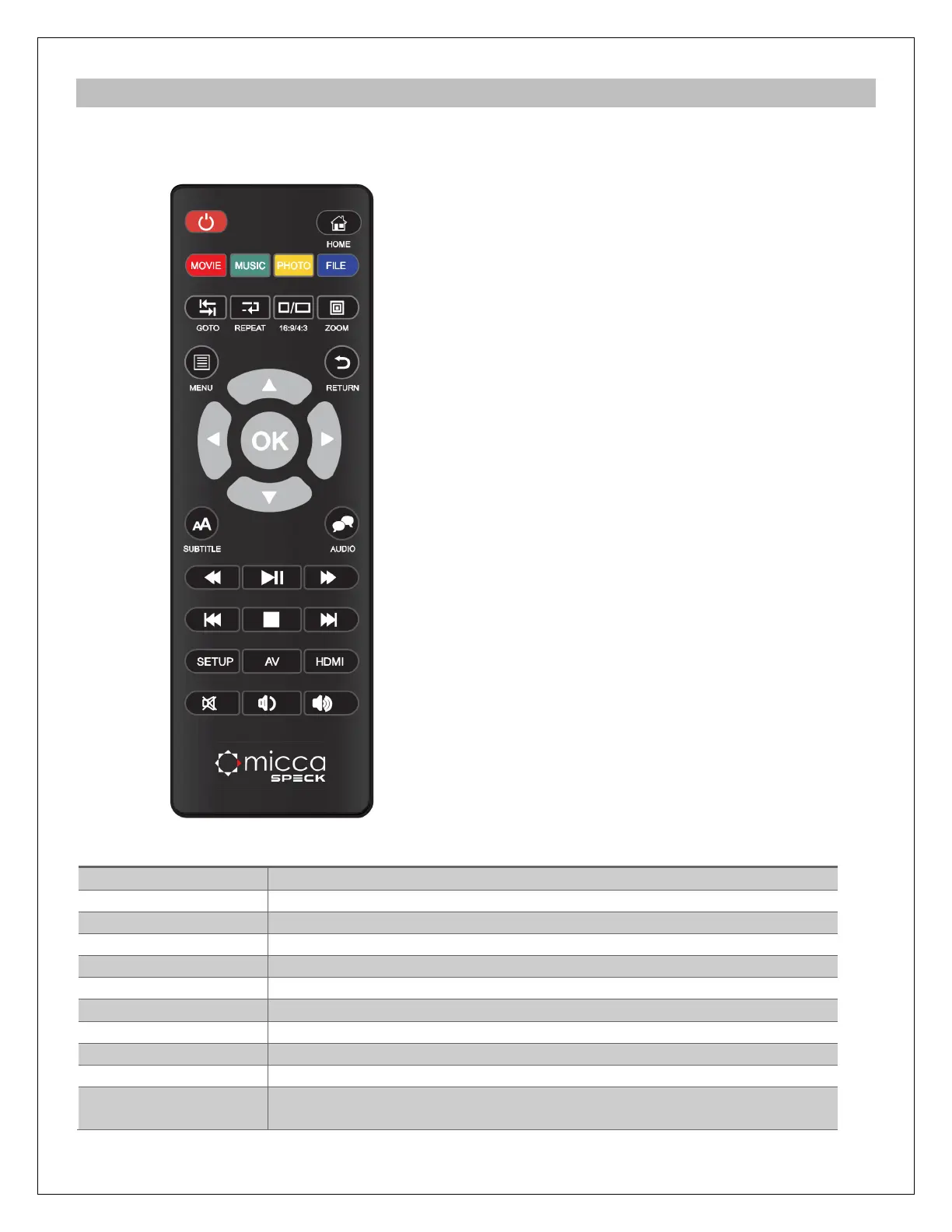
2.2 Remote Control
All player functions can be controlled by using the remote control. See the following for details
on the function of each button.
1. POWER 2. HOME
3. MOVIE 4. MUSIC
5. PHOTO 6. FILE
7. GOTO 8. REPEAT
9. 16:9/4:3 10. ZOOM
11. MENU 12. RETURN
13. DIRECTIONAL KEYS 14. OK/ENTER
15. SUBTITLE 16. AUDIO
17. REWIND 18. PLAY/PAUSE
19. FAST FORWARD 20. PREVIOUS
21. STOP 22. NEXT
23. SETUP 24. AV
25. HDMI 26. MUTE
27. VOLUME- 28. VOLUME+
Power on/off the player
Return to the main menu
Show only video files when browsing for files
Show only photo files when browsing for files
Show only music files when browsing for files
Show all files when browsing for files
Jump to a specific time in a video during playback
Set repeat option for the current playback
Set aspect ratio when viewing videos
Zoom in when viewing photos
Access the menu for the current function. The menu is context-
sensitive and will be different depending on the function.



 To Next Page