www.md-best.com
All Rights Reserved
Nabi User Manual
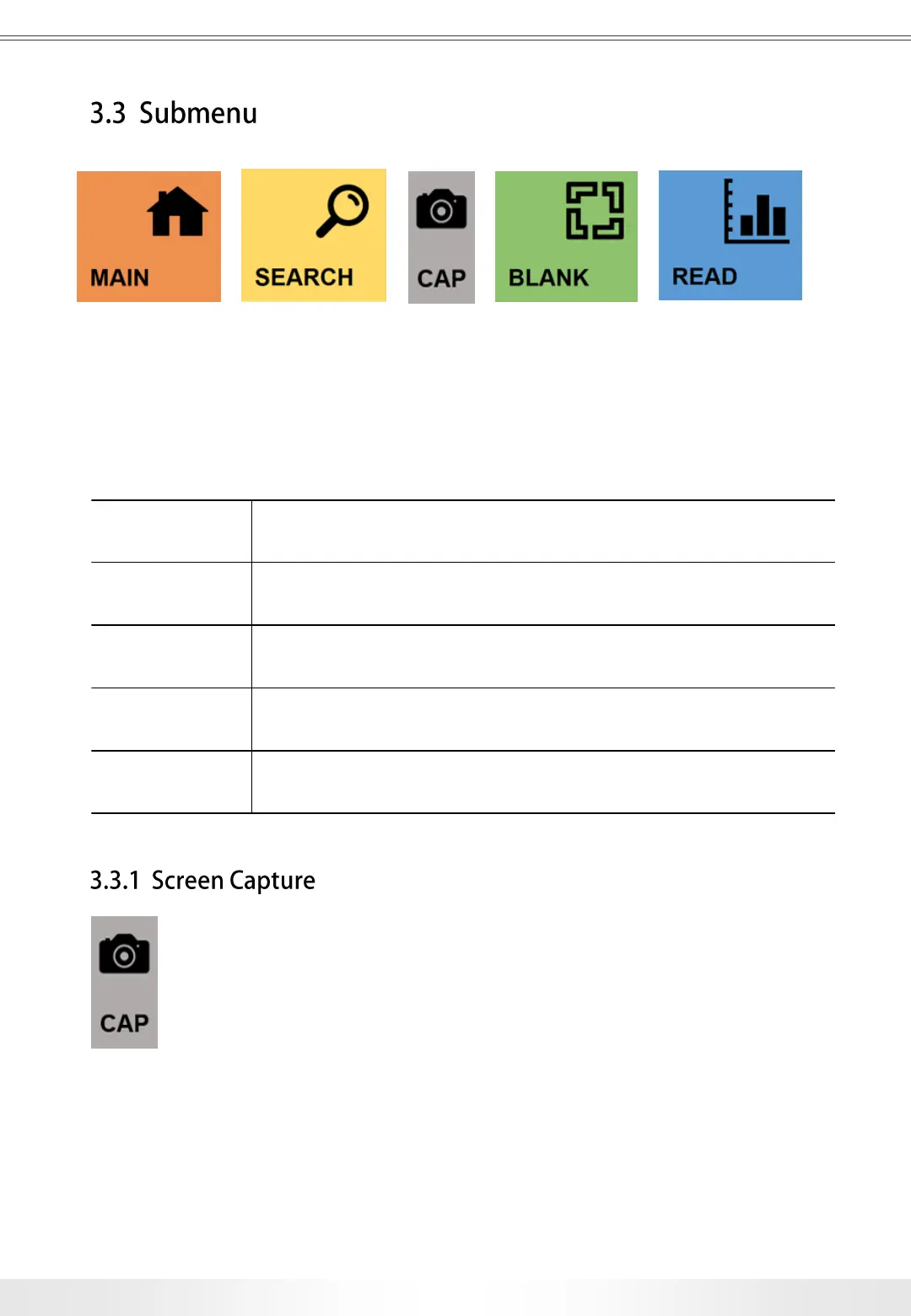
There are submenus located at the top of every measurement pages.
‘CAP’ button is only in Nucleic Acids, Kinetic, Protein, and Spectrum pages.
Submenu Buttons
MAIN Goes to the Main page.
SEARCH Opens Search panel.
CAP
Captures current screen and save it in the USB Flash Drive
connected. (Refer to pg. 13)
BLANK Measures and sets the blank value.
READ Performs measurement according to the settings.
13
3. User Interface
Users may capture a screenshot of the screen by touching the ‘CAP’ button
in Nucleic Acids, Kinetic, Protein, Spectrum measurement pages, and save it as image
files (.BMP) in a USB Flash Drive. USB Flash Drive must be plugged in one of the USB
Ports on the side of the instrument during the process. The screenshot image files will be
saved in the ‘Capture’ folder under the ‘Nabi’ folder.


 To Next Page