www.md-best.com
All Rights Reserved
Nabi User Manual
Procedure
1. Proceed to Nucleic Acids page by touching Nucleic Acids button in the Main page.
2. Touch and select the measurements among dsDNA, ssDNA, RNA, and Oligo .
3. Insert the title of the measurement.
4. Open the Head of the instrument.
5. Set the blank value. (Check pg. 8)
6. Pipette microvolume of the target sample on the Lower Pedestal,
and close the Head.
7. Touch Read button to start the measurement.
8. Check the results on the screen. The resulting data will be saved automatically
and can be searched in the search panel.
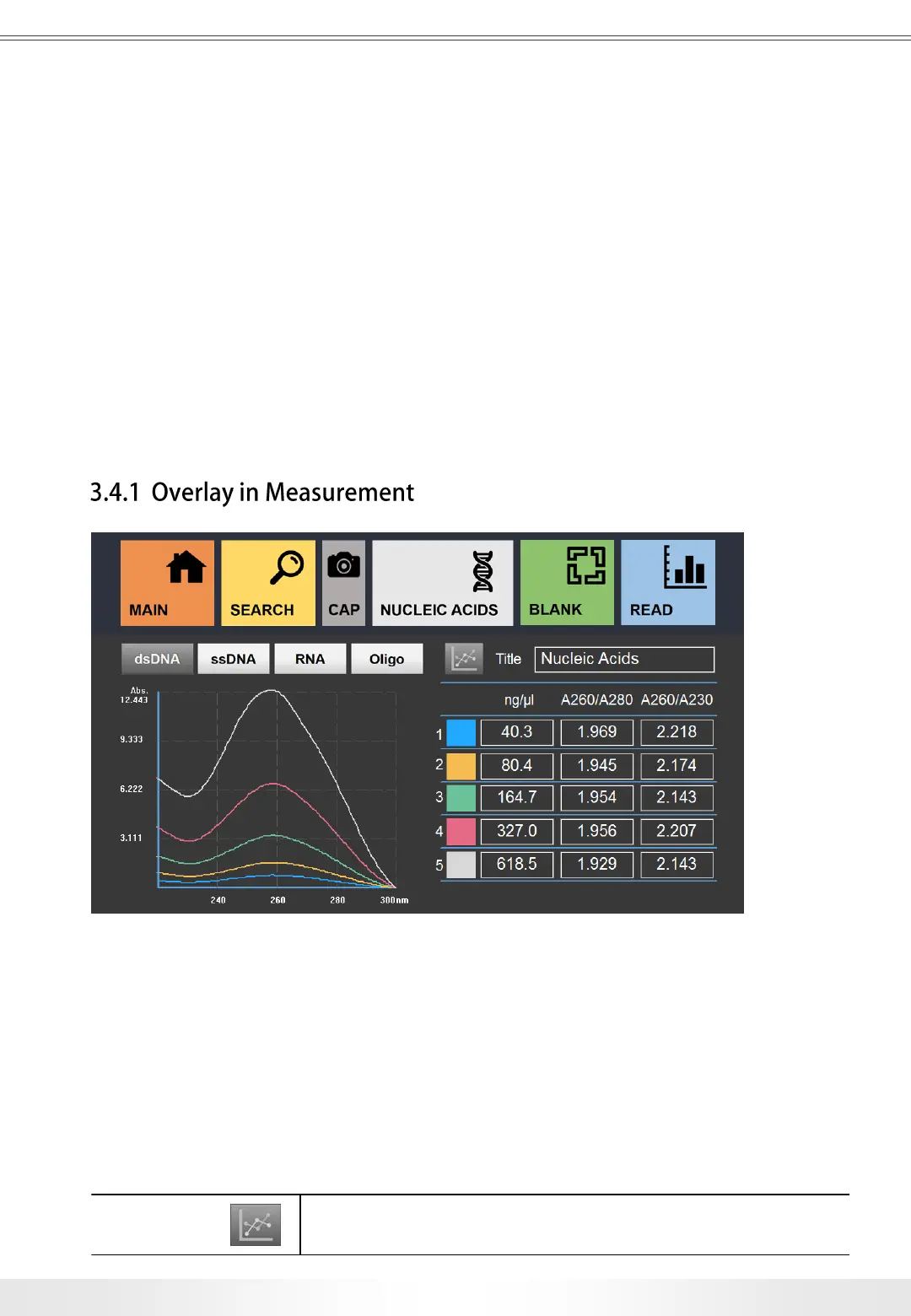
Nucleic Acids Overlay Measurement
Overlay page is to compare up to 5 results. Overlay page is accessible by touching
Overlay button in the Nucleic Acids Measurement page. Follow procedure of Nucleic Acids
to proceed. Each measurement has different colors labeled for graph comparison.
Each result will be saved individually, and multiple results can be loaded in Search
for comparison. (Check pg. 15) Users can go back to the Measurement page by touching
the Overlay button.
Overlay Button: Goes back to the Measurement page.
15
3. User Interface


 To Next Page