PC
Mp3 \ M p4
Media player
CD\ V CD \ DVD
Illustrations
3
4
Connections and Operations
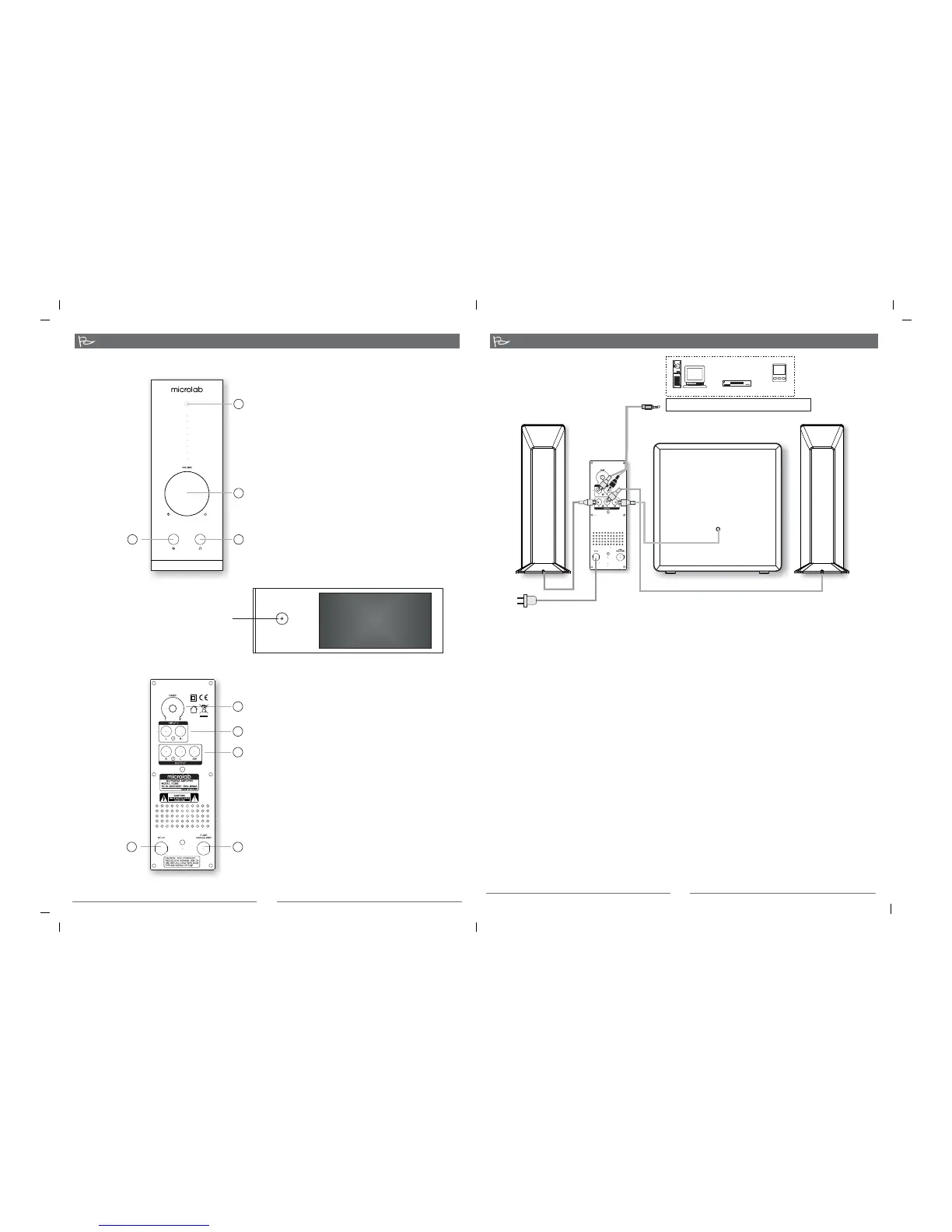
1. Bass volume knob: allows bass volume
adjustment on the subwoofer.
2. Input 1: 2 x RCA jacks for input source
connection from any media sources such as
CD / DVD, Mp3 / Mp4 player or TV.
3. Output connections: connect to left and
right satellites, and subwoofer.
4. Fuse: fuse socket
5. Power line: AC power source input
1. Power LED: illuminates in green when
power is turn on
2. Master volume knob: adjust volume level
3. Earphone output jack: allows 3.5mm
stereo plug connection for earphones
4. Audio source input jack: allows 3.5mm
stereo plug for connection to media
player source such as computer sound
card, CD / DVD, Mp3 / Mp4 player, etc.
1
2
3
4
1
2
3
4
5
Front panel
Connections
Rear panel
To CD/ DVD, Mp3 / Mp4, and other media playback
Left satellite
Right satellite
Subwoofer
AC power supply
AC 220V - 240V ~ 50Hz, 200mA or
AC100V - 120V ~ 60Hz, 460mA
Connections
Operations
1. Connect the satellites to the left and right RCA interfaces. Connect the subwoofer to the SW
input jack.
2. Place both satellites on extreme sides of the listening position and the subwoofer on the floor
with its back close to a wall.
3. Connect the playback device to the rear input RCA interface of the amplifier with the included
cable, or to the front 3.5mm stereo input jack.
4. The amplifier should be placed near a power source and near the playback device such as
CD/DVD, Mp3/Mp4 player or TV.
5. Last, connect the AC power cable at the rear of the amplifier to the AC power supply source.
Please ensure the AC power supply match the power requirement printed at the rear panel.
1. Ensure the master volume is at the lowest setting.
2. Turn on the main AC power and switch on the amplifier from the top power button.
3. Start the playback device and song.
4. Slowly adjust the volume to your preferred volume level and enjoy.
Note: it is advisable not to turn the volume too loud or to its extreme volume limit to avoid damage
to the speaker driver material. Always adjust in slow increment.
Do not block the ventilation of the amplifier during use.
Top panel
Power button
80-FC361(10)-97-0001-01 2010-03-03


 To Next Page