CCM005-1718347970-10451
micron_xccela_zedboard_user_guide.pdf Rev 2.1 4/19 7
Micron
®
Xccela
™
Flash User Guide for ZedBoard
™
3.3 Power Up
1.
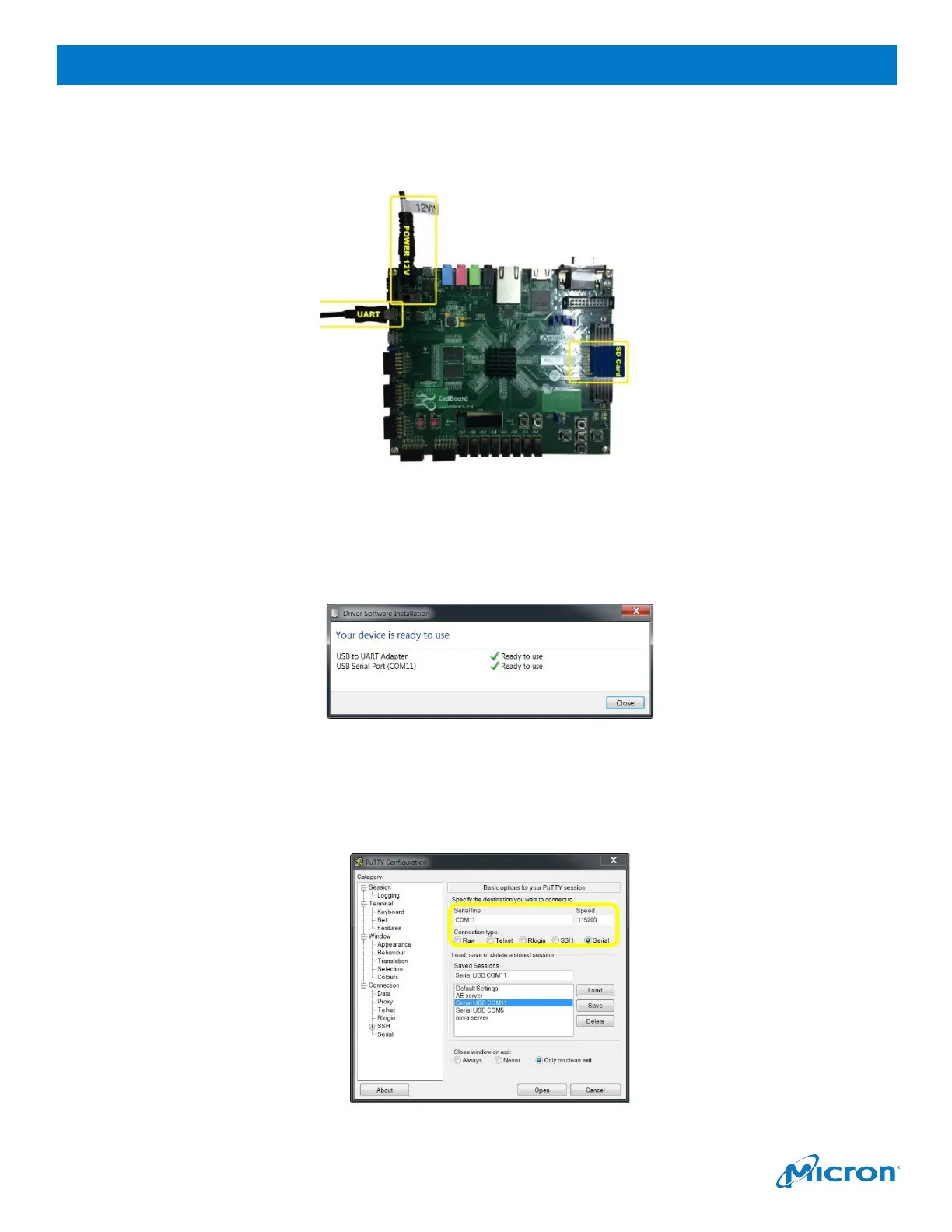
Plug in the SD card, USB cable (for the serial port), and DC adapter as shown below.
Figure 7: SD Card, USB Cable, DC Adapter Connections
2.
Switch on power by SW8.
3.
If this is the first time inserting the USB port, the driver automatically downloads and installs. After
the driver installs successfully, the USB port maps to a serial port (for example, COM11).
Figure 8: Driver Software Successfully Installed
4.
Open the serial port tool, and then configure the port number to the USB serial port mapped in the
previous step (for example, COM 11).
5.
Set the baud rate to
115200
.
Figure 9: Baud Rate Setting



 To Next Page