Set up an account
Stay up to date – add your important accounts, such as social media or mail accounts, to your
phone.
1. On the start screen, swipe down from the top of the screen, and tap ALL SETTINGS > email
+accounts.
2. Tap add an account and the name of the service, and follow the instructions shown.
Personalize your phone
Learn how to personalize the start screen, and how to change ringtones.
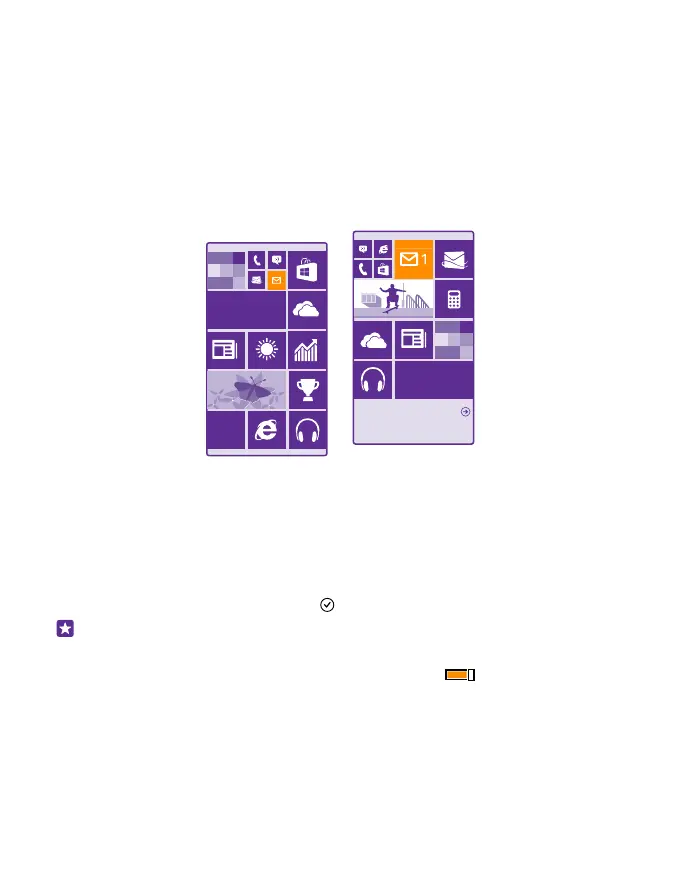
Personalize the start screen
Make your start screen yours – choose your background photo, pin your favorite apps and
much more to the start screen, or change the tile size and layout as you like. To get the most
out of the space on the start screen, group apps into folders.
1. To add a background photo, on the start screen, swipe down from the top of the screen,
and tap ALL SETTINGS > start+theme > choose photo.
2. Tap a photo, crop it as you like, and tap .
Tip: Why not match your background and tile colors with your background picture? Tap
Background or Accent color. To share your theme and other settings to all your
Windows devices, on the start screen, swipe down from the top of the screen, tap ALL
SETTINGS > sync my settings, and switch theme to On .
Move a tile
Tap and hold the tile, drag and drop it to the new location, and tap the screen.
© 2015 Microsoft Mobile. All rights reserved.
35














 To Next Page