OPERATION INSTRUCTIONS
1. Clock Setting
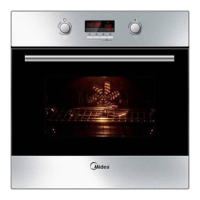
After connectiong the unit to the power, the symbols 00:00 will be visible on the display.
2. Function Setting
1) Turn " " to choose the cooking function you require .The related indicator will illuminated .
2) Turn " " to adjust the temperature.
2) Turn " " to adjust the hour figures, (Time should be within 0--23).
3) Press " ", the minutes will flash.
1) Press " ", the hour figures will flash.
4) Turn " " to adjust the minutes setting, (time should be within 0-59).
5) Press " " to finish the clock settings. ":" will flash, and the time will be illuminated.
Note: The clock is 24 hours.
3) Press " " to confirm the start of cooking.
4) If step 2 is ignored, Press " " to confirm the start of cooking. and the default time is 9 hours, the default temperature
will display on the LCD.
NOTE:
1) the step quantities for the adjustment time of the coding switch are as follow:
0------0:30 min : 1 minute
0:30--9:00 hour : 5 minutes
2) the step quantities for the adjustment of temperature is 5 degrees.
3) turn " " to adjust the cooking time when cooking begins.Then press "
" to start cooking.
If "
" not pressed within 3 seconds,the oven will revert back to the previous time to continue cooking.
4) turn" " to adjust the temperature when cooking begins.The related indicator will be illuminated.
Then press"
" to start cooking.If " " not pressed in 3seconds,the oven will revert back to the previous
temperatrue to continue cooking.
3. Inquiring function
During cooking process, you can use inquiring function, after 3 seconds return to the current working state.
1) During cooking mode, press " " button to see the current time.
2) If the clock was set, press " "button to ask for current time.
4. Lock-out Function for Children
To Lock : press " " and " " simultaneously for 3 seconds, there will be a long "beeping" sound indicating the children-lock is on
and the " " will be illuminated.
Lock quitting : press " " and " " simultaneously for 3 seconds, there will be a long "beeping" sound indicating the child-lock is
released.


 To Next Page