EasyManua.ls Logo

Midea CE-BCD87CM-SQ - Display and Main Control Panel(None)

Midea CE-BCD87CM-SQ
31 pages
Print Icon
To Next Page IconTo Next Page
To Previous Page IconTo Previous Page
Loading...
Service Manual, 2017-02
20 / 31
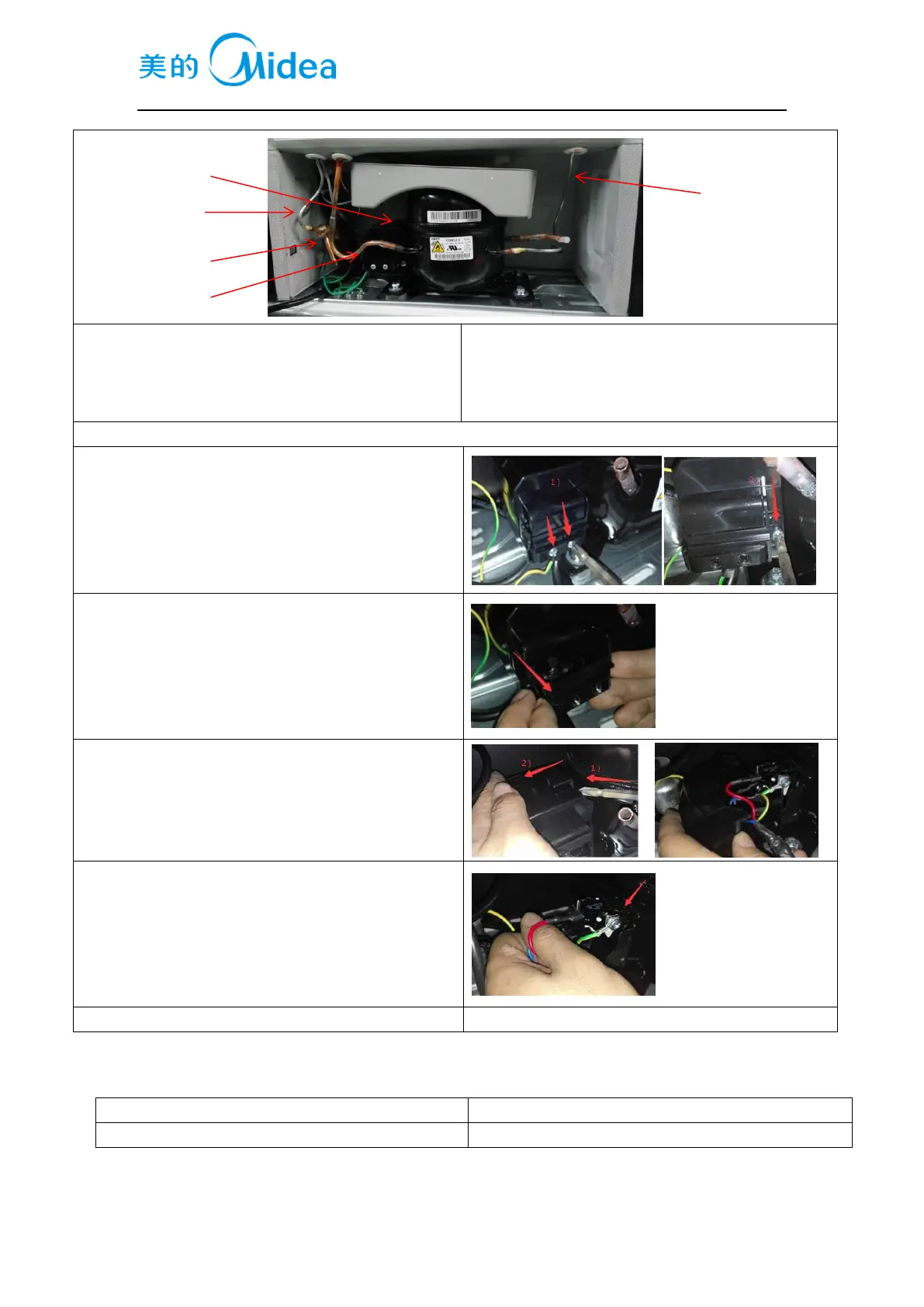
1.compressor
2.left condenser
3.dry filter
4.suction pipe
5.right condenser
Starter and protector of the compressor
1. Remove the screws
1 Two screws outside
2 One screw inside
2. Remove the clipping strip
Slowly pull it out
3. Remove the protective cover
1Pry the protective cover slowly from the upper part,
2Pull it out and remove it.
4. Remove the starter and protector
Unplug the starter and protector (you can use a
screwdriver to pry it slowly)
5. The reverse process can complete installation.
8.7Display and main control panel(None)
Display control board
None
Main control board
None
1
2
3
4
5

Table of Contents

Related product manuals