51
11. Weekly Timer 1
NOTE: The weekly timer setting can be returned to the previous step by pressing Back button.The time
of timer setting can be delete by pressing Day of botton The current setting will be restored and
withdrawn the weekly timer setting automatically when there is no operation for 30 seconds.
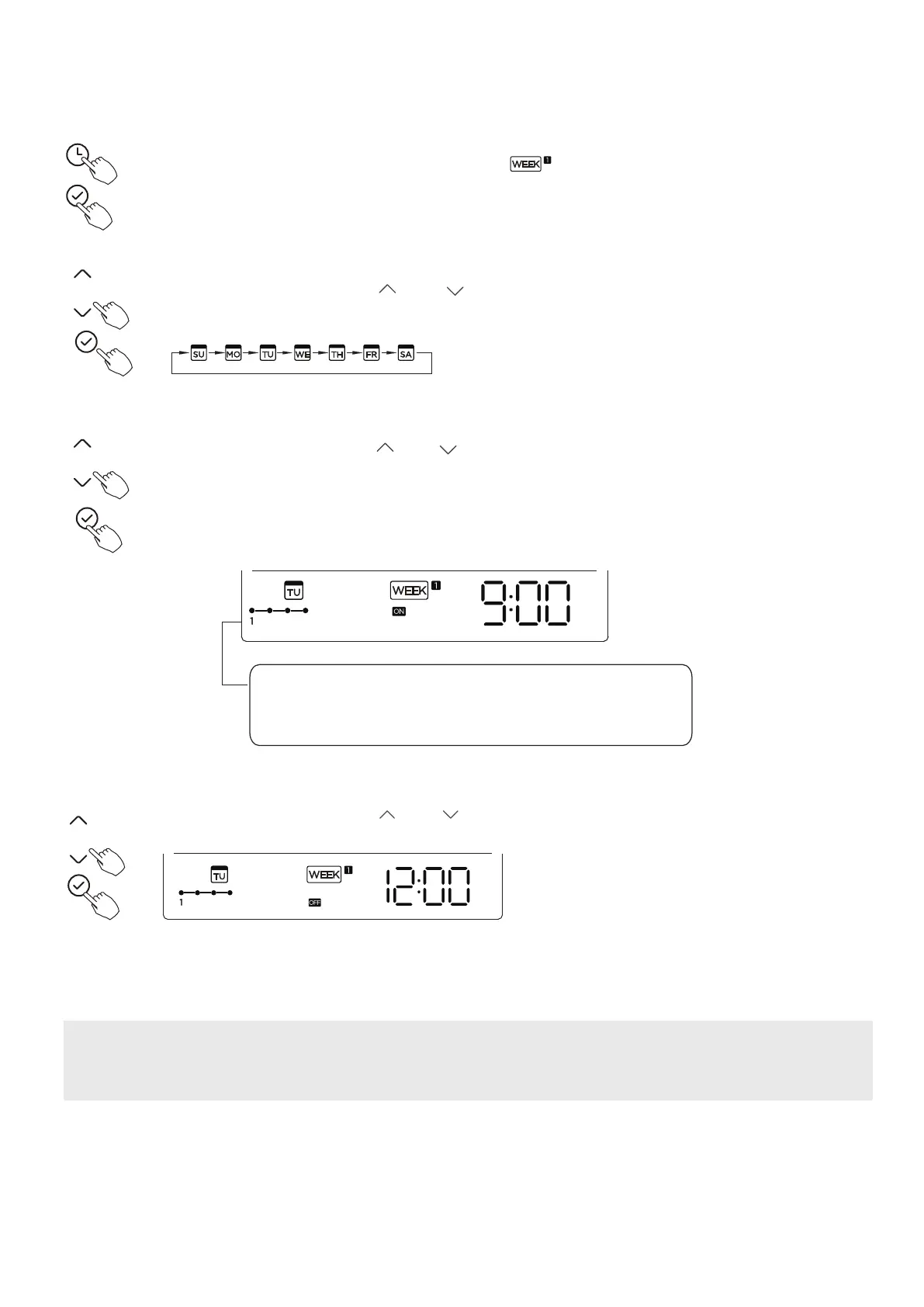
Press the Timer button to select the and then press the Confrm
button to confrm.
Press the button “ ” or “ ” to select the day of the week and then press the
Confrm button to confrm the setting.
Press the button “ ” or “ ” to set the time of On timer and then press the
Confrm button to confrm the setting.
1. Weekly timer setting
2. Day of the week setting
3. ON timer setting of timer setting 1
4. Off timer setting of timer setting 1
5. Diferent timer settings can be setted by repeating step 3 to 4.
6. Other days in one week can be setted by repeating step 2 to 5.
ex.Tuesday time scale 1
Up to 4 timer settings can be saved for each day of the
week.
It is conventent if the WEEKLY TIMER is set according to
the user’s life style.
Press the button “ ” or “ ” to set the time of Of timer and then press the
Confrm button to confrm the setting.
ex.Tuesday time scale 1





 To Next Page