Remote Control
Instructions
25
This feature can be activated from the remote control
ONLY. To activate SLEEP feature, the set temperature
will increase(cooling) or decrease(heating) by 1°C/2°F
(or 1°F) in 30 minutes. The set temperature will then
increase(cooling) or decrease(heating) by another 1°C
/2°F (or 1°F) after an additional 30 minutes. This new
temperature will be maintained for 7 hours before it
thermostat allowing for the precise temperature
control at its location. To activate the Follow Me/Temp
Sensing feature, point the remote control towards the
unit and press the Follow Me/Temp Sensing button.
The remote control will send this signal to the air
conditioner until press the Follow Me/Temp Sensing
button again. If the unit does not receive the Follow
Me/Temp Sensing signal during any 7 minutes interval,
the unit will exit the Follow Me/Temp Sensing mode.
Before using your new air conditioner, make sure to familiarize yourself with the
remote controller. The following is a brief introduction to the remote controller. For
instructions on how to operate your air conditioner, refer to the How to Use the Basic
Functions" section of this manual.
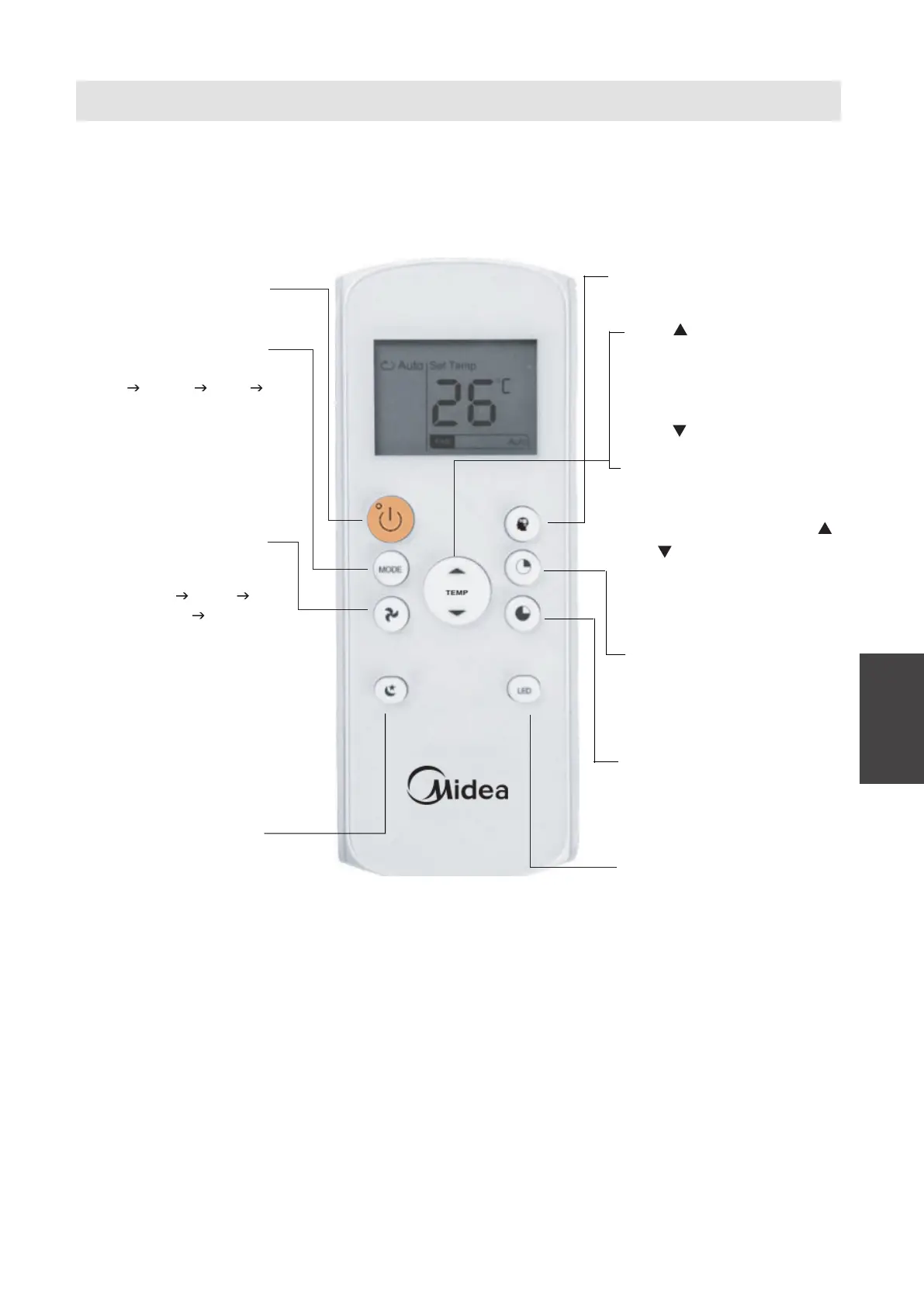
Function Buttons
ON/OFF
Turns theunitonor off.
MODE
Scrolls through operation
modesas follows:
AUTO
COOL DRY FAN
FANSPEED
Selectsfanspeedsin
the following order:
AUTO
LOW
MED HIGH
SLEEP
Saves energyduring
sleeping hours.
SHORT CUT
Sets and activates your
favourite presettings.
TEMP
Increases the temperature in
1
O
C (1
O
F) increments.
1
O
C (1
O
F) increments.
Max. temperature is
30
O
C (86
O
F).
17
O
C (62
O
F).
TEMP
Decreases temperature in
Min. temperature ist
TIMER ON
Sets the timer to turn the unit
on refer to "How to Use
BasicFunctions" for
instructions).
TIMER OFF
Sets thetimertoturntheunit
off refer to "How to Use
BasicFunctions"for
instructions).
LED
Turns on off indoor unit
’
s LED
NOTE:If youare sensitive
tolightwhenyougoto
sleep, you can press the
LED button to turn off
the LED display on the
unit.Press thebutton
again to turn it back on.
display.
NOTE:Press andholdthe
and buttons together for
3 seconds to switch the
temperature display
between the
O
C &
O
F scale.
(on some models)



 To Next Page