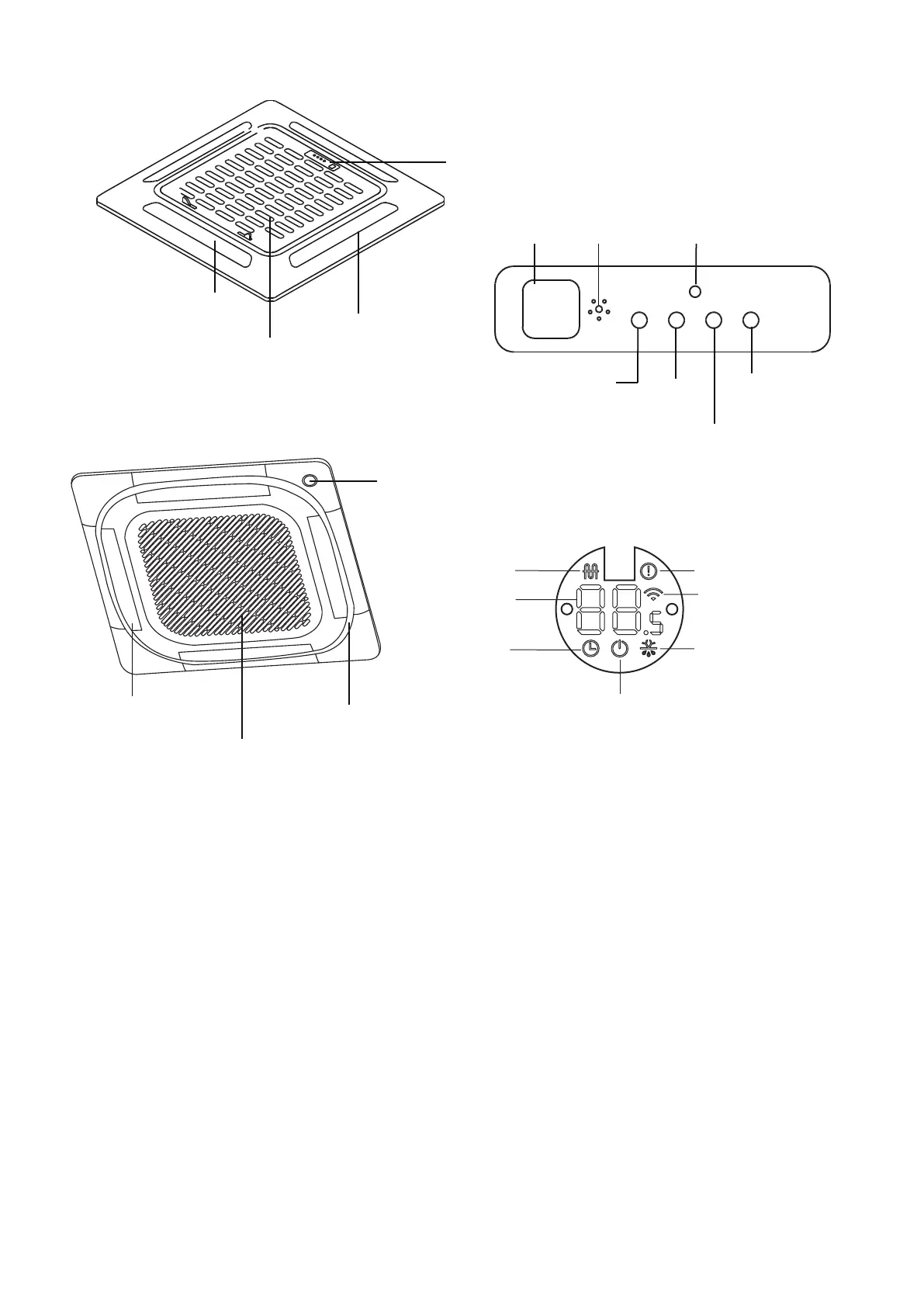
(A-3)
(B)
• MANUAL button: This button selects the mode in the following order: AUTO, FORCED COOL, OFF.
FORCED COOL mode: In FORCED COOL mode, the Operation light flashes. The system will then
turn to AUTO after it has cooled with a high wind speed for 30 minutes. The remote control will be
disabled during this operation.
OFF mode: When the display panel is turned o, the unit turns o and the remote control is
re-enabled.
Operation
indicator
Electric heating
indicator
( some models)
Timer
indicator
PRE-DEF indicator
(pre-heating/defrost)
Alarm indicator
Infrared
receiver
Timer
indicator
Alarm
indicator
PRE-DEF
(pre-heating/defrost)
indicator
Manual
button
Operation
indicator
LED
display
Air inlet
Air inlet
Air outlet
Air outlet
Louver
Louver
Display panel
Display panel
When wireless control
feature is activated
( some models)
LED display
40




 To Next Page