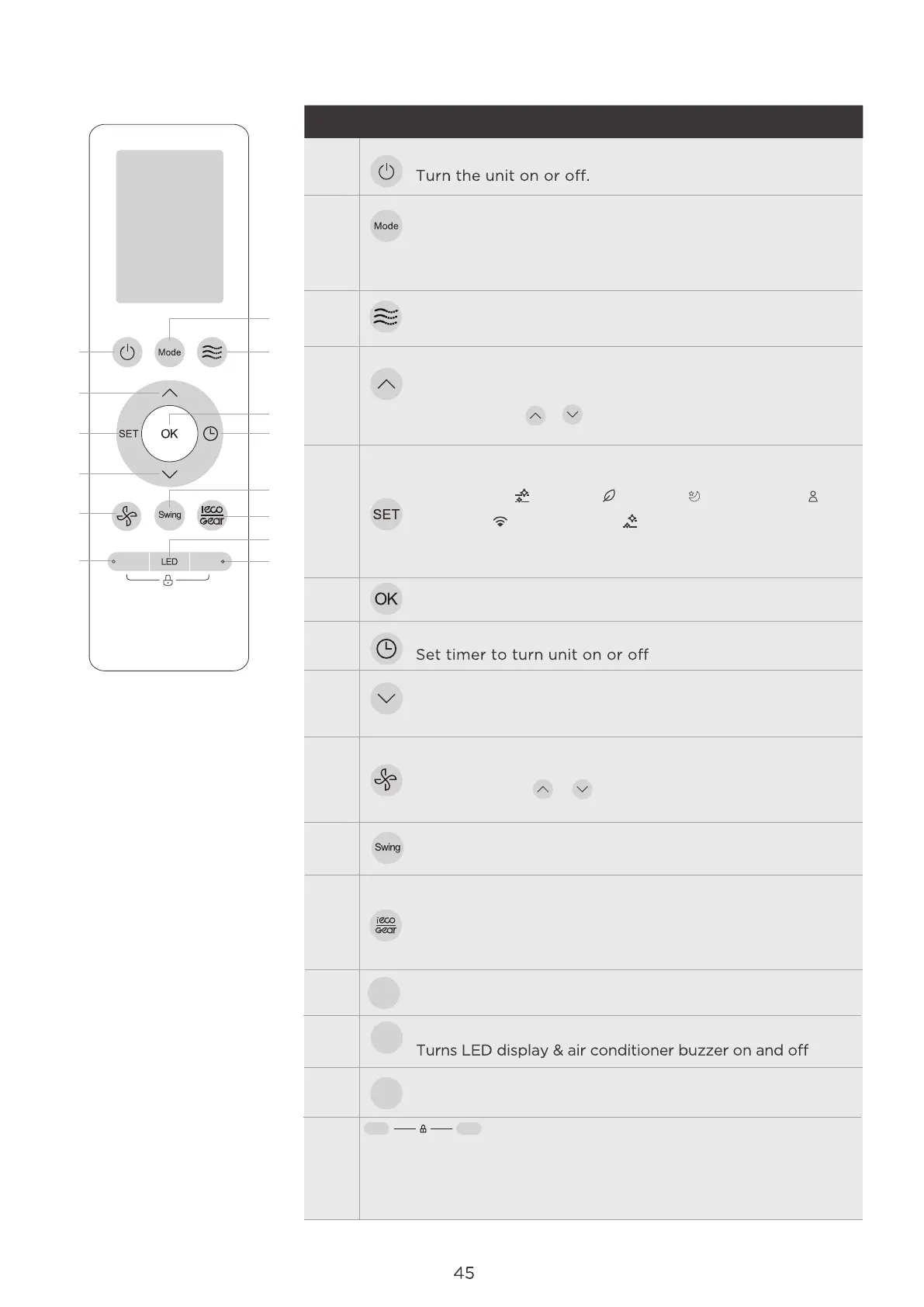
Buttons and Functions
1
4
2
3
Boost
5
8
9
12
6
7
10
11
13
14
Model:
RG10N3(2HS)/BGEF
RG10N3(2HS)/BGEFU1
Description
ON/OFF
No.1
No.3
No.4
No.5
No.6
No.8
No.2
No.7
No.9
No.10
OK
Used to confirm the selected functions
TEMP.
Decreases temperature in 0.5°C (1°F) increments.
Min. temperature is 16OC(60OF).
TIMER
FAN SPEED
No.11
TEMP.
Increases temperature in 0.5°C (1°F) increments.
Max. temperature is 30°C (86°F).
(Press together & buttons at the same time for 3 seconds
will alternate the temperature display between the °C & °F).
SET
MODE
Auto > Cool > Dry > Heat > Fan
AU > 20% >40% > 60% > 80% > 100%
Press the TEMP or button to increase/ decrease the fan
speed in 1% increments.
No.12
No.13
No.14
No.15
BUTTON
Enjoy evener comfortable cooling without a noticeable
breeze.
LOCK
Press together these two buttons simultaneously for 5 seconds
to lock the keyboard. Press together these two buttons for 2
seconds to unlock the keyboard.
NOTE: HEAT mode is not supported by the cooling only
appliance.
ECO/GEAR
ECO GEAR(75%) GEAR(50%) Previous setting mode
ECO
SWING
Starts and stops the horizontal louver movement.
Press this button to enter the energy ecient moce in a
sequence of following:
VANE
Press to enter the louver setting mode.
Clean
Boost Clean
LED
LED
BOOST
Enables unit to reach preset temperature in shortest possible time.
Boost
crolls through operation functions as follows:
The selected symbol will flash on the display area,
press OK button to confirm.
Vane
Fresh( ) Sleep( ) Follow Me( )
AP mode ( ) Active clean
( ) ......
Active clean( )




 To Next Page